
 Text Tools
 Image Tools
 PDF Tools
 Social Media Tools
 Security Tools
 Coding Tools
 CSS Tools
 Color Tools
 Miscellaneous Tools
 Add to Chrome
 Add to Firefox


Builds a direct message thread on X with a profile card, badges, shared posts, reactions and receipts, and saves it as an image.
What is Online Twitter DM Generator?
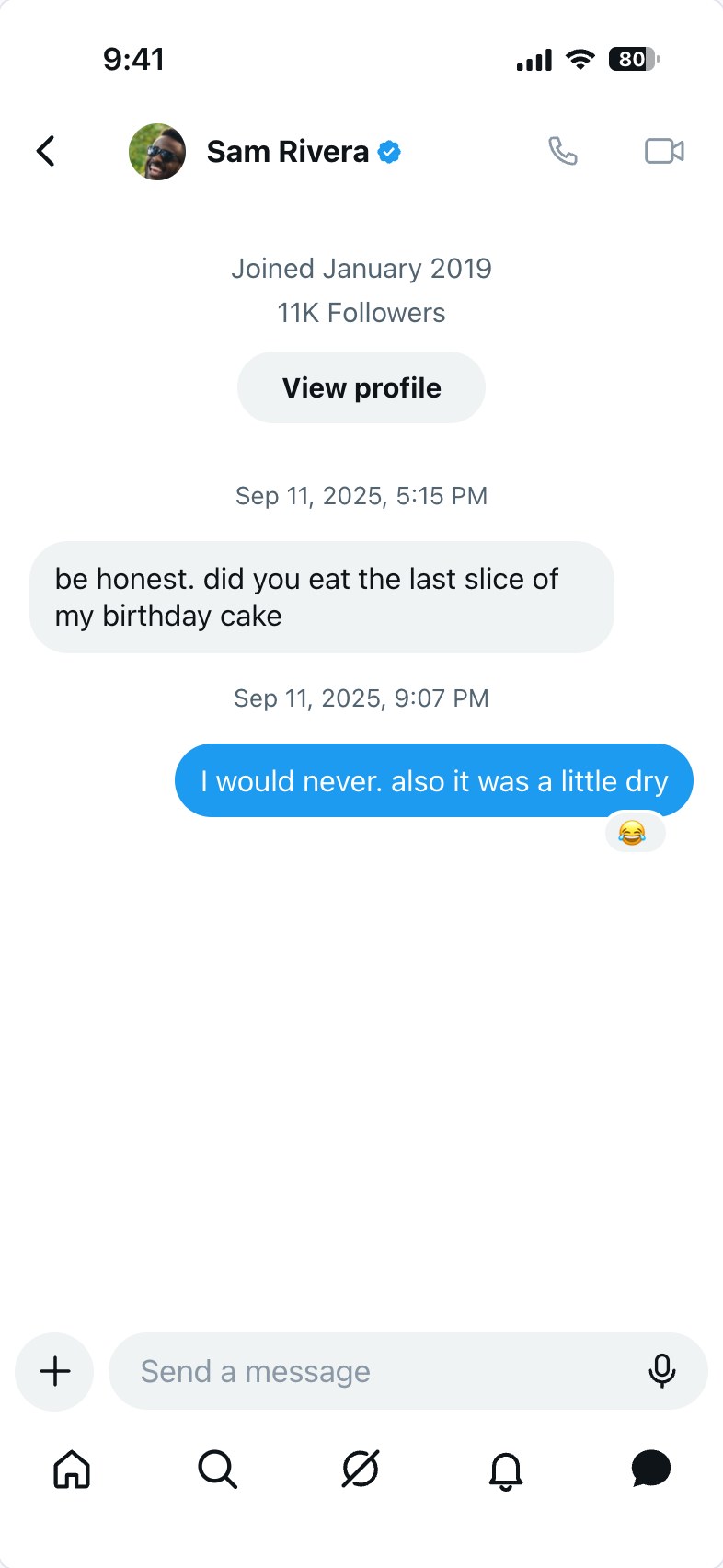
Twitter DM Generator is a free tool for making a direct message conversation on X (formerly Twitter) as an image. It draws the message screen of the current iPhone app, measured off a real screenshot: the profile photo, name and badge in the header with the call and video buttons, the join date and follower count with the "View profile" button above the first message, the conversation in rounded bubbles under their dates, the message box, and the tab bar at the bottom. Everything on the screen can be changed, and the result is saved as a PNG.
What You Can Put in the Conversation
- The top of the conversation. X opens a chat with when the other account joined, how many followers it has and a "View profile" button. Each line is editable, for any language, and the whole block can be turned off for a screenshot from the middle of a long chat.
- Badges. The blue check, the gold one for organizations (with the square profile photo that goes with it) or the grey one for government accounts, on the contact and on the author of a shared post.
- Shared posts. A post sent into the chat appears as a card with its author, handle, time, text and image, the way it does when someone taps Share and picks a conversation.
- Photos and reactions. Any message can be a photo, with or without text under it, and any message can carry an emoji reaction on its corner.
- Dates and receipts. The date and time between messages, as X shows them, plus an optional time under a message and "Seen" or "Sent" under your latest one.
- Message requests. The screen X shows when someone you do not follow writes to you: their messages, then the question and the Accept, Delete and "Block or report" buttons in place of the message box.
- Group chats. Up to as many members as you add, each with a name and photo; their pictures appear beside their messages and their names beside the time.
- 30 languages. The words X writes itself, "Seen", the message request and the encryption note, and the defaults of the lines above the first message and in the message box, in 30 languages from English and Turkish to Japanese, Korean and Chinese. Lines you have typed yourself are kept when you switch.
- Themes and colours. Light, Dim and Lights Out, with the six colours X offers for your bubbles and buttons: blue, yellow, pink, purple, orange and green.
What It Is Good For
Most people use a DM mockup for a joke between friends or a meme. It is also the quick way to get a believable conversation for a video storyboard, a scene in a story, a presentation about online safety and scams, or a design review of how a brand's support replies should read, without using anyone's real messages.
How to use Online Twitter DM Generator?
- Under Conversation, choose a one-on-one chat or a group, and type the display name and add a profile photo.
- Open Profile for the badge and the lines above the first message: the join date, the followers and the "View profile" button.
- Under Appearance, pick Light, Dim or Lights Out, the colour of your bubbles and the text size.
- In Messages, write each message and choose who sent it. Change its type to Photo or Shared Post when needed, and fill in "Date Above", "Time Below" or "Reaction" for the details around it.
- Reorder messages with the arrows, add more with "+ Add Message", and use Screen Details for the status bar, the Seen receipt, the typing bubble, the call buttons and the tab bar.
- Press "Export DM Screenshot" to download the image or copy it to the clipboard.
Frequently asked questions
Is my chat saved if I close the page?
Yes, in your own browser. The conversation you were working on is there when you come back, and "Start Over" clears it. A message you removed by mistake, or a chat you cleared, can be brought back with Undo for a few seconds. Nothing is uploaded.
How do I make it look like a message request?
In a one-on-one chat, set Screen to "Message request" under Conversation. The message box is replaced by the question X asks ("Do you want to let … message you?") and its three buttons, and the Seen receipt and call button are hidden, since neither exists before a request is accepted.
What is the Dim theme?
X has two dark themes. Dim is the dark blue one and Lights Out is pure black. Both are here, with the grey of the received bubbles and the lines matched to each.
Can I show a tweet inside the conversation?
Yes. Set a message's type to "Shared Post" and fill in the author, handle, time, text and image. To make the post itself as a full-size image, use the Tweet Generator.
What size is the image?
It has the proportions of an iPhone screen (393 × 852 points) and is exported at a higher pixel density, so it stays sharp when shared. Like the app, a conversation too long for one screen keeps its latest messages in view.
Does it connect to my X account?
No. There is no login and nothing is sent to or read from X; photos you add are only read by your own browser. For other apps there are the Instagram DM, Discord, iMessage and WhatsApp generators.
Usage Policy
Screenshots of direct messages are passed around as proof of what someone said, which is why a forged one can do real harm. By using Twitter DM Generator by 10015.io you agree not to fake a conversation with or from a real person or organization, not to present one as real, and not to use one to deceive, defraud, harass or defame anybody. It is meant for mockups, fiction, education and jokes that everyone involved is in on. 10015.io is not affiliated with X Corp. and takes no responsibility for what users create.