Text Tools
 Image Tools
 PDF Tools
 Social Media Tools
 Security Tools
 Coding Tools
 CSS Tools
 Color Tools
 Miscellaneous Tools
 Add to Chrome
 Add to Firefox


Tap who is singing and get each member's share of the lines, for BTS, BLACKPINK, TWICE or any group.
Which song is it?
How will you listen to it?
A video you download from here has no sound, because the song cannot be copied out of YouTube. Add it in a video editor.
What is Line Distribution Maker?
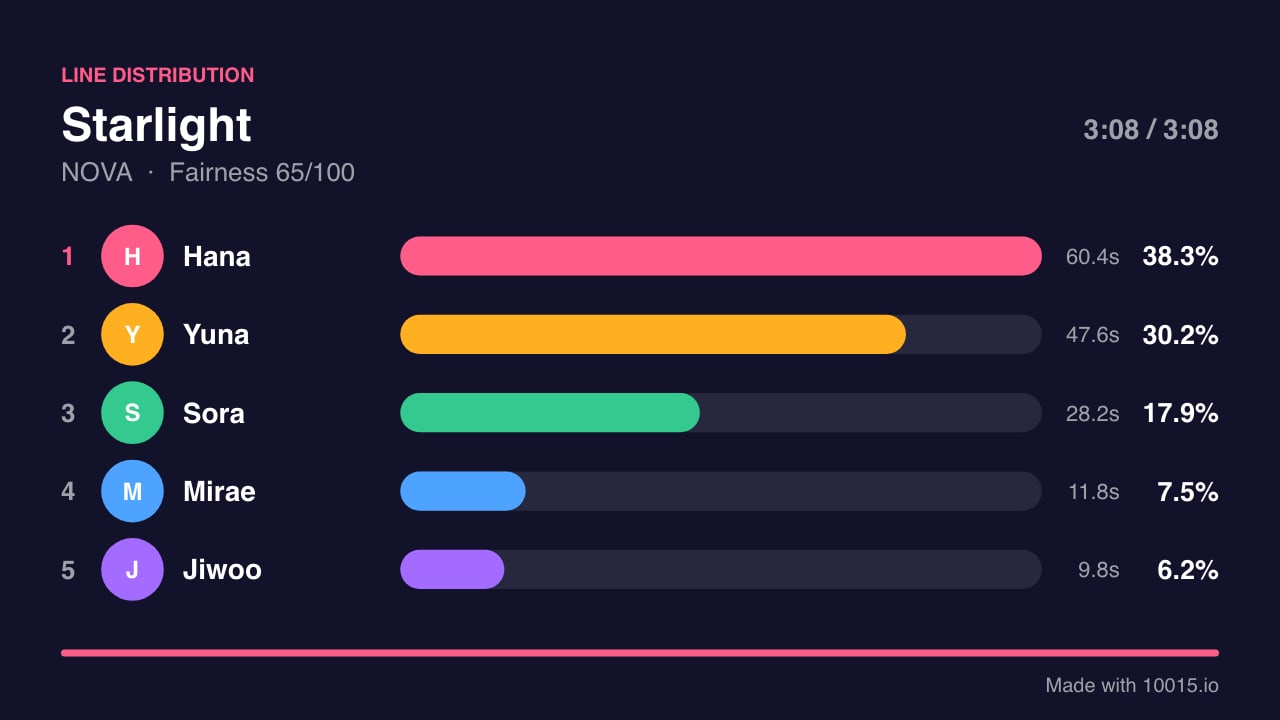
A line distribution shows how much of a song each member of a group sings: who got the most lines, who got six seconds, and how fairly the song was shared. Fans make them for every comeback, usually as a video in which coloured bars grow and overtake each other while the song plays.
Line Distribution Maker does the counting and the video for you. You play the song, tap a member whenever they sing, and the tool keeps each member's seconds, works out the percentages, ranks the members live and records the whole thing as a video you can upload. Nothing is sent to a server: the song, the photos and the chart stay in your browser.
How to make a line distribution
- Add the song. Choose an audio file (MP3, M4A, WAV or the sound of an MP4), paste a YouTube link, or use the timer alone while the song plays somewhere else.
- Add the members. Pick a group from the list to fill in the names, or type them. Give each member a colour and, if you like, a photo.
- Play and tap. Press play and tap the member who is singing, or press their key (1 to 9, 0, Q, W, E). Tap All (or press A) when the whole group sings. The bars grow and change places as the song goes on.
- Fix what you missed. Go back five seconds, jump anywhere on the timeline, remove a line with a click, or undo the last one.
- Download. Save the final chart as an image, record the video, or copy a link that opens your chart.
Features
- Two ways to mark lines: tap to switch from one singer to the next, or hold a member for as long as they sing. In hold mode several members can be held at once for a part sung together.
- A live ranking: bars slide past each other the moment one member overtakes another, the way they do in line distribution videos.
- Fast video export: the video is made from your chart in a few seconds, without playing the song again, as MP4 where the browser can write it and WebM otherwise. With an audio file, the song is in the video.
- Three shapes: landscape for YouTube, portrait for TikTok, Reels and Shorts, and square.
- Four looks: dark, light, pink and black, with member colours you choose.
- Up to 13 members, with photos, and 20 groups ready to fill in, among them BTS, BLACKPINK, TWICE, Stray Kids, SEVENTEEN, NewJeans, aespa, IVE, LE SSERAFIM, ENHYPEN and ATEEZ.
- A timeline you can edit: every line is a block on its member's lane, so a mistake is one click to remove.
- A fairness score: 100 when every member sings the same amount, lower the more unevenly the lines are shared.
- Saved as you go: the chart is kept in this browser, and a link shares it with anyone.
Frequently asked questions
How is a line distribution calculated?
By time. Each member's seconds of singing are added up, and their percentage is their seconds divided by the seconds sung by everyone. Instrumental parts count for nobody. When two members sing together and you hold both, each gets those seconds.
Does the video include the song?
It does when the song comes from a file on your device. With a YouTube link the video is recorded without sound, because a page cannot copy the audio out of YouTube's player; add the song in a video editor afterwards. Remember that music is copyrighted: platforms may mute or claim a video that contains it.
How do I mark a part the whole group sings?
Tap All (or press A). Every member gets those seconds until you tap someone else or tap All again. In Hold mode you can also hold two or three members at once for a part only some of them sing.
Can I use it for groups that are not K-pop?
Yes. It works for any song with more than one voice: J-pop and P-pop groups, boy bands, musical cast recordings, choirs, rap groups and duets.
Is my song uploaded anywhere?
No. The audio file is played from your device and never leaves it. The chart is stored in your browser, and the share link contains only the names, colours and timings.