Text Tools
 Image Tools
 PDF Tools
 Social Media Tools
 Security Tools
 Coding Tools
 CSS Tools
 Color Tools
 Miscellaneous Tools
 Add to Chrome
 Add to Firefox


Plans a pixel perfect Minecraft circle, oval or arch block by block, with a build guide and Litematica, WorldEdit and command exports.
What is the Minecraft Circle Generator?
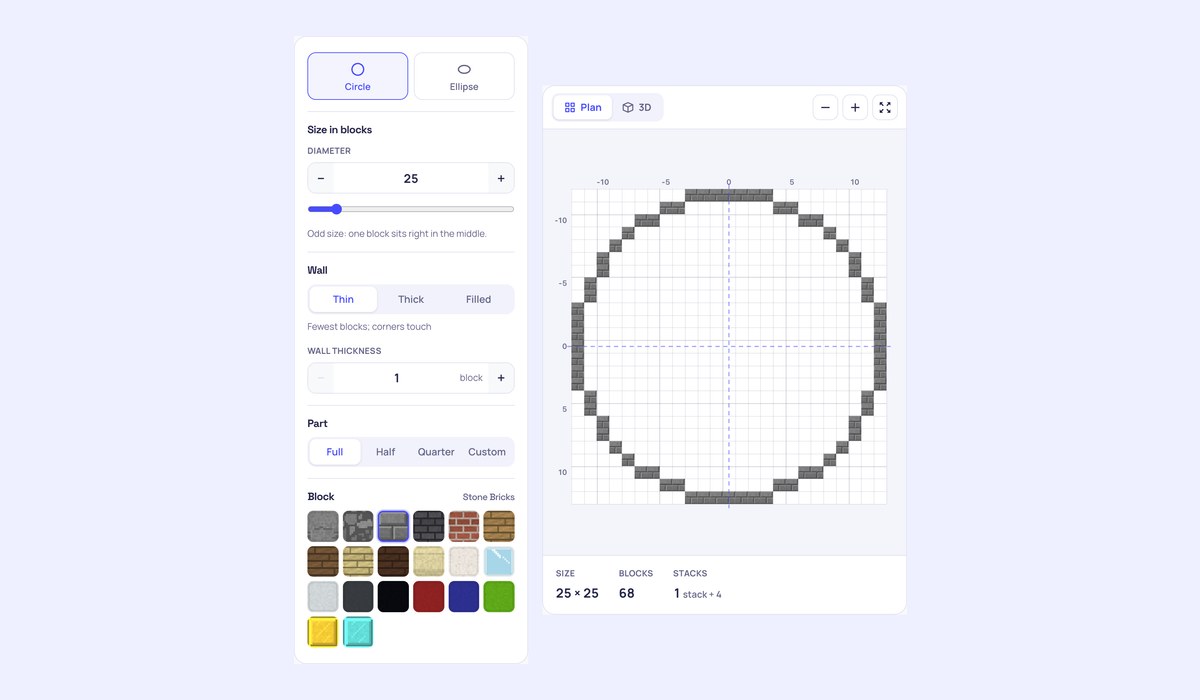
Minecraft is made of square blocks, so a round tower, a fountain or a castle wall needs a plan: which blocks to place on each row so the curve looks smooth. The Minecraft Circle Generator draws that plan for any size. Type the diameter, choose a thin, thick or filled circle, and you get the block grid numbered from the middle, the edge step pattern builders count by, a row by row checklist, the number of blocks and stacks, and a 3D view in the block you will use. When you would rather not count at all, take the shape into the game as a Litematica or WorldEdit file, or as /fill commands.
What you can make
- Circles from 1 to 1000 blocks across, and ovals (ellipses) with their own width and depth.
- Thin walls with the fewest blocks, thick walls where every block touches the next by a face (no gaps to slip through), or filled discs for floors and ponds. Walls can be several blocks thick, for rings and round paths.
- Arches and arcs: half a circle for a doorway or bridge, a quarter for a corner, or any angle you choose.
- Twenty blocks to preview it in, from stone bricks and oak planks to glass and gold, drawn in a Minecraft style.
How to use the Minecraft Circle Generator
- Choose Circle or Ellipse and type the size. Odd sizes have one block in the middle; even sizes have a 2×2 group.
- Pick the wall: thin, thick or filled, and how many blocks thick.
- Mark the middle in your world, then build row by row from the guide: each row says where it starts and ends, counted from the middle like the numbers on the plan. Tick rows off as you go.
- Or download the shape for Litematica, WorldEdit or as commands and let the game do the counting.
How to build a circle in Minecraft
Start with the middle: place a marker block where the centre goes and run a line of blocks north, south, east and west, each half the diameter long. The ends of those lines are the four flat sides of the circle. Then build one quarter from the plan and copy it to the other three, since every circle is the same in each quarter. The edge steps make it quick: a circle of 25 starts with a top row of 7, then each row reaches 2, 2, 1, 1, 1 blocks further out down to the 45° corner, and from there the same steps run back the other way.
Thin or thick?
A thin circle only touches corner to corner on its diagonal steps. It uses the fewest blocks and looks clean from above. A thick circle fills those corners so each block touches the next by a face. Use thick for walls you want to be solid, for redstone and water channels, and for fences that mobs should not slip past.
Using the exports
- Litematica (.litematic): put the file in the
schematicsfolder of your Minecraft folder, load it in Litematica and place it. The circle shows as a see-through guide to build over, in survival too. - WorldEdit (.schem): copy it to
plugins/WorldEdit/schematics(orconfig/worldedit/schematicsfor the mod), then//schem loadits name and//paste: the middle of the shape lands at your feet. - Commands (.mcfunction): /fill commands that build it around where you stand, for a datapack function. Or copy them all and paste them into command blocks.
- WorldEdit command: the
//cylcommand closest to your circle. WorldEdit always centres on one block, so for even sizes the file is the exact one. - PDF and PNG: print the plan or keep it on a second screen.
Frequently asked questions
How many blocks is a circle in Minecraft?
It depends on the size and the wall: a thin circle of 25 takes 68 blocks, a thick one 96, a filled one 489. The count updates as you change any setting, with the number of stacks of 64 and shulker boxes beside it.
Should a circle have an odd or even diameter?
Either works. An odd diameter has one block exactly in the middle, which is easy to mark and to line up with a doorway. An even one has a 2×2 middle, which suits a 2 wide path or a 2×2 tree in the centre.
Does it work for Bedrock?
The plan, the guide and the counts work for every edition. The Litematica and WorldEdit files are for Java Edition mods and plugins; the commands are written for Java Edition.
Is my progress saved?
Yes, the rows you tick stay in this browser for each shape you plan. The share link keeps the shape itself, so you can open it on another device or send it to a friend you build with.
Going 3D? Plan a ball with the Minecraft Sphere Generator or a roof with the Minecraft Dome Generator. Not affiliated with Mojang or Microsoft.