Text Tools
 Image Tools
 PDF Tools
 Social Media Tools
 Security Tools
 Coding Tools
 CSS Tools
 Color Tools
 Miscellaneous Tools
 Add to Chrome
 Add to Firefox


Plans Minecraft domes, towers, cones and rings layer by layer, with a 3D view and Litematica, WorldEdit and command exports.
What is the Minecraft Dome Generator?
Round roofs and towers are what make a Minecraft build look finished, and the hardest part to get right by eye. The Minecraft Dome Generator plans four of them: domes of any width and height, cylinders for round towers and silos, cones for wizard towers and spires, and tori, the ring shape of a space station or a giant donut. Each comes in 3D, in the block you will use, with a plan of every layer, a row by row checklist and the blocks you need, plus Litematica, WorldEdit and /fill exports to place it straight in your world.
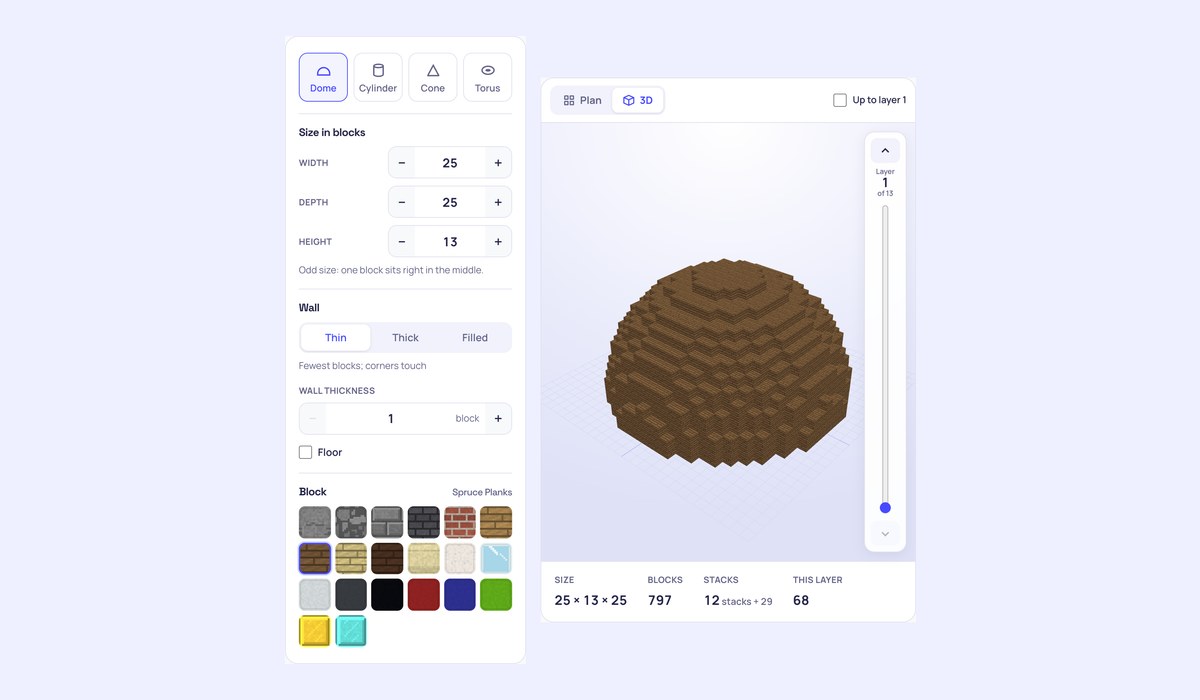
What you can make
- Domes with their own width, depth and height: a half sphere, a low saucer roof or a tall onion-like cap.
- Cylinders: round towers, silos and wells, open or with a floor and a roof.
- Cones: spires, tower roofs and volcanoes.
- Tori: rings, donuts and space stations, with any tube thickness.
- Thin, thick or filled walls, one or more blocks deep, in twenty blocks drawn in a Minecraft style.
How to use the Minecraft Dome Generator
- Choose Dome, Cylinder, Cone or Torus and set the width, depth and height in blocks.
- Pick the wall and, for domes, towers and cones, whether it has a floor (and a roof for towers).
- Turn the 3D view to check the shape, then build from layer 1 up with the plan and the checklist.
- Or download it for Litematica, WorldEdit or as /fill commands.
Building domes and towers
A dome as tall as half its width is a true half sphere. Make it lower for a flatter roof that sits well on a wide hall, or taller for a pointed, church-like dome. For a tower roof, make the dome or cone a block or two wider than the tower so it hangs over the walls. Round towers look best with an odd width, so a door and a window can sit right in the middle of a side.
Using the exports
- Litematica (.litematic): copy it to the
schematicsfolder, load it in Litematica and build over the see-through guide. - WorldEdit (.schem): copy it to the WorldEdit schematics folder, then
//schem loadand//paste: the base is centred at your feet. - Commands (.mcfunction): /fill commands that build it from where you stand.
- WorldEdit command: the
//cylor//conecommand for towers and cones. - PDF: every layer on its own page to print.
Frequently asked questions
How do I make a dome in Minecraft?
Set the width of the room it covers and a height of about half that. Build the bottom layer first, a circle as wide as the dome, then each layer above it from the plan: they get smaller towards the top. The shaded cells on each plan show the layer below, so you can see where to step in.
How many blocks is a dome?
A thin dome 25 blocks wide and 13 tall takes 797 blocks. The count updates as you change the size or the wall, with stacks of 64 and shulker boxes beside it.
Does it work for Bedrock?
The plans, the checklist and the counts work for every edition. The Litematica and WorldEdit files are for Java Edition mods and plugins; the commands are written for Java Edition.
Need a whole ball? Use the Minecraft Sphere Generator; for flat circles and arches, the Minecraft Circle Generator. Not affiliated with Mojang or Microsoft.