Text Tools
 Image Tools
 PDF Tools
 Social Media Tools
 Security Tools
 Coding Tools
 CSS Tools
 Color Tools
 Miscellaneous Tools
 Add to Chrome
 Add to Firefox

Makes iPhone Screen Time screenshots, day or week, with the chart, categories, most used apps, pickups and notifications.
Report
Chart
The bars are spread from the app times below. Shuffle draws a different day with the same totals.
Apps
The total screen time is the sum of these and Other Apps.
Pickups & Notifications
What is Online Screen Time Generator?
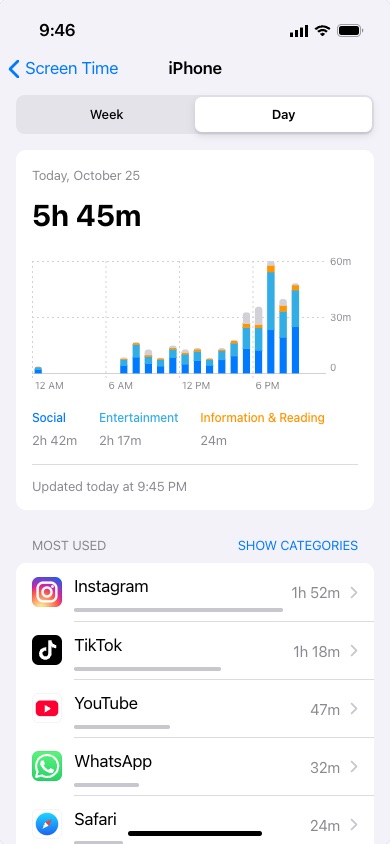
Screen Time Generator draws the Screen Time report from an iPhone (Settings → Screen Time → See All App & Website Activity) with numbers you choose, and saves it as a screenshot. You list the apps and how long each one was used; the tool adds them up, works out the categories and draws the chart the way iOS does, down to the dotted gridlines and the "Updated today at" line under it.
People use it for the "my screen time is embarrassing" posts on TikTok and Instagram, for memes, for a slide about phone habits in a class or a talk, or to show a goal they are working towards, such as getting under two hours a day.
Day and Week Reports
The Day report shows the total for one day and a bar for every hour. If the day is still in progress, the bars stop at the time the report was last updated, the way the real one does in the evening. The Week report shows the daily average, a bar for each day with the green dashed "avg" line through them, the total for the week and the change from last week, such as "12% from last week".
Categories, Colours and Sections
- Categories: each app is filed under the category iOS uses (Instagram and WhatsApp under Social, TikTok and YouTube under Entertainment, and so on). The three biggest get blue, cyan and orange in the chart and the legend, and the rest stays grey, exactly as on the phone.
- Most Used: the apps in order, each with its time and the grey bar that shows it next to the busiest one.
- Pickups: the first pickup of the day, the total, a chart, and the apps opened first after picking the phone up.
- Notifications: the total, a chart and which apps sent the most.
- Shuffle: the bars are spread from your totals with a natural-looking pattern (daytime, evening, night owl or all day); Shuffle draws another day with the same numbers.
How to use Online Screen Time Generator?
- Choose Day or Week, light or dark, and set the date and the time the report was updated.
- Add the apps and their times, written as "1h 52m", "47m" or "2:15". Use Other Apps for everything you do not want to list.
- Pick a usage pattern for the hourly chart and press Shuffle until the day looks right.
- Add notification and pickup counts if you want those sections, or switch them off.
- Click "Export Screenshot" to download a PNG or copy it. Tick "Full-Length Screenshot" for the whole report instead of one screen.
Frequently asked questions
Does it read my real screen time?
No. It has no access to your phone and nothing is uploaded. Every number on the report is one you typed, and the chart is drawn in your browser.
Why are only three categories coloured?
That is how iOS draws it: the three categories with the most time get colours, always blue, cyan and orange in that order, and the others are grey in the bars. If you want a different app in the colours, give its category more time.
Can I make an Android screen time screenshot?
Yes, with the Android Screen Time Generator, which draws Android's Digital Wellbeing dashboard with its ring chart, unlocks and notifications. The tabs above the preview switch between the two.
What size is the screenshot?
The report is drawn on a 390 × 844 point screen, the size of a recent iPhone, and exported at twice that, 780 × 1688 pixels, like a real screenshot. With "Full-Length Screenshot" it is as tall as the report.
Usage Policy
A made-up screen time report is fine for a joke, a meme, a lesson or a mockup. Using one to mislead a parent, a teacher, an employer or a study about how a phone was really used is not. By using Screen Time Generator by 10015.io you agree not to use it to deceive anyone, and that 10015.io is not responsible for what is made with it.