Text Tools
 Image Tools
 PDF Tools
 Social Media Tools
 Security Tools
 Coding Tools
 CSS Tools
 Color Tools
 Miscellaneous Tools
 Add to Chrome
 Add to Firefox
Builds an Instagram video or audio call screen with the username, profile picture and camera images you add, ready to download as a picture.
Call
What is an Instagram Call Screen Generator?
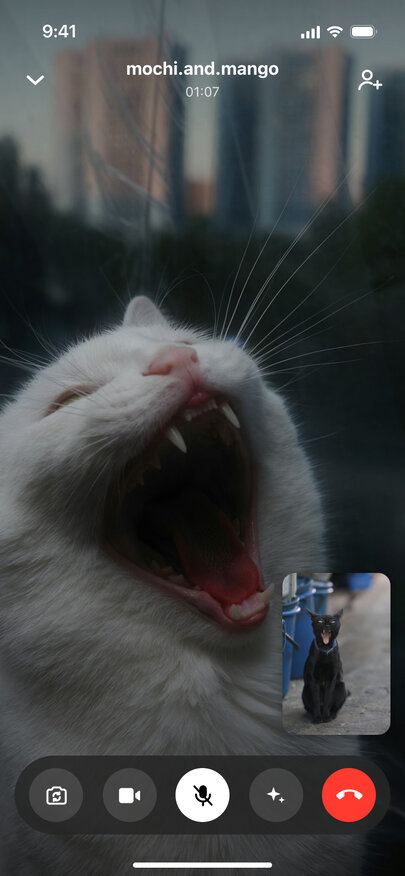
Instagram Call Screen Generator turns a username and a couple of photos into a fake Instagram call screenshot. Instagram calls start from a DM thread, and this tool draws what follows: the incoming call screen with the profile picture, the username and Decline and Accept buttons; the "Calling…" screen while you wait; and the call itself, with the username and timer at the top and the rounded control bar at the bottom.
It is made for the "guess who video called me" post, for a staged chat with a favourite creator, for memes where two pets are clearly on a call, and for creators who need a believable IG video call frame in an edit. Influencer marketers also use it to mock up how a live Q&A call with a follower might look.
Built Like an IG Call
- Username at the top — Instagram shows handles rather than full names, so the main field is the username, like mochi.and.mango.
- Video call controls — flip camera, camera, microphone, effects and the red end button in one dark pill.
- Audio call — the profile picture large in the middle over a blurred, darkened copy of it.
- Two cameras — one picture for the person you are calling, one for your own preview in the corner.
- Muted microphone — tick Muted and the mic button turns white with a line through it.
Switch between this tool and the WhatsApp or FaceTime call screen generators using the links over the phone preview.
Creating a fake Instagram video call, step by step
- Choose video call or audio call.
- Pick the moment: the call coming in, you calling them, or the two of you already talking.
- Type the Instagram username and upload the profile picture.
- Add the camera pictures for a video call and the timer for a running one.
- Download the image or copy it to share.
Frequently asked questions
What is the quickest way to fake an Instagram video call?
Choose "Video call" and "In the call", type the username, then upload a picture for their camera and one for yours. Add a timer such as 01:07 and export — the result looks like a screenshot taken in the middle of an IG video chat.
What does an incoming Instagram call show?
The caller's profile picture in a circle, their username, "Incoming video call…" or "Incoming audio call…", and the red and green buttons to decline or answer, all over a blurred version of the profile picture.
Can the self view be turned off?
Leave "Your Camera" empty and the corner tile shows a plain dark gradient, the way it looks when your own camera is covered or still loading.
Will the other person know?
There is no other person: the tool never contacts Instagram and makes no call. It draws an image in your browser and nothing you upload leaves your device.
Can I fake the DM thread too?
Yes, the Instagram DM Generator builds the messages that lead up to the call, including story replies and photos.
Usage Policy
Faked calls with famous accounts spread fast and can mislead. Anyone using this tool agrees not to pass off a generated call as a real conversation with a creator, a brand or any other real account, not to use it in scams or fake giveaways, and not to submit it as proof of anything. Instagram is a trademark of Meta and the Instagram Call Screen Generator is unofficial; responsibility for each image lies with the person who made it.