Text Tools
 Image Tools
 PDF Tools
 Social Media Tools
 Security Tools
 Coding Tools
 CSS Tools
 Color Tools
 Miscellaneous Tools
 Add to Chrome
 Add to Firefox
Turns a photo into an album cover: cover styles, filters, the explicit label and a vinyl or CD mockup, at 3000 × 3000.
Words
Style
Photo
Explicit label
What is Album Cover Maker?
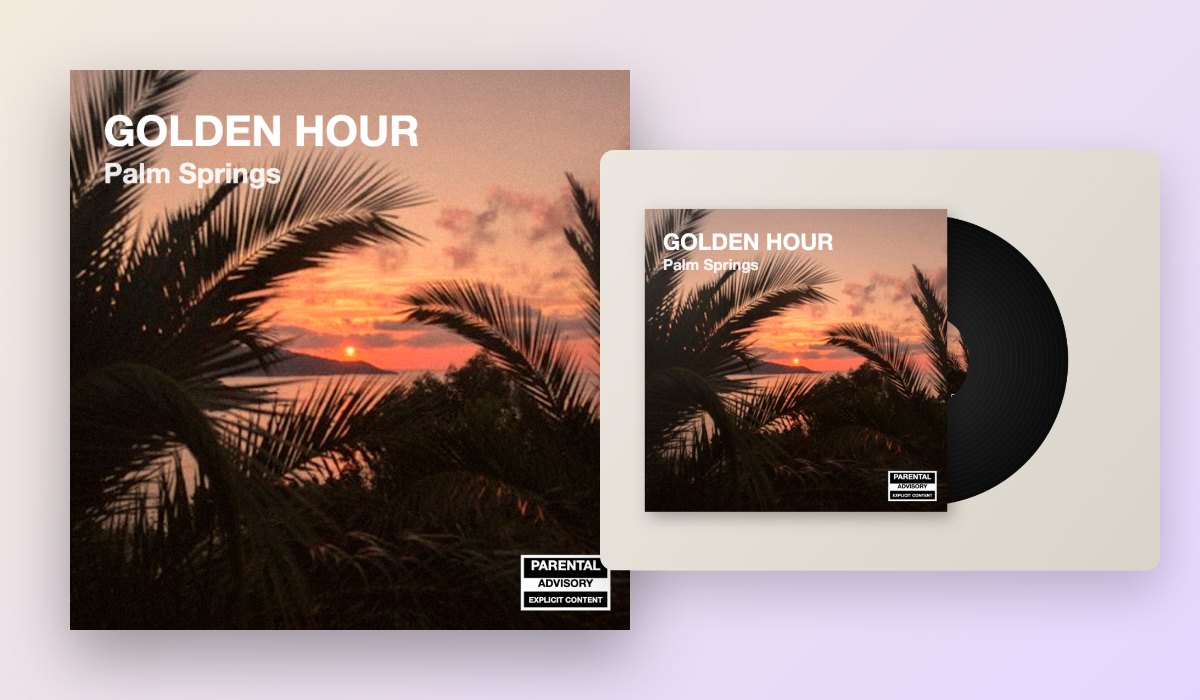
Album Cover Maker turns any photo into an album cover: your name and an album title in the style of a real record, a filter that sets the mood, and the black-and-white parental advisory label in the corner. Use it for your own music, a playlist, a mixtape for a friend, or just to see your photo as an album.
See it as a flat cover, sliding out of a vinyl sleeve or in a CD case, and download it at 3000 × 3000 pixels, the size streaming services ask for, or as a mockup to share. Your photo never leaves your browser.
What You Can Do
- Seven styles: Classic, Centred, Bold, Minimal, a framed print, the lime green look of blurred lowercase words, or no text at all.
- Seven fonts, from Helvetica and a serif to a poster font, a script and gothic letters, in any colour.
- Filters: black and white, faded, high contrast, warm film, duotone in your colours, or grainy.
- Move and zoom the photo on the cover.
- Parental advisory label, in any corner.
- Mockups: on a vinyl record or in a CD case.
- Downloads: PNG or JPG at 3000 × 3000, and the mockup.
How to use Album Cover Maker?
- Add your photo, or try it on the sample.
- Write the artist and the album title, and pick a style and a font.
- Choose a filter, move the photo, and add the explicit label if you like.
- Download the cover, or the vinyl or CD mockup.
Frequently asked questions
What size should an album cover be?
Square, and 3000 × 3000 pixels for Spotify, Apple Music and most distributors, which is the size this tool saves. Use the JPG for uploading to a distributor, which is smaller, and the PNG for the sharpest copy.
Can I use the parental advisory label?
The label marks music with explicit lyrics, and it is fine on covers for fun, playlists and mixtapes. For music you release, your distributor marks explicit tracks itself; check its rules before putting the label on the cover.
Can I use any photo?
Your own photos, yes. For music you release, use only photos you have the rights to. To put your favourite real albums together, try the Album Chart Maker.