Text Tools
 Image Tools
 PDF Tools
 Social Media Tools
 Security Tools
 Coding Tools
 CSS Tools
 Color Tools
 Miscellaneous Tools
 Add to Chrome
 Add to Firefox

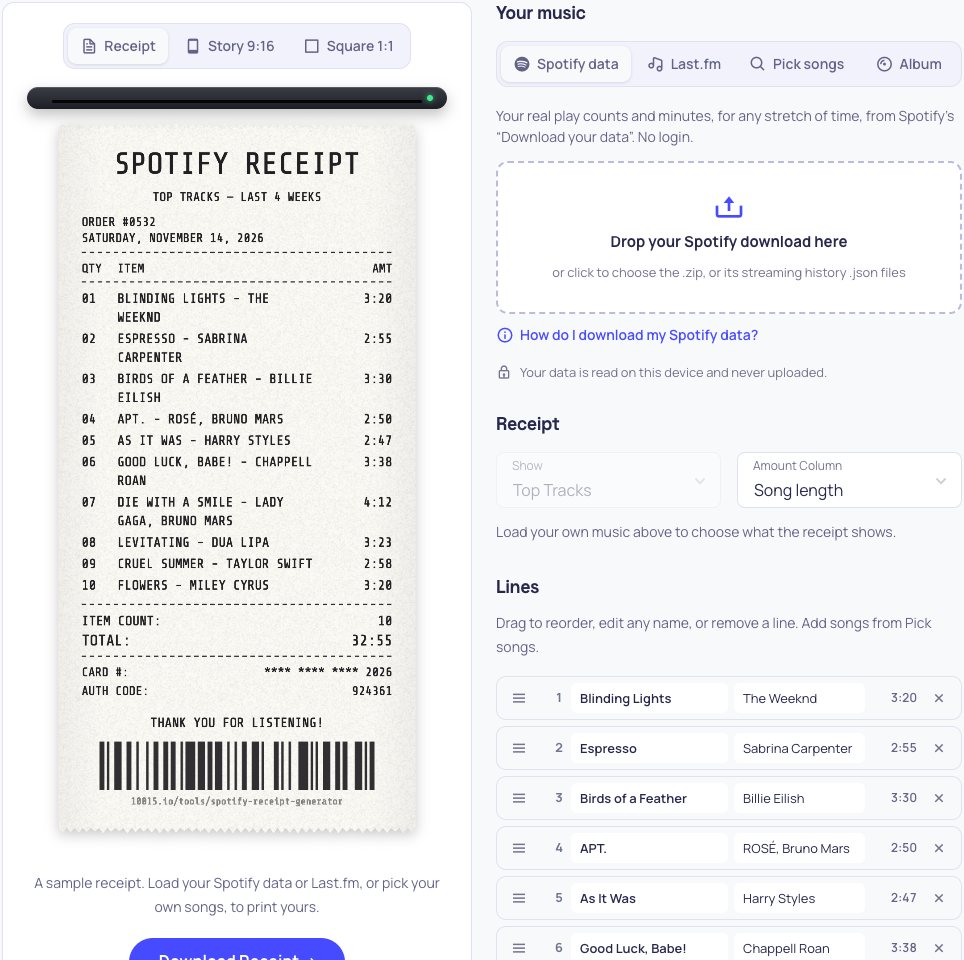
Print your top songs, artists, albums and listening stats as a receipt, from Spotify data or Last.fm.
A sample receipt. Load your Spotify data or Last.fm, or pick your own songs, to print yours.
Your music
Your real play counts and minutes, for any stretch of time, from Spotify’s “Download your data”. No login.
Your data is read on this device and never uploaded.
Receipt
Load your own music above to choose what the receipt shows.
Lines
Drag to reorder, edit any name, or remove a line. Add songs from Pick songs.
- 13:20
- 22:55
- 33:30
- 42:50
- 52:47
- 63:38
- 74:12
- 83:23
- 92:58
- 103:20
Paper
Printed on it
What is Online Spotify Receipt Generator?
Spotify Receipt Generator prints your music taste as a shop receipt: your top tracks, artists, albums, genres or listening stats as the items, how long or how often you played them as the amounts, and the total at the bottom. It is made to share: download it as a receipt, a 9:16 story or a square post, or send a link. Nothing needs logging in. Load the file from Spotify's "Download your data" for your real play counts and minutes over any period you choose, enter a Last.fm username, or pick the songs yourself.
Three Ways to Fill Your Receipt
- Spotify data: upload the .zip from Spotify’s privacy page. Every play is counted, so the receipt shows your true plays and minutes, for the last 4 weeks, 6 or 12 months, any year since you joined, all time, or dates you choose. It is read on your device and never uploaded.
- Last.fm: enter your username to print your scrobbles for the last 7 days, 1, 3, 6 or 12 months, or all time. It works for Spotify, Apple Music, YouTube Music and anything else that scrobbles.
- Pick songs or an album: search and add songs one by one, paste a list of “Song - Artist” lines, or turn any album into a receipt of its tracks and running time.
What You Can Print
- Top tracks, artists and albums: top 5, 10, 20, 30 or 50, with song lengths, play counts or minutes listened.
- Top genres: worked out from your top artists.
- Top podcasts: from your Spotify data.
- Listening stats: minutes listened, streams, different songs and artists, your biggest day, peak hour, skip rate and longest streak.
Make It Yours
Choose the paper (thermal white, crumpled, vintage, pink, mint, sky, midnight, or a colour from your top song's cover) and the printer's typeface (thermal, typewriter, clean mono or dot matrix). Print the receipt in English, Spanish, Portuguese, French, German, Italian, Turkish or Indonesian; song names in Japanese, Korean or any other script print as they are. Change the title, your name, the date and the closing message, reorder or rename any line, and add a barcode or a QR code to your profile or playlist. For Instagram and TikTok stories, the receipt is laid on a blurred cover, a wooden desk, marble, a gradient or black.
How to use Online Spotify Receipt Generator?
- Choose where your music comes from: Spotify data, Last.fm, picked songs or an album.
- Choose what to show (top tracks, artists, albums, genres, podcasts or stats), the period and how many lines.
- Pick the paper, font and language, and edit the title, your name and the lines.
- Choose Receipt, Story or Square, and download, share or copy the link.
A Receiptify Alternative Without Logging In
Receiptify made music receipts popular by reading your top tracks through a Spotify login. This generator needs no login and gives you more to print: exact play counts and minutes from your own Spotify data, any period down to the day, top albums, genres, podcasts and stats, eight papers, four fonts and eight languages, and story and post sizes ready to share.
Frequently asked questions
How do I get my Spotify data?
Go to spotify.com/account/privacy, tick Account data (the last year, ready in a few days) or Extended streaming history (every year, within 30 days), and request it. When Spotify emails you, download the .zip and drop it on this page. While you wait, use Last.fm or pick your songs.
Why don't you use a Spotify login?
Spotify no longer lets new apps read listeners' top tracks through a login. Your data download is more accurate anyway: it counts every play, while a login only gives a ranked list for three fixed periods.
Is my data safe?
Yes. The Spotify file is read in your browser and never leaves your device. For Last.fm, only the username is sent, to fetch the public charts of that profile.
Can I make a receipt for Apple Music?
Yes, through Last.fm if your Apple Music scrobbles to it, or by picking your songs or pasting a list. Change the title to “Apple Music Receipt” or anything you like.