Text Tools
 Image Tools
 PDF Tools
 Social Media Tools
 Security Tools
 Coding Tools
 CSS Tools
 Color Tools
 Miscellaneous Tools
 Add to Chrome
 Add to Firefox

Lays out a YouTube channel page in the mobile app style from your own banner, videos and numbers, ready to download.
Channel
Counts
Videos
App Screen
What is Online YouTube Channel Generator?
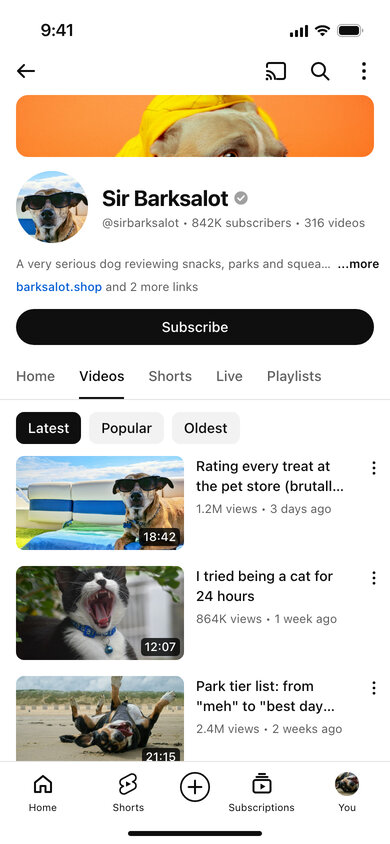
YouTube Channel Generator is a free mockup tool for the YouTube channel page as it appears in the phone app. You get the banner strip, a round channel icon, the channel name with its check mark, the "@handle • subscribers • videos" line, a description, links, the Subscribe button, the Home / Videos / Shorts / Live / Playlists tabs and the video list — every piece of it taken from your input.
Starting a channel involves a lot of decisions you can only judge once you see them together: does the name fit, does the banner work at that thin crop, do the thumbnails stand out next to one another, do the titles get cut off? This tool shows all of that before you upload a thing. It is also useful for media kits, course material about YouTube, video intros and fun "my cat has a channel" posts.
Writing the Video List
Videos are entered one per line, with the details separated by vertical bars:
Title | views | time ago | duration
For example I tried being a cat for 24 hours | 864K | 1 week ago | 12:07. Leave a part out and it simply is not shown. Titles longer than two lines are cut with an ellipsis, as on YouTube, which is a quick way to check whether yours are too long. Upload up to six thumbnails; they are used in the same order as the lines.
How to use Online YouTube Channel Generator?
- Type the channel description, name and handle, and upload a channel photo and a banner.
- Enter the subscriber and video counts and an optional link.
- List your videos one per line and upload their thumbnails.
- Mark the channel as verified or subscribed, and pick light or dark mode.
- Use "Export Screenshot" to download the page as a JPG or copy it.
Frequently asked questions
What banner size should I upload?
YouTube recommends 2560 × 1440 for channel art, but phones show only a thin strip from its middle. Any wide image works here: it is cropped to the centre, the same as the app does, so you can see what survives the crop.
How many videos fit on the page?
About four or five are visible on an iPhone screen below the channel header, and the tool reads up to six lines. Anything below the bottom bar is cut off, just like a real screenshot.
What does "Subscribed" change?
The black Subscribe button becomes the grey "Subscribed" button with a bell, which is how the page looks to someone who already subscribes.
Is it connected to YouTube?
No. It does not read or change any real channel, and it is not made or endorsed by YouTube or Google. Your images stay in your browser.
Usage Policy
Subscriber counts carry weight with advertisers and viewers, so by using YouTube Channel Generator by 10015.io you agree not to use a made-up channel page to misrepresent an audience, not to copy an existing creator's channel to pass yourself off as them, and not to use the images to deceive or defraud anyone. Planning, presentations, teaching and humour are what it is for. 10015.io is not responsible for the images created with it.