Text Tools
 Image Tools
 PDF Tools
 Social Media Tools
 Security Tools
 Coding Tools
 CSS Tools
 Color Tools
 Miscellaneous Tools
 Add to Chrome
 Add to Firefox
Builds an Android text conversation in the Google Messages style, with RCS or SMS, Material You colours and dark mode, as a PNG.
Phone
Messages
What is Online Android Text Message Generator?
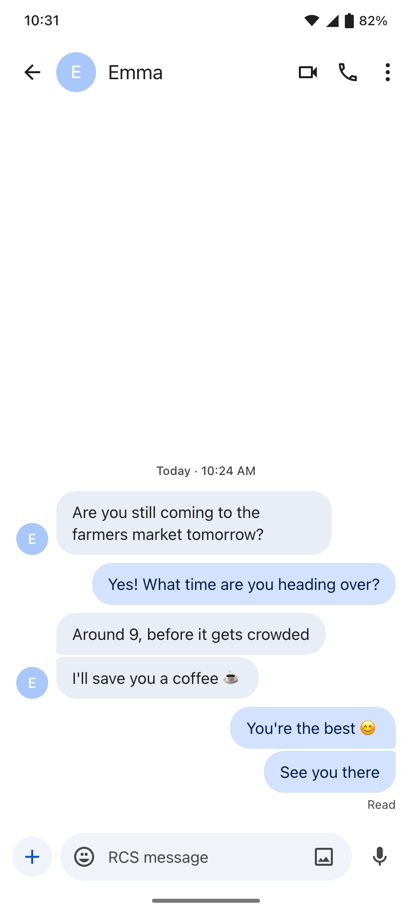
Android Text Message Generator is a free tool for making a fake text message conversation that looks like it was screenshotted on an Android phone. It draws Google Messages, the texting app most Android phones use: the Android status bar, the contact's name and photo with the call buttons, the conversation in rounded bubbles, the "Read" or "Delivered" line under your last message, and the compose bar with its add and voice buttons.
A text conversation is the most common kind of fake screenshot there is, and until now the site only drew the iPhone side of it in the iMessage Chat Generator. Roughly seven in ten phones in the world run Android, so for most people a real text screenshot looks like this one, not like iMessage.
What Makes It Look Like Google Messages
- Material You colours. Since Android 12, Google's apps take their colours from the phone's theme, so sent bubbles are not one fixed blue — they can be blue, green, purple or pink depending on the wallpaper. Pick the one that matches the phone you are imitating.
- Grouped bubbles. Several messages in a row from the same person stack with tight corners between them and rounded ones at the ends, instead of separate pills.
- The contact's photo or initial. Received messages carry the sender's photo, or their initial on a coloured circle, beside the last bubble of each run.
- Read receipts. "Sent", "Delivered" or "Read" under the last message you sent.
- Date lines. A small centred time such as "Today · 10:24 AM" where the conversation picks up again.
- The Android status bar. Clock on the left; Wi-Fi, signal and battery on the right, with an optional percentage.
RCS or SMS
Google Messages sends chats over RCS when both phones support it and falls back to plain SMS when they do not, and the compose box says which one you are in: "RCS message" or "Text message". RCS is what gives you read receipts, typing indicators and full-quality photos, and since iPhones gained RCS support in iOS 18 it covers conversations with iPhone users too. Choose RCS for a modern-looking chat, or SMS for one with an older phone or a number that only takes texts.
How to use Online Android Text Message Generator?
- Set up the phone: light or dark, the colour, RCS or SMS, the clock and the battery level.
- Type the contact's name and add their photo, or leave the photo empty to show their initial.
- Write the messages, choosing "You" or the contact as the sender for each. Add a date line above any message where the conversation resumes.
- Choose whether "Read", "Delivered" or "Sent" shows under your last message.
- Click "Export Screenshot" to download a PNG or copy it to the clipboard.
Frequently asked questions
Does it look like Samsung Messages?
No, it draws Google Messages. Samsung has made Google Messages the default on its Galaxy phones in many countries, so it is also what most Samsung owners see, but phones still using Samsung's own Messages app show a different layout.
How do I make several messages appear as one block?
Give them the same sender and put them next to each other without a date line between them. The bubbles join up automatically, with the corners between them tightened the way the app does it.
What size is the screenshot?
The screen is drawn at the size of a typical Android phone, 412 × 915, and exported at twice that, 824 × 1830 pixels, which has the proportions of a real screenshot from a modern Pixel or Galaxy. Long conversations lose their oldest messages off the top, exactly as they would on the phone.
Can I make a dark mode screenshot?
Yes. Dark mode switches the background, the received bubbles and the compose bar to Google's dark colours and gives every colour theme its dark variant.
Does it send any texts?
No. It makes a picture of a conversation and nothing else — no message is sent, no number is needed and the contact photo you add stays in your browser.
Usage Policy
Text screenshots get used as evidence — in arguments, in breakups, in workplace disputes and in court — which is what makes a convincing fake one harmful. By using Android Text Message Generator by 10015.io you agree not to make conversations that put words in a real person's mouth, not to present them as genuine to anyone, and not to use them for scams or harassment. Pranks your friends are in on, mockups and fiction are fine. 10015.io is not responsible for the images made with it.