Text Tools
 Image Tools
 PDF Tools
 Social Media Tools
 Security Tools
 Coding Tools
 CSS Tools
 Color Tools
 Miscellaneous Tools
 Add to Chrome
 Add to Firefox

Builds a full-screen YouTube Shorts screenshot with your video frame, title, channel and counts, as a JPG.
Video
Creator
Title
Engagement
App Screen
What is Online YouTube Shorts Generator?
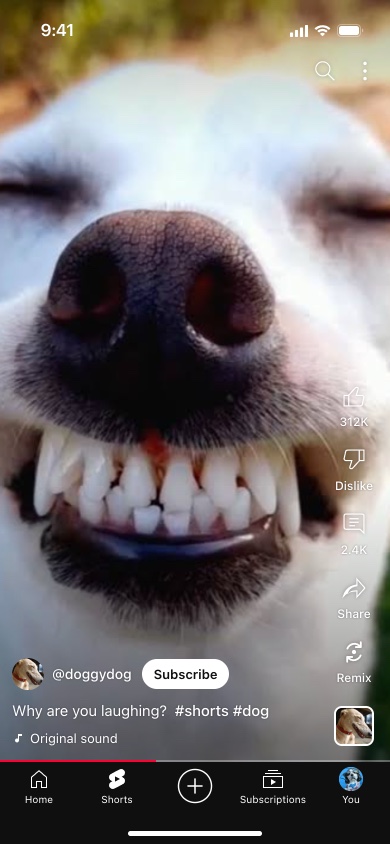
YouTube Shorts Generator is a free tool for making a screenshot of a YouTube Short. It draws the Shorts player from the YouTube app on an iPhone — the search and menu buttons at the top, the like, dislike, comment, share and remix buttons down the right, the channel's photo and @handle with the white Subscribe button, the title, the sound, the thin red progress line and the bottom bar with Home, Shorts, the create button, Subscriptions and You — over a frame from your video.
Creators use it to check a Short before uploading it, and to show one that does not exist yet: in a pitch to a brand, a channel strategy deck, a thumbnail test or a lesson about short-form video.
How YouTube Shows a Short
- Likes, but no dislike count. The like button carries a number; the dislike button just says "Dislike", because YouTube stopped showing dislike counts publicly in 2021.
- Share and Remix are labels, not counts. Remix lets other creators reuse a clip or the sound of your Short in their own, and you can hide it.
- The title, not a caption. Shorts show the video's title under the channel name, cut at two lines, with hashtags such as #shorts in bold.
- Subscribe or Subscribed. A white button for channels you have not subscribed to, a translucent grey one for those you have.
- The sound. "Original sound" by default, or the track the Short uses, with the channel photo in the rounded square below the buttons.
- The red line. How far through the Short the viewer is, along the bottom edge of the video.
Planning Around the Buttons
Shorts can be up to three minutes long since late 2024, but the screen they play on has not changed: the buttons cover the right-hand 76 points of it, and the channel row, title and sound cover the bottom 150 or so above the bottom bar. Put a frame from your edit into the generator and anything that disappears under them — on-screen text, a face, a product — is something to move before you upload.
How to use Online YouTube Shorts Generator?
- Upload a frame from your video, or choose a background colour.
- Set the channel handle and photo, the verified tick, and whether the viewer is subscribed.
- Write the title and the sound name.
- Fill in the like and comment counts, tick "Liked" for a filled thumb, and decide whether to show Remix and the progress bar.
- Set the status bar time, then click "Export Screenshot" to download or copy the image.
Frequently asked questions
Why does the dislike button not show a number?
YouTube hides dislike counts on all videos, Shorts included, so the real app only shows the word "Dislike". A number there would give the screenshot away.
How do I write the like count?
The way YouTube abbreviates it: 312K, 1.2M, or the plain number below a thousand. The comment count follows the same pattern.
What size is the screenshot?
780 × 1688 pixels, the shape of an iPhone screen. Use a vertical 9:16 frame from your Short so it fills the screen without cropping.
Does it upload anything to YouTube?
No. There is no login and nothing leaves your browser. For the comments under a Short, the YouTube Comment Generator draws those.
Usage Policy
Previews, pitches and jokes are fine. By using YouTube Shorts Generator by 10015.io you agree not to make a Short that appears to come from a real channel in order to mislead people, not to present invented view or like counts as real figures to sponsors or advertisers, and not to use it against anyone. 10015.io is not responsible for the images made with it.