Text Tools
 Image Tools
 PDF Tools
 Social Media Tools
 Security Tools
 Coding Tools
 CSS Tools
 Color Tools
 Miscellaneous Tools
 Add to Chrome
 Add to Firefox

Builds a YouTube comment section with pinned comments, creator hearts and replies, and downloads it as a PNG.
Appearance
Write with AI
Pick a vibe and, if you like, say what the post is about. The comments below are replaced with new ones you can still edit.
Written by AI with invented names. Check it before you share, and do not use it to mislead anyone.
Comments
What is Online YouTube Comment Generator?
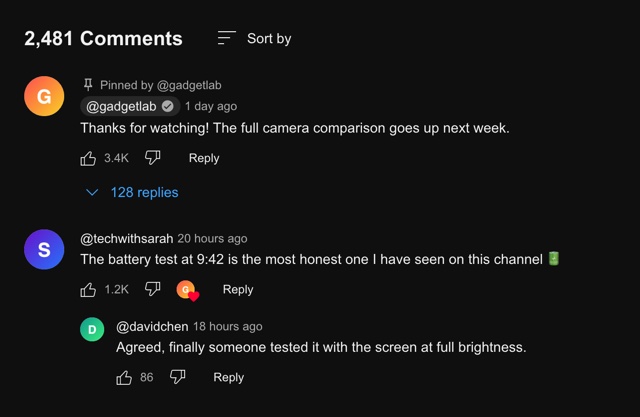
YouTube Comment Generator is a free tool for making a YouTube comment, or a whole comment section, as an image. It draws the comments the way they appear under a video on YouTube in a desktop browser — avatar, @handle, time, the comment, the thumbs up and down, Reply — and adds the details that only YouTube has: the "Pinned by" line, the grey pill around the channel owner's name and the small creator heart.
It is mostly used by people who make videos. A comment on screen is one of the most common things in a YouTube edit — reacting to a viewer, answering a question in the next video, or a "the comments on my last video were…" segment — and a clean image of it is easier to work with than a cropped screenshot. Turn on the transparent background and the comment drops straight onto your footage.
The Details That Make It Look Like YouTube
- @handles. Since YouTube introduced handles in 2022, comments show the @handle rather than the channel name, so every name here starts with @.
- Pinned comments. The channel owner can pin one comment to the top. It gets a pin icon and "Pinned by @yourchannel" above it — set the handle once under Appearance.
- The channel owner pill. When the creator comments on their own video, YouTube puts a grey pill behind their name so it stands out. Tick "Channel Owner" for that.
- The creator heart. A creator can heart a viewer's comment, which shows as their own avatar with a small red heart next to the like button. Upload a channel avatar so the heart carries the right face.
- No dislike count. YouTube stopped showing dislike counts publicly in 2021, so the dislike button has no number next to it, just like the real one.
- Replies. Replies sit indented under the comment with smaller avatars, and the blue "128 replies" button stands in for the ones you have not written out.
Writing Numbers and Times the YouTube Way
YouTube abbreviates like counts above a thousand to one decimal — 1.2K, 3.4K, 1.1M — and writes times in words: "2 hours ago", "1 day ago", "3 weeks ago", with "(edited)" after the time if the comment was changed. The comment count in the header, by contrast, is written in full with commas, as in "2,481 Comments". Copying those conventions is most of what makes a generated comment pass at a glance.
Comments Written by AI
"Write with AI" fills the section for you. Choose the mood of the audience (a mix, hyped viewers, questions about the video, critics, or the channel answering its viewers) and, if you like, describe the video in a sentence. You get five comments in YouTube's own voice, with handles, "2 days ago" style times and like counts, ready to pin, heart or edit.
How to use Online YouTube Comment Generator?
- Under Appearance, choose light or dark mode and set the comment count, or untick "Show Header" to leave it out. Add your channel handle and avatar if you want a pinned comment or a creator heart.
- To skip the typing, use "Write with AI": choose a mood, describe the video and let it write the comments.
- Edit the comments: handle, avatar, time, likes and the text. Tick "Verified", "Liked", "Channel Owner", "Hearted by Creator", "Pinned" or "Edited" as needed.
- Use "+ Add Reply" or tick "Reply to Above" to indent a comment under the one before it, and the arrows to change the order.
- Put a number in "Hidden Replies" to show the blue replies button under a comment.
- Tick "Transparent Background" if the comment is going over a video, then click "Export Comments" to download a PNG or copy it.
Frequently asked questions
Can I put the comment in my video?
Yes, that is what the transparent background is for. The export is a PNG, so with the background switched off only the comment itself is visible, and it can be placed over footage in Premiere Pro, DaVinci Resolve, Final Cut, CapCut or any other editor that accepts images.
Why is there no number next to the dislike button?
Because YouTube does not show one. Public dislike counts were removed in November 2021, and a comment with a dislike number would look wrong to anyone who uses YouTube today.
How do I make a pinned comment?
Tick "Pinned" on the first comment and set your channel handle under Appearance; the line above the comment then reads "Pinned by @" followed by your handle. On YouTube the pinned comment is usually the creator's own, so ticking "Channel Owner" as well makes it more convincing.
What size is the image?
The comment section is 640 pixels wide, close to the width of the comments column on youtube.com, and it is exported at twice that, 1280 pixels, so it stays sharp when scaled up in a 1080p or 4K edit. The height follows the number of comments.
Does it look like the YouTube app on a phone?
It follows the desktop website, which is the version most people recognise from screenshots and the one that reads best when shown inside a video. The phone app shows the same parts — handle, time, likes, heart, replies — in a narrower layout.
Is anything posted to YouTube?
No. There is no sign-in, nothing is sent to YouTube, and the avatars you upload stay in your browser. The tool only produces an image.
Can it write YouTube comments with AI?
It can. Pick a mood, add a short description of the video and press "Write"; five comments arrive in the list, with invented channel names. Mark one as pinned or hearted afterwards, or press "Write" again for another set.
Is the description I give the AI kept?
No. The mood and your short description go to OpenAI's model only to write the comments; 10015.io does not store them. The rest of the tool runs in your browser.
Usage Policy
Showing a made-up comment in a sketch, a meme or a mockup is fine. Putting words under a real person's handle and passing them off as something they actually wrote is not, and neither is using fake comments as evidence in a dispute or a news story. By using YouTube Comment Generator by 10015.io you agree to keep it to the first kind. 10015.io is not responsible for the images made with it.