Text Tools
 Image Tools
 PDF Tools
 Social Media Tools
 Security Tools
 Coding Tools
 CSS Tools
 Color Tools
 Miscellaneous Tools
 Add to Chrome
 Add to Firefox


Make Discord timestamps that show in everyone’s own time zone: type a time, copy any of the 9 formats in one click.
What is a Discord timestamp?
A Discord timestamp is a small code like <t:1797000000:F> that Discord turns into a date and time in each reader’s own time zone and language. Write “Raid starts <t:1797000000:t>” and a player in New York sees 9:40 AM while one in Berlin sees 15:40. No more “is that your time or mine?”. The Discord Timestamp Generator makes these codes for you: type a time in plain words, see every format exactly as Discord shows it, and copy the one you want with a click.
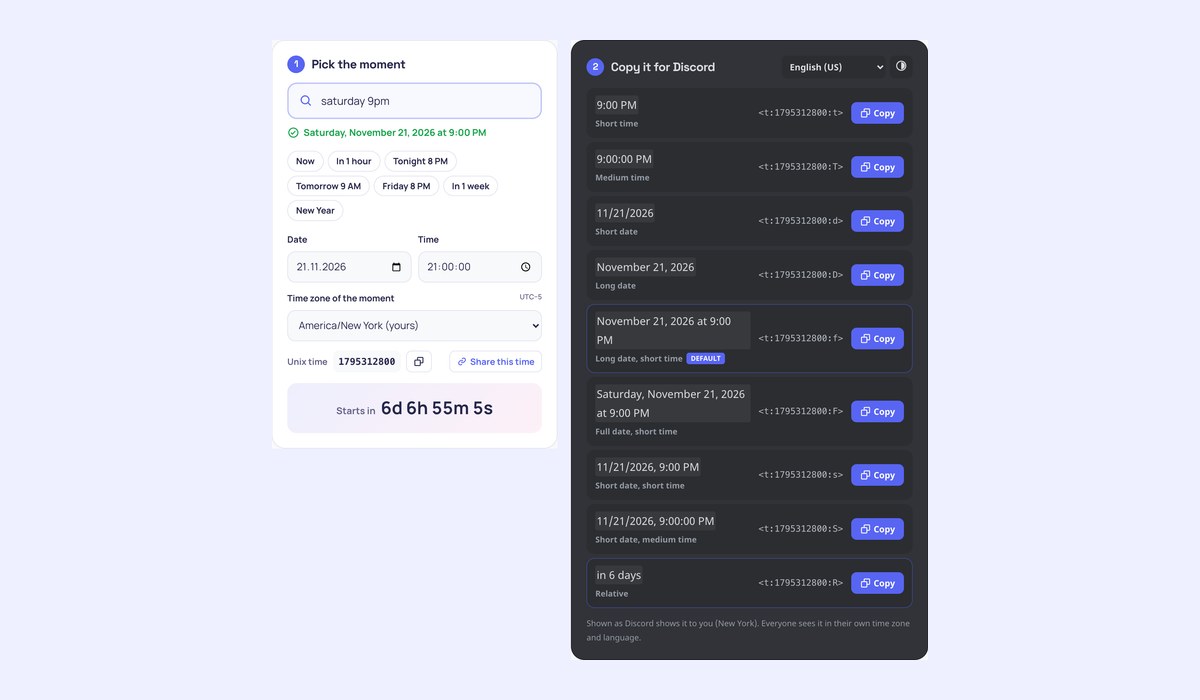
What makes it different
- Type the time in words: “tomorrow 8pm”, “next friday 19:30”, “in 2 hours”, “dec 24 6pm”, “new year’s eve”. Or use the date and time pickers.
- All 9 formats, including the newer short date and time styles
sandS, each shown as it looks in Discord, in dark or light theme. - One click to copy any code; the relative one updates live, like in Discord.
- Any time zone: set the moment in the event’s time zone (“8 PM New York time”) and Discord converts it for everyone else.
- How everyone sees it: the same moment in cities around the world, day or night, with the date change marked.
- Preview in other languages, from Spanish to Japanese, the way Discord writes dates for them.
- Write the whole message with as many timestamps as you like, see it as a Discord message and copy it in one go.
- Paste a timestamp or a Unix time to read it, and share a link to the moment.
Discord timestamp formats
Every code is <t:UNIX:STYLE>, where UNIX is the moment in seconds since 1970 (UTC) and STYLE one letter. The examples show 4:20:30 PM on April 20, 2021 for a reader in English (US):
tShort time: 4:20 PMTMedium time: 4:20:30 PMdShort date: 4/20/2021DLong date: April 20, 2021fLong date, short time (the default when no letter is given): April 20, 2021 at 4:20 PMFFull date, short time: Tuesday, April 20, 2021 at 4:20 PMsShort date, short time: 4/20/2021, 4:20 PMSShort date, medium time: 4/20/2021, 4:20:30 PMRRelative: in 2 hours, 3 days ago, updating on its own
How to use the Discord Timestamp Generator
- Type when it happens (“saturday 9pm”) or pick the date and time. Change the time zone if the event is set in another one.
- Click the format you want to copy its code.
FwithRnext to it is a favourite for events: “Saturday, November 21, 2026 at 9:00 PM (in 5 days)”. - Paste it into any Discord message, channel topic, event description or embed.
Frequently asked questions
How do I make a timestamp in Discord?
Write <t:, the Unix time in seconds, a colon and a style letter, then >: <t:1797000000:R>. Discord shows it as soon as the message is sent. This page works the Unix time out for you from the date you pick.
Does a Discord timestamp show in everyone’s time zone?
Yes, that is the point of it. The code holds one moment, and each person’s Discord app shows it in their device’s time zone and their language, on desktop, web and mobile.
Why is my timestamp off by some hours?
The time was probably set in the wrong time zone. If the event is at 8 PM in New York, choose America/New_York as the time zone of the moment before copying, and everyone else will see the right local time.
Can bots and webhooks use timestamps?
Yes. Message text and embed descriptions and fields render them the same way; embed titles, footers and author names do not. For a bot, build the code from the Unix time in seconds: `<t:${Math.floor(date / 1000)}:R>`.
What are the s and S formats?
Two newer styles: s is a short date with a short time (4/20/2021, 4:20 PM) and S adds seconds. Older generators list only seven formats; Discord’s reference now has nine.
Making Discord posts? Try the Discord Message Generator or see your year with Discord Wrapped.