Text Tools
 Image Tools
 PDF Tools
 Social Media Tools
 Security Tools
 Coding Tools
 CSS Tools
 Color Tools
 Miscellaneous Tools
 Add to Chrome
 Add to Firefox


Turns your Discord data package into story cards: messages, top servers and DMs, emoji, words and more.
A made-up year. Upload your Discord data to see yours.
Your data
Your data is read on this device and never uploaded.
Wrapped
What is Online Discord Wrapped?
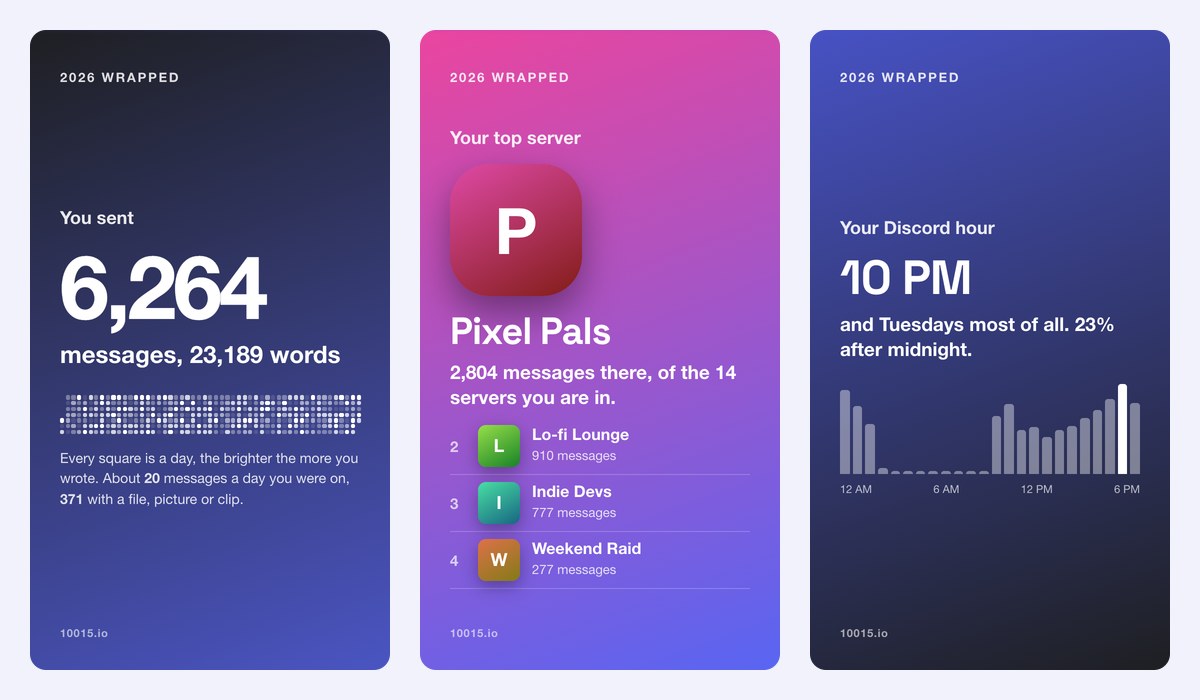
Discord Wrapped turns your Discord data into a year in review: how many messages you sent, your top servers and channels, the people you DM most, the hour and the month you were busiest, your favourite emoji and words, your longest streak, your very first message of the year and what kind of Discord user that makes you. Every result is a 9:16 story card to post.
It reads the data package Discord sends you when you request your data, in your browser: your messages are never uploaded, stored or seen by anyone else. Pick any year you were on Discord, or all time.
What Is in Your Wrapped
- Messages: how many you sent, how many words, and how many came with a file or picture.
- Top servers and channels: where you talked most, out of all the servers you are in.
- Top DMs: the people you messaged most, and how much of your Discord was in DMs.
- Time: your Discord hour, your day of the week, your busiest month and biggest day.
- Emoji and words: the ones you used most, custom server emoji included.
- Streak and type: the most days in a row you sent a message, and whether you are a Night Owl, a DM Devotee or a Server Hopper.
- First message: what you wrote first that year, and where.
How to use Online Discord Wrapped?
- Request your data in Discord under User Settings › Data & Privacy, with Messages ticked: the “How do I download my Discord data?” button shows every step.
- When Discord emails the link, download the package.zip and drop it on the page.
- Pick the year, or all time.
- Go through the cards, then download one, download all of them as a ZIP, or copy one to paste in a story.
Frequently asked questions
Are my messages uploaded anywhere?
No. The package is opened and counted in your browser, and the cards are drawn there too. None of your messages are sent to our servers or anywhere else.
How long does Discord take to send my data?
Usually a few days, and at most 30. The link in Discord’s email works for 30 days. Ticking only Messages, Account and Servers keeps the package small; Activity makes it much bigger and is not needed here.
Why are only my own messages counted?
Discord’s data package holds the messages you sent, not other people’s, and leaves out messages you deleted. So the numbers are about you: what you wrote, where and when. Times are shown in your device’s time zone.
How is it different from Discord Checkpoint?
Checkpoint is Discord’s own recap in the app, shown for a few weeks at the end of the year and not to everyone. This one works any day, for any year since you joined or all time, and goes further: your channels, words, busiest month, streak and first message.
Is it made by Discord?
No. It is an independent tool that reads Discord’s standard data package; it is not made by, or connected to, Discord Inc. See your Spotify Wrapped and YouTube Wrapped too, or make a fake chat with the Discord Message Generator.