Text Tools
 Image Tools
 PDF Tools
 Social Media Tools
 Security Tools
 Coding Tools
 CSS Tools
 Color Tools
 Miscellaneous Tools
 Add to Chrome
 Add to Firefox


Turns a public Steam profile into story cards: hours, top games, genres, backlog and library value.
Example library. Load your profile to see yours.












Your Steam, all time
3,716 hours
Across 47 games, since 2014. Here is your library, in numbers.



















Your Steam profile
Only public profile data is read, straight from Steam. Nothing is stored.
What is Online Steam Wrapped?
Steam Wrapped turns your Steam library into your life on Steam, in numbers: how many hours you played and how many days that is, your most played game and your top five, what you played in the last two weeks, the kinds of games your hours went to, your backlog, the era and the studio you play most, your taste in Steam reviews, what your library is worth and what kind of gamer that makes you. Every result is a 9:16 story card to post.
Paste your profile link and it is ready in seconds. No Steam login, no password and no download: it reads the same public data anyone can see on your profile.
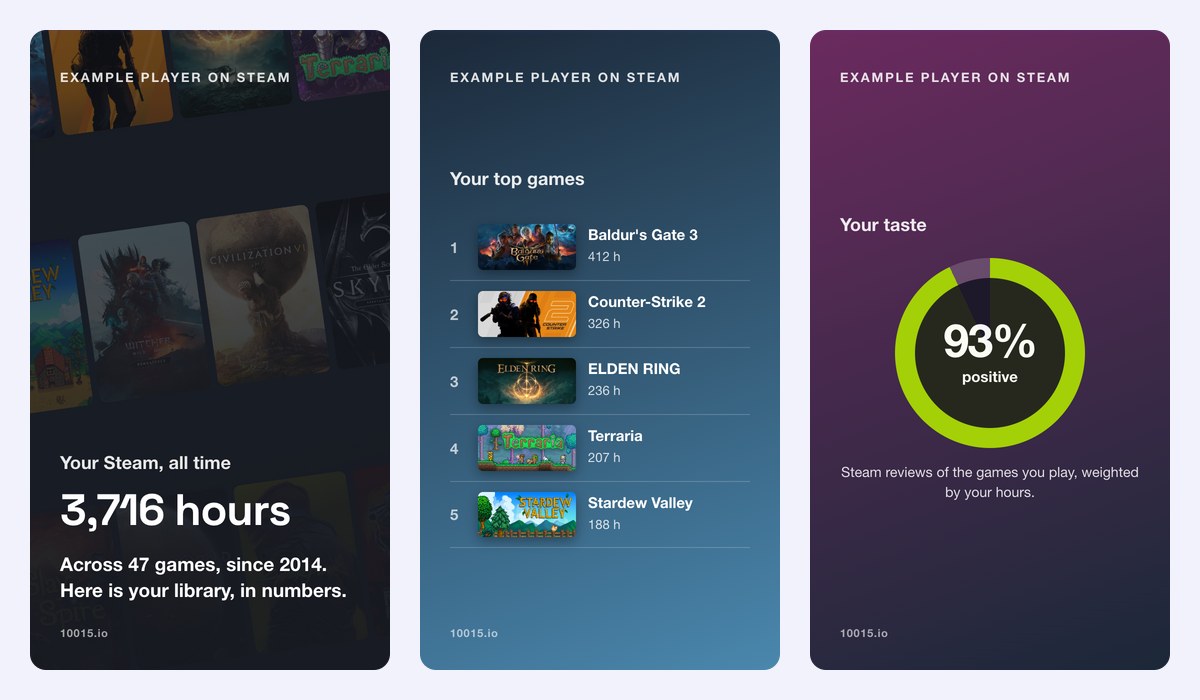
What Is in Your Steam Wrapped
- Hours: your total playtime, in hours and whole days, and how many of your games you played.
- Top games: your most played game with its share of your time, and your top five.
- Last two weeks: what you are playing right now.
- Genres: the Steam tags your hours went to, such as Roguelike, Open World or FPS.
- Backlog: the games you never launched, and what they cost.
- Era and studio: the decade your games come from and the developer you play most.
- Taste: how well reviewed your games are, and your hidden gem.
- Value: what your library is worth at today’s prices, and your best buy per hour.
- Gamer type: The Devotee, The Collector, The Retro Gamer, The Grinder and more.
How to use Online Steam Wrapped?
- Open your Steam profile and copy its link, or your custom URL name or SteamID.
- Paste it into the profile field and click Load.
- Pick the store whose prices you want for the value cards.
- Go through the cards, then download one, download all of them as a ZIP, or copy one to paste in a story.
Frequently asked questions
Is this Steam Replay?
No. Steam Replay is Valve’s own year in review, and it only comes out in December. Steam does not share playtime by date with other sites, so Steam Wrapped shows your whole time on Steam, all time, and it works any day of the year. The last two weeks card is the one part that is recent.
Why does it say my profile is private?
Steam only shares a library when the profile and its game details are public. In Steam, open your profile, click Edit Profile › Privacy Settings, set “My profile” and “Game details” to Public, and leave “Always keep my total playtime private” unticked. You can make it private again once your cards are saved.
Do you need my Steam password?
No, never. The tool uses Steam’s official Web API with the public profile link, the same data anyone can see on your profile page. Nothing is stored on our servers.
How is the library value worked out?
Each game is counted at its own full price in the Steam store you pick, not at what you paid, and bundles, free games and games no longer on sale are left out. For a closer look at every game, use the Steam Account Value Calculator, and when you cannot decide what to play next, let the Steam Random Game Picker choose.
Is it made by Valve?
No. It is an independent tool built on Steam’s public Web API; it is not made by, or connected to, Valve. See your Spotify Wrapped and Discord Wrapped too.