Text Tools
 Image Tools
 PDF Tools
 Social Media Tools
 Security Tools
 Coding Tools
 CSS Tools
 Color Tools
 Miscellaneous Tools
 Add to Chrome
 Add to Firefox


A 9:16 story frame with the real chrome — progress bar, header and all — exported as an image.
Start From a Template
Story Content
Story Views
What is Online Instagram Story Generator?
Instagram Story Generator is a free online tool for generating Instagram stories for having fun with people around you by making them think the story is real. Instagram Stories is probably one of the most used features on the platform right now. People post stories all the time — what they eat, where they go, random thoughts. Stories show up at the top of your feed and disappear after 24 hours, which makes them feel more casual than regular posts. This tool can be defined as fake Instagram story maker or fake Instagram story creator which can be used for fun purposes only.
A Free Instagram Story Maker That Runs in Your Browser
Most story makers are phone apps that want an account, a subscription or at least your patience with a watermark across the middle of the picture. This one is a web page: you fill in the fields, the story updates as you type, and the download is a clean JPG with nothing stamped on it. Nothing is uploaded either — your photos are drawn into the story right in the browser, so the Instagram story creator works the same on a laptop as on a phone, and you can make as many stories as you like for free.
Instagram launched Stories back in 2016 (yes, they basically copied Snapchat, everyone knows that) and it blew up really fast. Today almost everyone uses stories more than they post on their actual feed. You can put text on them, add location stickers, music, polls and all sorts of stuff.
If you want to have fun with your friends by sending them real-looking fake Instagram stories to making jokes to them, Instagram Story Generator is the best alternative for you. But you have to keep in mind that Fake Instagram Story generator has a usage policy and you have to follow the rules if you want to use it.
There are lots of different options available in Instagram stories. Most of the major ones are included in the tool. You can set a profile picture, username, verified badge, the green Close Friends label, story text with different styles (Classic, Modern, Neon, Typewriter, Strong — just like the real app) in any colour, @mention stickers, background gradients, location tags, and the story progress bar at the top. You can also pick between full image and square image layout for the story image.
Instagram stories use a 9:16 aspect ratio which is basically full-screen vertical on phones. The tool generates stories in this ratio so when you share the image, it looks exactly like a screenshot taken from a real phone.

One nice thing about this tool is the language support. Everything Instagram writes on a story follows the language your app is set to — the "Send message" box, the green Close Friends label, and on your own story the Activity, Highlight, Mention, Send and More buttons and the Viewers list. This tool translates all of them into over 25 languages so you can pick the right one to match whoever you are trying to prank. Small details like this make the generated story look way more convincing.
Tag Someone With a Mention Sticker
A story that tags somebody is half the joke — the "hard launch" of a new partner, a birthday shout-out, a friend dragged into an embarrassing photo. Type up to four handles in the Mention Stickers field and each one becomes its own sticker with the handle in bold capitals: white with the orange-to-purple gradient name Instagram uses by default, the gradient as the background, a dark translucent label for busy photos, or no sticker at all — just the handle as typed, in the same font, colour and style as your story text. The stickers sit with the story text or on their own at the top, middle or bottom of the frame. An @handle you type into the story text itself is underlined, the way Instagram marks a tagged account inside a caption.

Start From a Template
Not sure what to write? The templates above the form fill in a believable story in one click: a hard launch, a birthday shout-out, a celebrity posting from the airport for an AU (alternate universe fan fiction), your own story with the viewers list open, a neon concert story and a quiet late-night thought. Each one sets the username, text, style, stickers and chrome, and keeps the photos you already added, so you can pick one, swap in your picture and change the names.
Show Who Viewed the Story
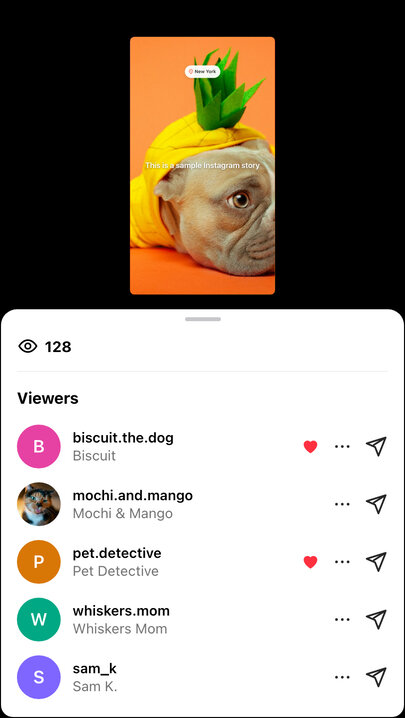
A story looks different to the person who posted it, and those screenshots are often the funny ones — "look who watched my story". The bottom of the story can show three things: the "Send message" box everyone else sees; your own story, with the faces of the latest viewers and "Activity" in the corner and the Highlight, Mention, Send and More buttons; or the viewers list swiped open, with the story shrunk at the top, the eye icon and view count, and every viewer with their name, photo and a red heart if they liked it.
How to Use Instagram Story Generator?
You can generate Instagram story images by following these steps.
- Pick a template to start from, or skip this and fill in everything yourself.
- Upload a profile picture for the avatar. This is optional — if you skip it, a default grey avatar will be shown just like Instagram does.
- Upload a story image if you want one. You can choose between full image (covers the whole story) or square (shows the image centered with the gradient background visible behind it). If you don't upload an image, the gradient background you pick will fill the entire story.
- Fill in the username, set the verified badge or mark it as a Close Friends story if needed, pick the time ago text (like "2h" or "5m"), and optionally add a location tag.
- Write your story text and pick a text style. You have 5 options: Classic (plain white), Modern (a dark label behind each line), Neon (glowing outline), Typewriter (serif font), and Strong (bold on a solid label that hugs every line, like the app). Pick a text colour too: it colours the letters, the neon glow, or for Strong the label behind the text, which turns black or white to stay readable. You can also set the text position, alignment, and size.
- Type the handles you want to tag in Mention Stickers, then choose their style and where they sit.
- When everything looks good in the preview, hit "Export Story" to download it as an image or copy it to your clipboard.
Frequently asked questions
What size is the output?
The 9:16 portrait shape stories actually use, so what you download looks right on a phone instead of letterboxed.
Can I mention someone in the story?
Yes. Write the handles in Mention Stickers, with or without the @ and separated by spaces or commas. Up to four stickers fit on one story; long handles are cut off with an ellipsis the way a narrow sticker would be. Instagram writes a mention sticker in capitals, so that is how the sticker styles show it; for "@someone" in lower case, pick "In the text style, as typed" or simply type the handle into the story text.
Can I make a Close Friends story?
Yes. Tick "Close Friends story" and the green star label Instagram shows only to people on your list appears next to the name and time — the detail that makes a "you're on my close friends" screenshot believable.
Is it good for AU stories?
It is a common use: fan fiction told through social media screenshots needs stories from characters who do not exist. Give the character a username, a verified badge if they are famous, a location and a few mentions of the other characters, and export one story per chapter beat. The "AU: celebrity at the airport" template is a ready starting point.
Can I fake the story viewers list?
Yes. Set the bottom of the story to "Your story, viewers list open", type the total view count, and add the viewers one by one with a username, a name, an optional photo and whether they liked the story. The same viewers appear as the small faces in the corner when you choose "Your story (Activity)".
What can I change?
The background image, the profile picture and username, the overlaid text and the story chrome — the progress bar and header that make it read as a real screenshot.
Can I use it for client work?
Yes. Previewing a campaign in the story format, or filling a deck with plausible mockups, is quicker here than rebuilding the interface in a design tool.
Is it legal?
A mock-up is. Presenting one as a genuine screenshot of somebody else is where it stops being a joke — that can be defamation, and it is on whoever shares it, not the tool.
Does it touch my Instagram account?
No. There is no account to connect; the tool produces an image and nothing more.
What about feed posts?
The Instagram Post Generator does the square format, and the Instagram Filters will style the background photo first.
Usage Policy
10015.io is not responsible for the generated images by users. By using Instagram Story Generator by 10015.io, you agree to use our tool lawfully and ethically, and in accordance with these rules:
- You do not use generated Instagram story images to create content that has ill intent including but not limited to harass, attack, incite violence, slander, threaten, disparage, intimidate, or otherwise hurt other people or entities.
- You do not use generated Instagram story images to spread false information that will affect human life in a negative way.
- You do not present created Instagram stories as fact. As described, main intent is having good time by making fun of people, not just misleading them.
- You make it obvious to any viewers that Instagram stories that are generated by Instagram story maker are not original/genuine.