Text Tools
 Image Tools
 PDF Tools
 Social Media Tools
 Security Tools
 Coding Tools
 CSS Tools
 Color Tools
 Miscellaneous Tools
 Add to Chrome
 Add to Firefox

Builds a Facebook Messenger conversation with reactions, read receipts and chat colours, and downloads it as a PNG.
Chat
Messages
What is Online Messenger Chat Generator?
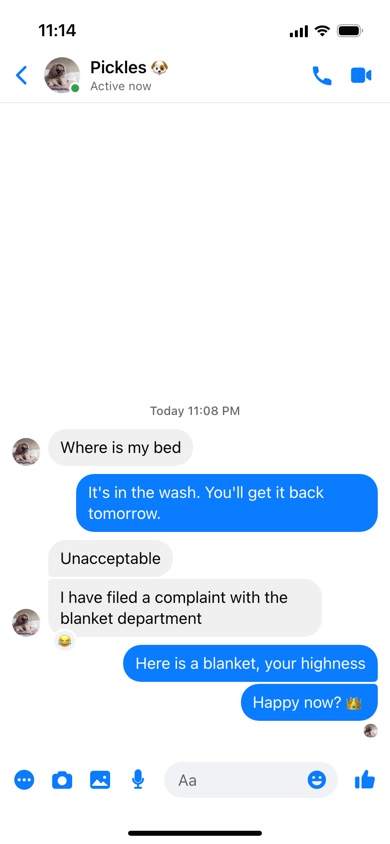
Messenger Chat Generator is a free tool for making a Facebook Messenger conversation as an image. It draws the chat screen of the Messenger app on an iPhone: the contact's photo with the green dot and "Active now", the call and video buttons, the conversation in rounded bubbles, emoji reactions on the messages, the tiny read receipt under your last message, and the row of buttons around the "Aa" box at the bottom.
The Small Things Messenger Shows
- Read receipts. Messenger marks your last message with an empty circle when it is sent, a filled circle when it is delivered, and the other person's tiny profile picture once they have seen it. Pick any of the three, or none.
- Active status. The green dot on the contact's photo and the line under their name — "Active now", "Active 12m ago" — or nothing at all.
- Reactions. A small emoji in the corner of a bubble, the way Messenger shows a reaction someone tapped on a message.
- Grouped bubbles. Messages sent in a row stack together with tight corners between them, and the contact's picture appears once, beside the last one.
- Chat colours. Messenger lets each conversation have its own colour or gradient. Your bubbles and the buttons follow it: blue, purple, a purple-to-coral gradient, green or pink.
What It Is Good For
Funny conversations are the obvious use — the screenshot that does the rounds in the group chat. It is also handy for anything that needs a realistic chat without real people in it: a storyboard for a video, a scene in a comic or a short story, a slide about online scams, or a mockup of how a business's customer conversations should sound.
How to use Online Messenger Chat Generator?
- Set up the chat: the contact's name and photo, their activity line and green dot, the read receipt, the chat colour and light or dark mode.
- Type each message and say who sent it — you, or the person you are chatting with.
- Give a message a timestamp such as "Today 7:42 PM" to start a new block of the chat, and put an emoji in its Reaction field if someone reacted to it.
- Use the arrows to reorder messages and "+ Add Message" for more.
- Press "Export Screenshot": save the chat as a PNG, or copy it and paste it wherever it needs to go.
Frequently asked questions
What do the little circles under messages mean?
They are Messenger's delivery status. An outlined circle with a tick means the message was sent, a filled one means it was delivered to the other person's phone, and their profile picture means they have read it. Choose one under Read Receipt and it appears beneath your most recent message.
How do I add a reaction to a message?
Type or paste an emoji into the "Reaction" field of that message. It appears in a small bubble on the corner of the message, on the right for yours and on the left for theirs.
Is there a dark mode?
Yes. Dark mode turns the background black and the received bubbles dark grey, as in the app, and every chat colour works with it.
What size is the screenshot?
780 × 1688 pixels, the shape of an iPhone screen. Like the real app, the chat fills from the bottom up, so in a long conversation the earliest messages scroll out of view above the header.
Does it connect to my Facebook account?
No. Nothing is sent and there is no login; the contact photo is only ever read by your own browser. For other apps there are the WhatsApp, iMessage and Android text message generators.
Usage Policy
Messenger conversations get screenshotted and forwarded as evidence in fallings-out, breakups and workplace rows, which is why a forged one is never harmless. By using Messenger Chat Generator by 10015.io you agree not to fake a chat with or from a real person, not to pass one off as a real conversation, and not to use one to scam, threaten or embarrass anybody. Mockups, stories and jokes everyone is in on are what it is for, and 10015.io takes no responsibility for what users create.