Text Tools
 Image Tools
 PDF Tools
 Social Media Tools
 Security Tools
 Coding Tools
 CSS Tools
 Color Tools
 Miscellaneous Tools
 Add to Chrome
 Add to Firefox

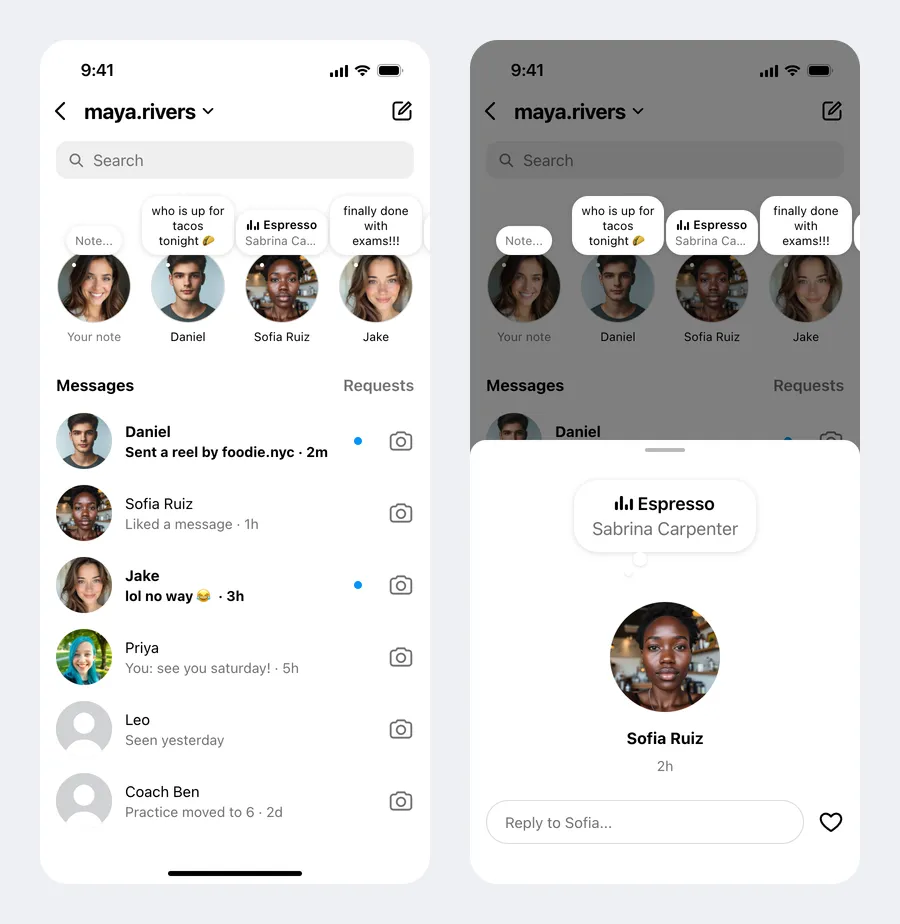
Draws the Instagram Notes tray above the DM inbox, or an opened note, as a JPG of an iPhone screen.
Screen
Notes
One per line as name: note. Start the note with ♫ for a song: ♫ Song - Artist. Pictures follow the same order.
Your Inbox
One per line as name: last message. Start a line with * to make it unread. Pictures follow the same order; people with a note reuse theirs.
What is Online Instagram Notes Generator?
Instagram Notes Generator is a free tool for making Instagram Notes as an image. Notes are the short thoughts — sixty characters at most — that float in little bubbles over people's profile pictures at the top of the Instagram inbox, and disappear after a day. The generator draws that screen as it looks on an iPhone: your username, the search bar, the row of notes starting with your own, and the chat list underneath. It can also draw a note opened on its own, with the reply field and the heart.
Text Notes and Music Notes
Write each note on its own line as name: note, for example "Daniel: who is up for tacos tonight 🌮". A note can also be a song: start it with ♫ and write the title and the artist separated by a dash — "Sofia: ♫ Espresso - Sabrina Carpenter" — and it is drawn the way Instagram shows a music note, with the small moving bars, the song in bold and the artist underneath. A line with only a name puts that person in the row without a bubble.
The Rest of the Inbox
- Your note. The first picture is always yours, labelled "Your note". Leave it empty and its bubble says "Note..." in grey, as it does when you have not shared anything.
- Chats. Below the notes come your conversations — "name: last message" per line. Start a line with * to make it unread: bold, with the blue dot.
- Pictures. Upload the profile pictures in the same order as the notes; anyone who also appears in the chat list keeps the same picture there.
- Light or dark. Both themes are drawn, with the colours of the Instagram app.
An Opened Note
Tapping a note in the app opens it on a sheet over the dimmed inbox: a larger bubble, the picture, the name and how long ago it was posted, and a "Reply to…" field next to a heart. Choose which note to open, set the time, and turn on "Liked" to fill the heart in red.
How to use Online Instagram Notes Generator?
- Write the notes, one per line as "name: note", and start a line's note with ♫ for a song.
- Upload the profile pictures in the same order.
- Set your username, your own note and picture, and the chats in the list below.
- Choose the inbox or an opened note, and the light or dark theme.
- Click "Export Screenshot" to download a JPG or copy it to the clipboard.
Frequently asked questions
How long can an Instagram note be?
Sixty characters, emoji included, and the generator keeps your own note to the same limit. In the row the bubble shows up to three short lines, as the app does; the opened note shows all of it.
How long does a note stay up?
Twenty-four hours, so the time on an opened note is written in minutes or hours, such as "2h".
What size is the image?
780 × 1688 pixels, the proportions of an iPhone screen, ready to post as a story or to use in a video.
Can I make the conversation as well?
Yes, with the Instagram DM Generator, which draws the chat itself with messages, photos and reactions. For a story use the Instagram Story Generator, and for WhatsApp's version of a short-lived update the WhatsApp Status Generator.
Does it post a note to Instagram?
No. It only makes a picture in your browser. There is no login, nothing is uploaded and nothing is posted to Instagram.
Usage Policy
Instagram is a trademark of Meta Platforms, Inc.; this tool is not affiliated with or endorsed by it. Notes vanish after a day, so screenshots of them are easily passed around as proof of what someone "said". By using Instagram Notes Generator by 10015.io you agree not to make notes that appear to come from a real person in order to embarrass, accuse or mislead, and not to present a generated screenshot as genuine. Mockups, memes, videos and design work are what it is for. 10015.io is not responsible for the images made with it.