Text Tools
 Image Tools
 PDF Tools
 Social Media Tools
 Security Tools
 Coding Tools
 CSS Tools
 Color Tools
 Miscellaneous Tools
 Add to Chrome
 Add to Firefox

Builds a full-screen TikTok For You screenshot with the video, caption, sound and counts you choose, for mockups and jokes.
Post Content
Engagement
App Screen
What is Online TikTok Post Generator?
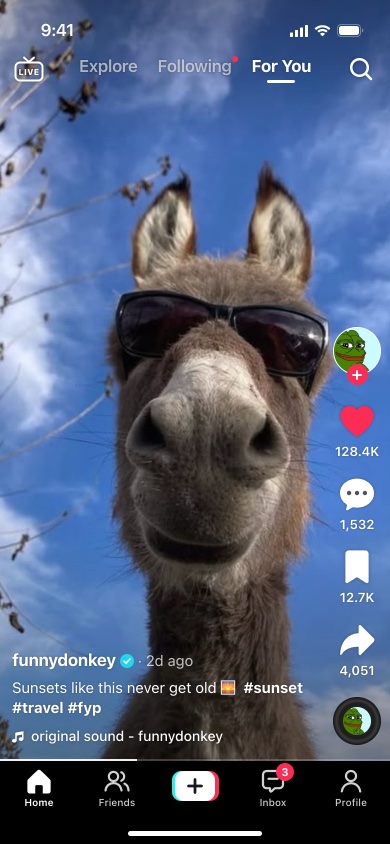
TikTok Post Generator is a free online tool that makes a TikTok post screenshot without TikTok. It draws the whole phone screen the way the iPhone app shows a video on the For You feed — the status bar, the tabs along the top, the like, comment, bookmark and share buttons down the right, the creator name, caption and sound at the bottom, and the navigation bar underneath — and puts your photo behind it.
Every piece of text and every number on that screen is yours to set, and the preview changes as you type. What you download is an image of exactly what the preview shows, with no watermark on it.
What Is on the Screen
- The video — any photo or a frame from your video, filling the screen or fitted inside it with black bars. Without one, a colour background stands in.
- The creator — profile picture, username, the blue verified badge, and the red follow button, which disappears once the account is followed, the same as in the app.
- The caption — hashtags and @mentions are set in bold automatically, and long captions are cut off after two lines the way the feed shows them. Turn that off to show the caption in full.
- The sound — "original sound - username" by default, or the name of any song, with the profile picture on the spinning disc in the corner.
- The counts — likes, comments, bookmarks and shares, plus a red heart if the post is liked and a yellow bookmark if it is saved.
- The app around it — the clock, the top tabs (with or without Explore and Shop), Friends, Shop or Discover in the bottom bar, the inbox badge and the video progress line.
Making It Look Real
Most fake TikToks give themselves away with the photo or the numbers rather than the interface. A few things make the difference:
- Use a tall photo. The screen is 9:19.5, taller than most photos. A landscape picture gets cropped hard at the sides, so a portrait shot or a frame from a vertical video works best.
- Keep the subject in the middle. The status bar and tabs cover roughly the top 90 points of the screen, the buttons take the right-hand 80, and the name, caption and sound sit over roughly the bottom 140. Anything important under those will be hidden, exactly as it would be in the app.
- Write counts the way TikTok does. Large numbers are shortened with one decimal, as in 128.4K or 2.1M. A post with 2.1M likes and 12 comments looks wrong, so keep the four counts in proportion to each other.
- Match the details. A post date like "2d ago" or "3-14", a caption with two or three hashtags, and a time on the clock that fits the story you are telling.
Who Uses It
Social media managers and designers use it to show a client what a video will look like on the feed before it is filmed or posted, and to check that the caption and the edges of the frame survive the buttons drawn over them. It also fills pitch decks, presentations and app mockups with a TikTok screen that does not have to be drawn by hand. And plenty of people use it for what it looks like it is for: a joke in the group chat.
How to use Online TikTok Post Generator?
- Upload the video image — a photo or a frame from your video. Choose "Fill Screen" to crop it to the phone, or "Fit" to keep it whole with black bars.
- Upload a profile picture and type the username. Tick "Verified" for the badge and "Following" to hide the follow button.
- Write the caption and, if you like, the post date and the sound name.
- Fill in the likes, comments, bookmarks and shares, and tick "Liked" or "Bookmarked" for the coloured icons.
- Adjust the app screen if you want to: the top tabs, the second tab in the bottom bar, the clock, the inbox badge and the progress line.
- Click "Export Post" and choose "Download Image" for a JPG, or "Copy Image" to paste it straight into a chat.
Frequently asked questions
Is there a watermark on the image?
No. The downloaded image is exactly the preview, with nothing added to it.
What size is the downloaded image?
780 × 1688 pixels. The screen is drawn at the size of an iPhone 14 and exported at twice that, so it has the same shape as an iPhone screenshot. A screenshot taken on the phone itself is sharper still, 1170 × 2532, so the generated one is not pixel for pixel identical, but it is well beyond what a chat app or a slide will show.
Can I use a video instead of a photo?
Not directly. A screenshot is a still image, so the tool takes one too. Pause your video on the frame you want, screenshot it or export that frame, and upload it as the video image.
Does it look like TikTok on Android?
It draws the iPhone version of the app, with the iOS status bar and home indicator. The TikTok screen itself is laid out almost the same on Android, but the status bar at the very top is different.
Is there a light mode?
No, and that is on purpose. TikTok's light theme changes its menus and settings, but videos on the For You feed are always shown on black, so a light version would be the one thing that gives the screenshot away.
Does it post anything to TikTok or need my account?
No. There is no login and nothing is published anywhere. The tool only produces an image file.
Are my photos uploaded?
No. The screenshot is put together in your browser, so the photo and the profile picture you add never leave your device.
Can I make fake posts for other apps?
Yes. The Instagram Post Generator and Instagram Story Generator do the same for Instagram, and the Tweet Generator for X. For a fake conversation rather than a post, there are the Instagram DM, WhatsApp and iMessage generators.
Usage Policy
A fake TikTok is fine as a mockup or a joke that everyone is in on. It stops being fine when someone is meant to believe it. By using TikTok Post Generator by 10015.io you agree not to use it to:
- put words in a real creator's or brand's mouth, or make it look as if they endorsed something they did not;
- harass, threaten, mock or defame a real person;
- spread false information, or pass a generated post off as genuine evidence of anything.
10015.io is not responsible for the images people make with the tool. Depending on what it says, a fake post presented as real can amount to defamation or fraud, and that responsibility lies with whoever made and shared it.