Text Tools
 Image Tools
 PDF Tools
 Social Media Tools
 Security Tools
 Coding Tools
 CSS Tools
 Color Tools
 Miscellaneous Tools
 Add to Chrome
 Add to Firefox


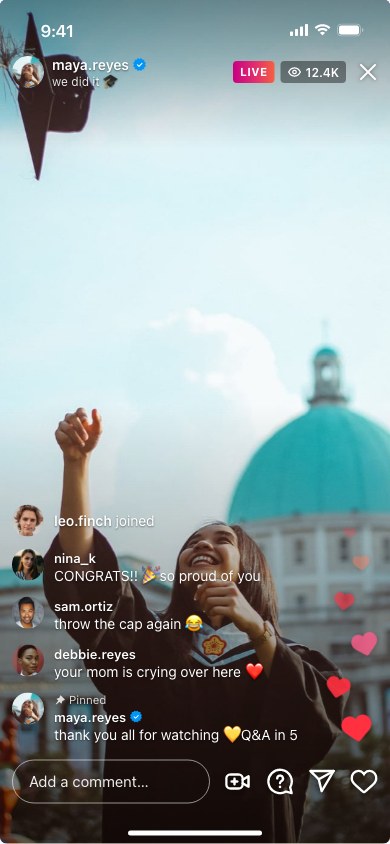
Puts any photo inside the Instagram Live screen, with the host, viewer count, comments, hearts and an optional guest, and exports it as an image.

 maya.reyeswe did it 🎓
 leo.finch joined
 nina_kCONGRATS!! 🎉 so proud of you
 sam.ortizthrow the cap again 😂
 debbie.reyesyour mom is crying over here ❤️Pinnedmaya.reyesthank you all for watching 💛 Q&A in 5
The photos are samples. Remove one to upload your own; everything is made in your browser and nothing is uploaded.
The last line sits just above the comment box. When there are more than fit, the oldest leave at the top, as on a live video.
What is Online Instagram Live Generator?
Instagram Live Generator is a free template for the Instagram Live screen. Upload a photo for the stream and the tool frames it with what makes a live video recognisable: the host's photo and username in the top corner, the pink LIVE badge with the number of people watching, comments rising from the bottom left, hearts floating up the right edge, and the comment box with its row of buttons. It opens with a finished sample, so you can see the result first and then replace it piece by piece.
Creators use it for "going live tonight" announcements and thumbnails, social media managers to show a client what a live session will look like before it happens, and teachers and writers who need a clean, anonymous live screen for a guide or a slide. It is also a popular base for skits and memes about suddenly having thousands of viewers.
Comments, "joined" lines and a pinned comment
The chat is built line by line, and each line is one of three kinds. A comment shows the viewer's photo, their username in bold and the message under it. A joined line is the notice that appears when someone starts watching. A pinned comment carries the small "Pinned" label Instagram puts above a comment the host has fixed in place. Every line can have its own photo; without one, the viewer gets a coloured initial. Lines can be reordered with the arrows, and a removed line can be brought back with Undo.
Live with a guest
Choose Live with a guest and the screen splits in two, the way it does when a host brings someone into their live video: the host on the top half, the guest on the bottom half, and both names with both profile photos in the corner. Each half takes its own image.
Viewer or host
The same live video looks a little different from each side. Viewer is what someone watching sees, with the heart button and the request to join. Host is the broadcaster's own screen, with the buttons for adding a guest and turning the camera around.
How to use Online Instagram Live Generator?
- Remove the sample stream image and upload your own, or keep a coloured background.
- Set the number of viewers and choose between one person and a live with a guest.
- Enter the host username, profile photo, an optional title and the verified badge.
- Write the comments, add "joined" lines, and pin one if you like.
- Optionally add a viewer question, and pick the viewer or the host screen and the language.
- Export the screenshot as a PNG or copy it to the clipboard.
Frequently asked questions
What photo works best for the stream?
A vertical photo of a person facing the camera, like a selfie or a frame from a video, looks most like a real live. Keep the face in the upper half, because the comments and buttons cover the bottom of the screen. A landscape photo can be fitted with black bars instead of being cropped.
Can I show a huge audience, or an empty one?
Yes. The viewer count is free text, so "3" and "1.2M" both work, and leaving it empty hides it. For a quiet stream remove the comment lines and turn the hearts off; for a busy one stack the comments up.
What is the question card for?
Viewers can send questions during a live video, and the host can put one on screen while answering it. Type a question and the name of who asked it under Question, and the card appears above the comments. Leave it empty to hide it.
Can I make it in another language?
Yes. Choose the language under App Screen and the words Instagram writes itself change to it: the LIVE badge, "joined", "Pinned" and the comment box. There are English, Spanish, German, French, Portuguese, Turkish, Indonesian, Dutch, Russian, Polish, Vietnamese and Italian. What you type yourself, like comments and usernames, stays as you wrote it.
What size is the screenshot?
It is an iPhone screen of 390 × 844 points exported at 3×, so the PNG is 1170 × 2532 pixels, the full resolution of an iPhone screenshot and the right shape for stories and Reels.
Are my photos uploaded anywhere?
No. The screen is drawn and exported in your browser, and the photos never leave your device. Your work is also kept in this browser, so it is still there after a reload; Start over brings back the sample.
Usage Policy
By using Instagram Live Generator by 10015.io you agree not to fake a real person's or brand's live video, not to show invented viewer numbers to brands or agencies as proof of popularity, and not to use the images in giveaway scams or fake fundraisers. Announcements, mockups, tutorials and comedy are fine. The tool is not made by or connected to Instagram or Meta, and 10015.io is not responsible for the images created with it.