
 Text Tools
 Image Tools
 PDF Tools
 Social Media Tools
 Security Tools
 Coding Tools
 CSS Tools
 Color Tools
 Miscellaneous Tools
 Add to Chrome
 Add to Firefox

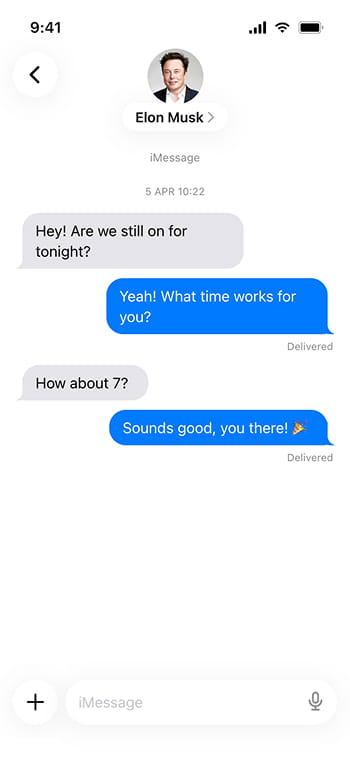
Blue bubbles for iMessage and green for SMS — getting that backwards is what gives a fake mockup away.

Settings
Messages
What is Online iMessage Chat Generator?
We have all seen those iMessage screenshots floating around the internet. Someone shares a hilarious conversation, everyone laughs, and half the time you are left wondering if the exchange actually happened. Well, now you can be the one creating those screenshots. This free iMessage chat generator lets you build a realistic-looking Apple Messages conversation right in your browser, no iPhone required.
Apple Messages, also known as iMessage, has been the default messaging app on every iPhone, iPad, and Mac since 2011. If you own an Apple device, you have used it. And because literally everyone with an iPhone recognizes the interface — the blue bubbles, the gray bubbles, the little bubble tails — a well-made fake screenshot is basically indistinguishable from a real one.
One of the most recognizable things about iMessage is the bubble color system. Blue bubbles mean the message was sent via iMessage (Apple to Apple, over the internet), while green bubbles mean it went as a regular SMS or MMS (usually when the other person has an Android). This distinction has become such a cultural phenomenon that "green bubble shame" is an actual thing people talk about. Our tool supports both colors, so you can pick whichever fits your prank better.
It copies the iOS Messages app closely enough to pass at a glance: the curling tail on the last bubble of each run, "Delivered" under your latest text, date stamps where the conversation picks up again, the round contact photo with the name beneath it, and the text field at the bottom. Dark mode is there for a night-time look, and every change appears in the preview immediately.
Blue vs Green Bubbles
If both people in the conversation are using Apple devices and have an internet connection, messages go through iMessage and show up as blue bubbles. The chat type label says "iMessage" and the input field placeholder also reads "iMessage".
If one person is on Android, or if there is no internet connection, messages fall back to SMS and show up as green bubbles. The label switches to "Message · SMS" and the whole vibe changes. In our tool, you can toggle between the two with a single dropdown.
How to use Online iMessage Chat Generator?
Building a fake iMessage conversation takes about a minute:
- Choose your theme (light or dark) and bubble color (blue for iMessage, green for SMS). The labels and input placeholder will automatically adjust.
- Fill in the contact's name and, if you like, their photo; they appear in the centre of the header as on an iPhone. For a group, enter the group's name and its members instead.
- Build the thread with "Add Message": choose who sends each text, type it, and add a date line such as "Today 9:41 PM" wherever the conversation resumes.
- Read it through in the phone preview and adjust the wording, the order or the bubble colour until it feels like a real thread.
- Use "Export iMessage Chat" to save a JPG or copy the screenshot for pasting.
Features
- Blue and green bubbles — Switch between iMessage and SMS mode with a single click.
- Realistic bubble tails — The curved tails on message bubbles match the real iOS Messages app.
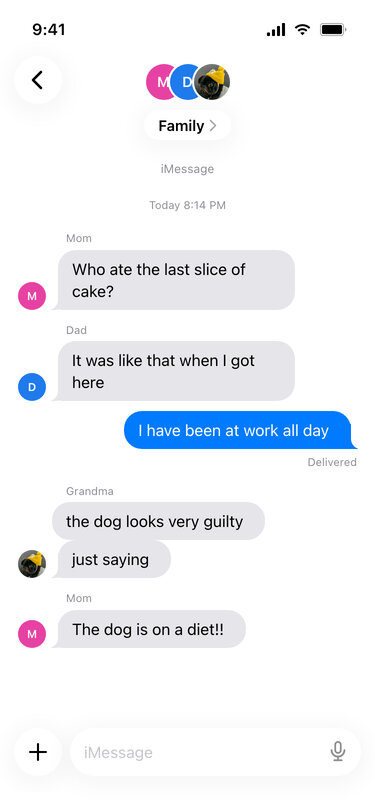
- Group conversations — Add several people to one thread; their names appear above their messages and their photos next to them, and an unnamed group is titled "4 People" like on the iPhone.
- Light and dark mode — Both themes are supported with accurate colors.
- "Delivered" indicator — Optionally show the delivery status below your messages.
- Date/time separators — Add timestamps between message groups for realism.
- Customizable labels — Change the chat type label and input placeholder to any language.
- Save or copy — a JPG download or a clipboard copy, without signing up and without a watermark on the picture.
Frequently asked questions
Why do the bubble colours matter?
Because they carry meaning. Blue means iMessage between Apple devices; green means it fell back to SMS, usually because the other person is on Android. Getting this wrong is the quickest way for a mockup to look fake to anyone who uses it daily.
Does it do iMessage group chats?
It does. Choose Group as the chat type and add the members of the thread. Like the Messages app, the header shows the members' pictures and either the group's name or how many people are in it, each person's name appears in small grey text above their first message, and their photo sits beside their last one.
What can I set?
Both sides of the conversation, contact name, timestamps, read receipts, typing indicators and the bubble colour — the details that decide whether a screenshot reads as real.
Is it useful outside jokes?
Yes. App store screenshots, onboarding walkthroughs, support articles and design mockups all need a convincing conversation that does not expose anyone's real messages.
Where is the limit?
A screenshot shared among friends who know it is staged is harmless. Inventing a thread between real people and passing it off as real is where it stops — those images keep getting forwarded long after anyone remembers they were made up.
Does it connect to Messages?
No. It renders an image in your browser and nothing else.
What about other platforms?
WhatsApp users will want the WhatsApp Chat Generator, Instagram conversations are covered by the Instagram DM Generator, and Android phones by the Android Text Message Generator.
Usage Policy
Fake text messages are a common tool for bullying and fraud, so by using iMessage Chat Generator by 10015.io you agree to the rules below. 10015.io is not responsible for the images created with it:
- Do not create texts that appear to come from a real person — a partner, a classmate, a boss — to hurt, frighten or embarrass them.
- Do not imitate banks, delivery companies or relatives in the kind of scam texts people receive every day.
- Do not show a generated thread as evidence of what someone said, whether in a breakup, a workplace complaint or a legal matter.
- Make it clear the screenshot is made up whenever it leaves your own circle of friends.