Text Tools
 Image Tools
 PDF Tools
 Social Media Tools
 Security Tools
 Coding Tools
 CSS Tools
 Color Tools
 Miscellaneous Tools
 Add to Chrome
 Add to Firefox
Draws a Bumble profile with your photos, About me, basics and interests, as one phone screen or the whole scrolling profile.
Profile
My Basics
App Screen
What is Online Bumble Profile Generator?
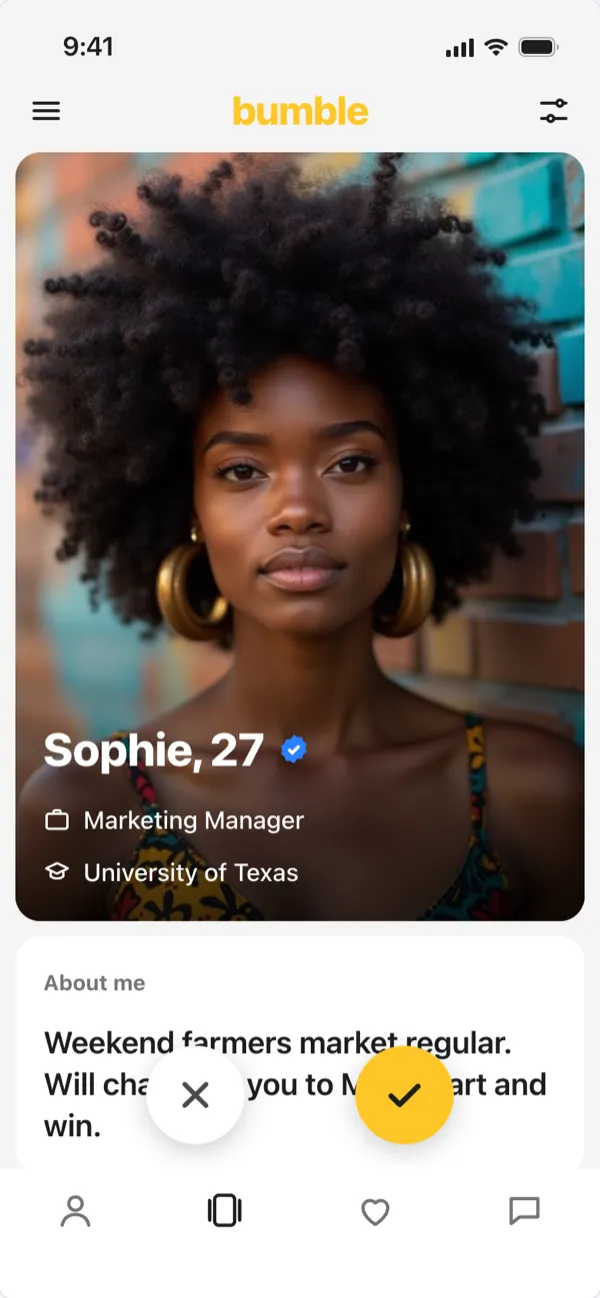
Bumble Profile Generator draws a Bumble profile as the app shows it: a big first photo with your name, age, job and school, then the cards below it, About me, My basics (height, exercise, education, drinking, smoking, star sign), what you are looking for, your interests and where you live, with the yellow check and the pass button floating over them.
See the Whole Profile at Once
Choose "Whole profile (long)" to get every card and photo in one tall image: easy to send to a friend for feedback, or to compare two versions of your About me. "One phone screen" gives a normal screenshot.
How to use Online Bumble Profile Generator?
- Type the name and age, and upload up to four photos.
- Write your About me and fill in the basics you want to show; empty ones are hidden.
- Add what you are looking for and your interests, emoji included.
- Choose one screen or the whole profile, light or dark, and download the image.
Frequently asked questions
What should I write in my Bumble About me?
Something specific that is easy to reply to: a habit, a strong opinion about food, or a challenge. Try a few versions here and see which one reads best next to your photos.
Is my profile sent anywhere?
No. It is drawn in your browser and nothing is uploaded or posted. Bumble is a trademark of its owner, which is not connected with this tool.
Are there other dating apps?
Yes: the Hinge Profile Generator for prompt cards, and the Tinder Profile Generator for the swipe card and the "It's a Match!" screen.