Text Tools
 Image Tools
 PDF Tools
 Social Media Tools
 Security Tools
 Coding Tools
 CSS Tools
 Color Tools
 Miscellaneous Tools
 Add to Chrome
 Add to Firefox

Builds Discord conversations with role colours, replies, reactions and markdown, and downloads them as a PNG.
Channel
Messages
Messages in a row from the same name and avatar are grouped, as in Discord. Use **bold**, *italic*, `code`, ||spoiler|| and @mentions in the text.
What is Online Discord Message Generator?
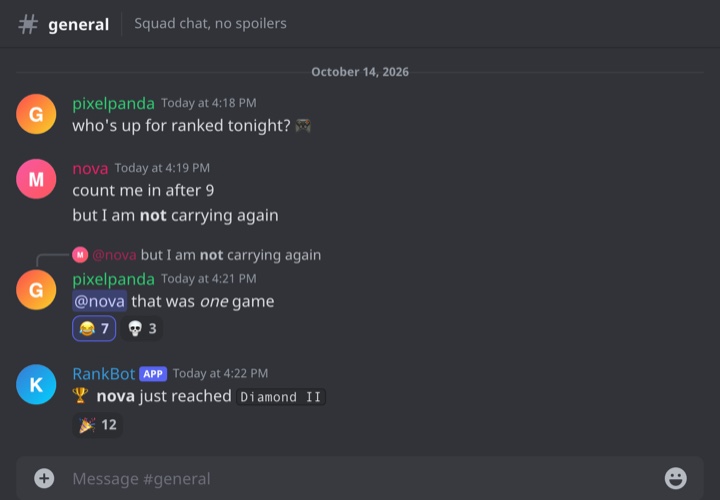
Discord Message Generator is a free tool for making Discord messages as an image. It draws a channel the way it looks in the Discord app on a computer — the channel name and topic along the top, a date divider, messages with avatars, role-coloured names and timestamps, and the message box at the bottom — and lets you write every message in it.
It handles the things that make a Discord screenshot recognisable at once: consecutive messages from one person folded under a single name, the curved line of a reply, reactions with a count, the blue APP tag on bots, @mentions, the yellow highlight on a message that pings you, and Discord's own markdown.
Writing Messages the Way Discord Shows Them
Discord formats messages with a small set of markdown, and the generator understands the same syntax, so you can type exactly what you would type in Discord:
**bold**for bold and*italic*for italic.`code`for inline code, shown in a small boxed monospace font — the usual way bots show commands, ranks and values.||spoiler||for a spoiler, shown as a blacked-out block as it is before anyone clicks it.@namefor a mention, drawn in Discord's blue mention pill.
Names, Roles and Grouping
In a server, a member's name takes the colour of their highest coloured role, which is why moderators are often red and bots blue. Pick a colour for each message from the role colours Discord offers by default, or leave it on Default for an ordinary member. Bots and apps carry a small blue tag after their name; Discord has labelled them APP since 2024, and older screenshots show BOT instead, so both are available.
When the same person sends several messages in a row, Discord shows the name and avatar once and stacks the messages underneath. The generator does the same automatically whenever two messages in a row have the same name and avatar. A reply always starts a new group, with the line curving up to the message it answers.
What People Use It For
- Memes and storytime videos. "Discord drama" is a format of its own, and a clean recreation is easier to show than a cropped screenshot with other people's names in it.
- Server announcements. Community managers draft how a welcome message, a rules post or an event announcement will read in the channel before posting it.
- Bot development. Developers mock up what their bot's replies will look like — the APP tag, the formatting, the reactions — before writing the code that sends them.
- Teaching and safety training. Example conversations for lessons on online behaviour, without screenshots of real children's chats.
How to use Online Discord Message Generator?
- Set the channel: dark or light mode, the channel name and topic, the date divider, and whether to show the header and the message box.
- Edit each message: name, avatar, name colour, tag and time, then type the text with any markdown you need.
- Add reactions as emoji and counts separated by commas, such as 😂 7, 💀 3, and tick "You Reacted" to give the first one the blue outline.
- Tick "Reply to Previous" to make a message a reply, "Mentions You" for the yellow highlight, or "Edited" for the (edited) label.
- Click "Export Messages" to download a PNG or copy it to the clipboard.
Frequently asked questions
How do I make two messages show under one name?
Give them the same name and the same avatar and put them next to each other. "+ Add Message" starts each new message as the last person who spoke, so the quickest way to write a run of messages is to keep adding and only change the name when someone else answers.
How do I show that a message pinged me?
Tick "Mentions You". Discord highlights messages that mention you with a pale yellow background and a yellow bar on the left, and the generator draws the same.
Can I make it look like Discord's light theme?
Yes. Switch the theme to Light and every colour changes to match — background, text, reactions, code blocks, mentions and the message box. Dark is the default because it is what most people use.
What size is the image?
The chat is 720 pixels wide, close to the width of the message column in the desktop app, and is exported at twice that, 1440 pixels. The height grows with the number of messages.
Does it connect to my Discord account or server?
No. Nothing is sent to Discord, no bot is added anywhere and there is no login. The messages and avatars stay in your browser.
Usage Policy
Discord screenshots are often passed around as proof of what someone said, which is exactly why a fake one can do real damage. By using Discord Message Generator by 10015.io you agree not to make messages that appear to come from a real person or server in order to accuse, expose or harass anyone, and not to present generated chats as evidence. Jokes, mockups and fiction are what it is for. 10015.io is not responsible for the images made with it.