Text Tools
 Image Tools
 PDF Tools
 Social Media Tools
 Security Tools
 Coding Tools
 CSS Tools
 Color Tools
 Miscellaneous Tools
 Add to Chrome
 Add to Firefox

Builds a full-screen Instagram Reel screenshot with your video frame, caption, audio and counts, as a JPG.
Video
Creator
Caption
Engagement
App Screen
What is Online Instagram Reel Generator?
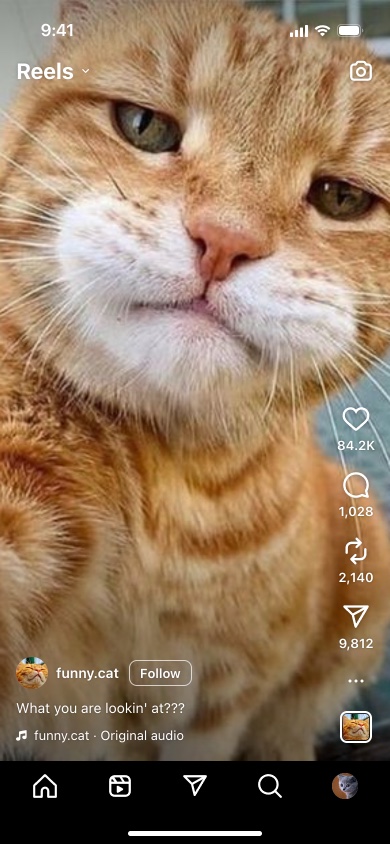
Instagram Reel Generator is a free tool for making a screenshot of an Instagram Reel without posting one. It draws the Reels screen from the Instagram app on an iPhone — "Reels" and the camera along the top, the like, comment, repost and share buttons down the right with their counts, the creator's photo, name and Follow button, the caption, the "Original audio" line, the audio thumbnail, and the bottom bar — over a frame from your video.
It is built for seeing a Reel before it exists: how the cover frame sits under Instagram's buttons, whether the caption's first line says enough before Instagram cuts it off, and what the whole thing looks like to someone scrolling past. It also makes a convincing mockup for a client deck or a joke for the group chat.
What Instagram Covers on a Reel
Reels are 9:16 — 1080 × 1920 pixels is the size Instagram recommends — but not all of that frame is visible. On the screen this tool draws, the status bar and the "Reels" heading take roughly the top 95 points, the buttons take the right-hand 76, and the name, caption and audio sit over about the bottom 130 points of the video, above the bottom bar. Faces, text and products in those areas will be hidden on the real app too, which is exactly what this preview is for checking.
The Details You Can Set
- The caption. Instagram shows a single line and cuts the rest with "…", so the first few words carry the whole caption. Untick "Shorten Long Text" to see it in full.
- Audio. "username · Original audio" for a Reel with its own sound, or the name of a song or a trending audio.
- Counts. Likes, comments, reposts and shares, written the way Instagram writes them: 84.2K above ten thousand, 1,028 with a comma below it.
- Repost. The newer repost button between comments and share, which you can hide for an older-looking Reel.
- Follow or following. The outlined Follow button next to the name disappears once you follow the account.
- The bottom bar. Instagram has been rearranging it, so there is the current layout with Reels and messages up front, and the classic one with search and the create button.
How to use Online Instagram Reel Generator?
- Upload a frame from your video, or pick a background colour if you do not have one yet.
- Set the creator: username, profile photo, the blue verified badge and whether you follow them.
- Write the caption and the audio line.
- Fill in the likes, comments, reposts and shares, and tick "Liked" for the red heart.
- Choose the bottom bar layout and the time on the status bar, then click "Export Screenshot".
Frequently asked questions
Why is my caption cut off after one line?
Because Instagram does the same. On the Reels screen only the first line of the caption is visible until someone taps it, so the preview cuts it in the same place. Untick "Shorten Long Text" to show the caption in full.
What size should my video frame be?
Vertical, ideally 1080 × 1920 like the Reel itself. A frame in another shape is cropped to fill the screen, or shown whole with black bars if you choose "Fit". The downloaded screenshot is 780 × 1688 pixels, the proportions of an iPhone screen.
Can I make the Reel look already liked?
Yes. Tick "Liked" and the heart turns red, the way it does after a double tap.
Is this connected to Instagram?
No. Nothing is posted and there is no login. The frame and photos you add stay in your browser. For a feed post or a story instead of a Reel, use the Instagram Post Generator or the Instagram Story Generator.
Usage Policy
Mockups, previews and jokes are what this is for. By using Instagram Reel Generator by 10015.io you agree not to make a Reel that appears to come from a real person or brand in order to mislead, not to fake engagement figures in a pitch or a sponsorship negotiation, and not to use it to harass anyone. 10015.io is not responsible for the images made with it.