Text Tools
 Image Tools
 PDF Tools
 Social Media Tools
 Security Tools
 Coding Tools
 CSS Tools
 Color Tools
 Miscellaneous Tools
 Add to Chrome
 Add to Firefox

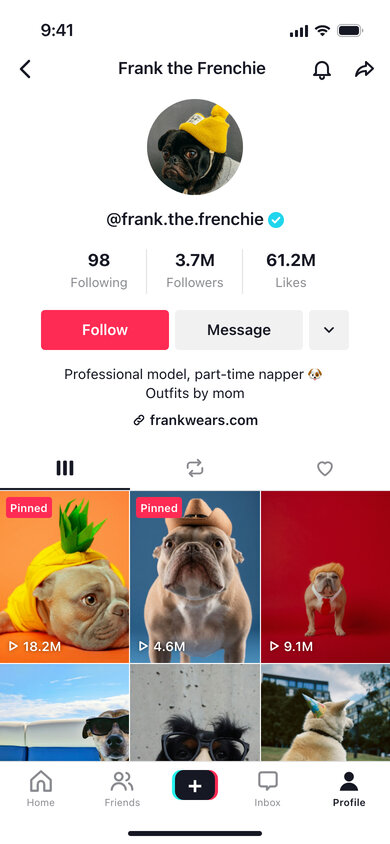
Mocks up a TikTok account page with your own counts, bio and video covers, and saves it as a phone screenshot.
Profile
Counts
Videos
App Screen
What is Online TikTok Profile Generator?
TikTok Profile Generator lets you design a TikTok account page without opening TikTok. Your picture sits in the centre with the @username beneath it, then the Following, Followers and Likes numbers, the red Follow button, a short bio and the grid of video covers, each with its play count in the corner and the first ones marked "Pinned".
Creators use it to picture where their channel is heading — what 1M followers would look like on their own page — and agencies use it to present a creator concept before filming anything. It also makes a good prop for stories, videos about going viral, school projects on social media, or a birthday joke that turns your dog into a celebrity.
Views, Pins and Likes
What sells a TikTok profile is the numbers on the grid. Type the play counts in one box, separated by commas — "2.1M, 845K, 12.4M" — and they are placed on the covers in order. Choose how many videos are pinned, from none to three, and those tiles get the red "Pinned" tag TikTok puts on them. The Likes total at the top is separate, so you can make it as modest or as absurd as you like.
How to use Online TikTok Profile Generator?
- Write the bio and enter the username, display name and link; upload an avatar.
- Enter the Following, Followers and Likes totals.
- Upload up to nine video covers, list their view counts, and pick how many are pinned.
- Switch between light and dark mode and set the clock in the status bar.
- Press "Export Screenshot" to save the JPG or copy it to your clipboard.
Frequently asked questions
Can I add the verified badge?
Yes, the "Verified" option adds the turquoise check mark next to the @username. Untick it for an ordinary account.
Do I have to upload video covers?
No. Without uploads each tile gets a coloured gradient, which is fine for wireframes. Any still image works as a cover; vertical images look most natural because the tiles are 3:4.
Does the tool connect to my TikTok account?
No. It never contacts TikTok and nothing is uploaded to a server — your images stay in the browser, and the page is built only from what you type.
How large is the downloaded image?
780 × 1688 pixels, a retina capture of a 390-point-wide iPhone screen, which is a comfortable size for Instagram stories, slides and thumbnails.
Usage Policy
By using TikTok Profile Generator by 10015.io you agree not to recreate a real creator's page to impersonate them, not to show invented follower or like counts as proof of reach to sponsors or buyers, and not to use the screenshots for fraud or harassment. Concept work, education, entertainment and labelled parody are fine. TikTok has no connection to this tool, and 10015.io takes no responsibility for the images people make with it.