Text Tools
 Image Tools
 PDF Tools
 Social Media Tools
 Security Tools
 Coding Tools
 CSS Tools
 Color Tools
 Miscellaneous Tools
 Add to Chrome
 Add to Firefox

Draws a WhatsApp status, its "Viewed by" list or a reply to it in a chat, as a JPG of an iPhone screen.
Screen
Status
Posted By
What is Online WhatsApp Status Generator?
WhatsApp Status Generator is a free tool for making a WhatsApp status as an image. It draws four screens from the WhatsApp app on an iPhone: someone else's status with the Reply bar and the heart, your own status with the eye and the number of views, the "Viewed by" list that slides up over it, and a chat where somebody has answered a status — the message with the little quoted status and its thumbnail on top.
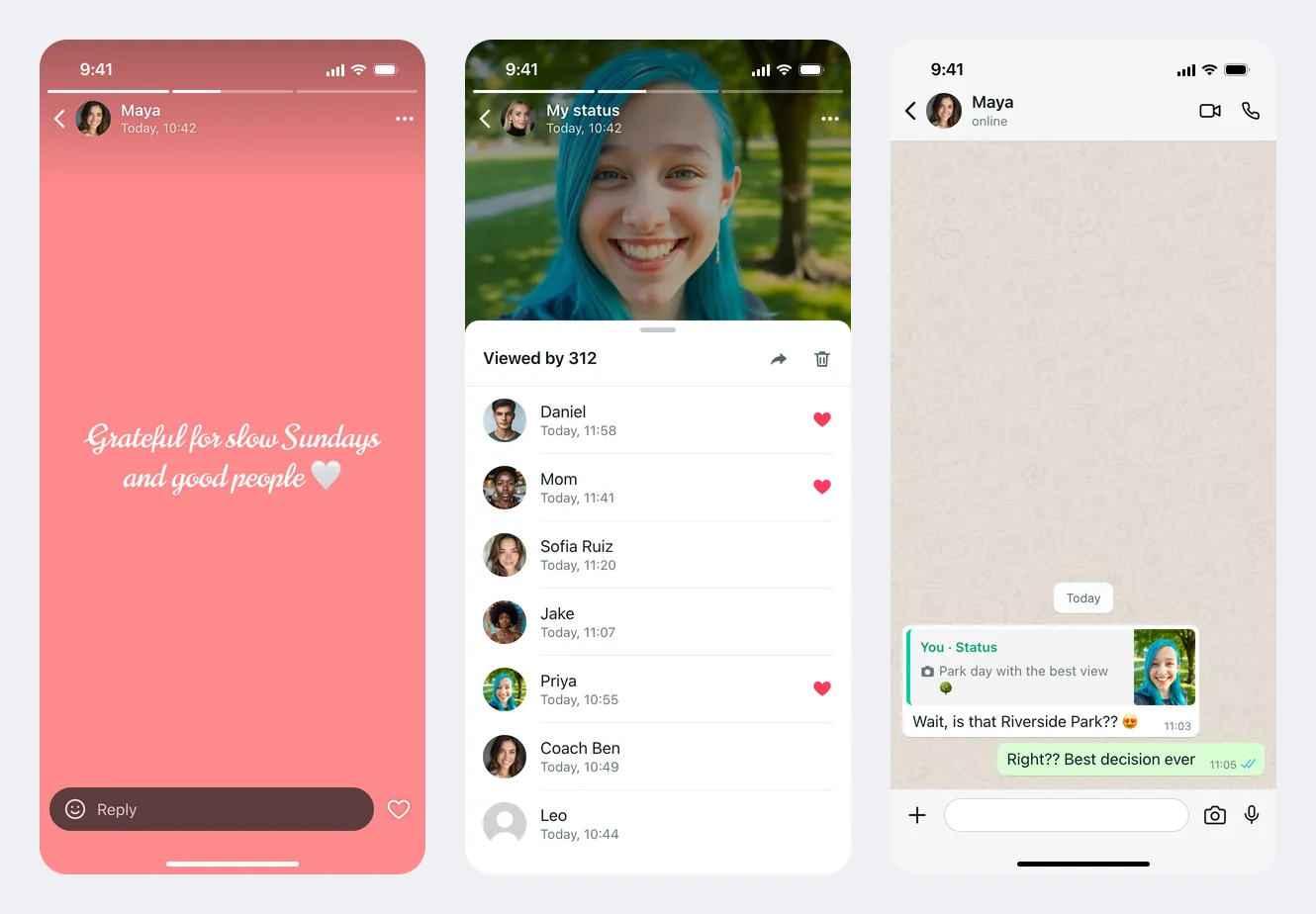
Photo and Text Statuses
A status is either a picture or a few words on a coloured background. Upload a photo and it fills the screen — or fits inside it with black bars — with your caption on a dark strip near the bottom, the way WhatsApp shows it. Leave the photo out for a text status: pick one of twelve background colours and one of five typefaces, from a plain sans serif and a serif to a flowing script, handwriting and tall condensed capitals. Short text is set large and long text smaller, so a one-liner and a paragraph both fill the screen properly.
Views, Likes and the "Viewed by" List
- View count. On your own status, the eye at the bottom shows how many people have seen it. Type any number — 24 or 5,000 — and it is written with thousands separators, the way the app does.
- Viewed by. Swipe up in WhatsApp and a list of viewers covers the lower part of the status. Write one person per line as "name, time", add ❤️ to the end of a line to give that viewer the red heart of a status like, and upload their pictures in the same order.
- The count and the list are separate. The heading can say "Viewed by 312" while the list shows the first eight names, which is exactly what a screenshot of a long list looks like.
- Light or dark. The sheet follows the phone's theme; the status behind it is always on black.
Status Replies in a Chat
When someone answers a status, WhatsApp does not show it on the status — it starts a chat. The message arrives with a quoted block above it: "You · Status", the caption or text of the status, and a small thumbnail of the picture or the coloured text card. Choose whether they replied to your status or you replied to theirs, write the reply and, if you like, the answer to it, and pick a light or dark chat with the familiar wallpaper.
How to use Online WhatsApp Status Generator?
- Choose the screen: someone's status, your status with views, the "Viewed by" list, or a status reply in a chat.
- Upload a photo and write a caption, or leave the photo out and type a text status with its colour and font.
- Set the name, profile picture and when it was posted, and how many updates the bars at the top show.
- For your own status, enter the view count and the viewers; for a reply, write the messages.
- Click "Export Screenshot" to download a JPG or copy it to the clipboard.
Frequently asked questions
Can I make a status with hundreds of views?
Yes. The view count is a separate field from the list of viewers, so the eye and the "Viewed by" heading can show any number while the list holds the names you want on screen.
How long does a WhatsApp status stay up?
Twenty-four hours, which is why the time under the name reads "Today, 10:42", "Yesterday, 22:15" or "12 minutes ago" and never a date. Each bar at the top is one update from the same person in that day; set how many there are and which one is on screen.
What size is the image?
The download is 780 × 1688 pixels, the proportions of an iPhone screen. For a photo status, a vertical 9:16 picture such as 1080 × 1920 fills it without cropping anything important.
Can I make the rest of the chat too?
The reply screen shows the status reply and one answer. For a longer conversation, with photos, voice notes, read ticks and groups, use the WhatsApp Chat Generator, and for a ringing or ongoing call the WhatsApp Call Screen Generator. Stories for other apps are made with the Instagram Story Generator and the Facebook Story Generator.
Does it post anything to WhatsApp?
No. It only draws an image in your browser; there is no login, nothing is uploaded and nothing is sent to WhatsApp or to anyone in your contacts.
Usage Policy
WhatsApp is a trademark of WhatsApp LLC; this tool is not affiliated with or endorsed by it. A status is gone after a day, so a screenshot is often all that is left of one — and that is why it is easy to pass a fake one off as proof. By using WhatsApp Status Generator by 10015.io you agree not to make statuses or view lists that appear to come from a real person in order to embarrass, accuse or mislead, and not to present a generated screenshot as genuine. Mockups, jokes, videos and design work are what it is for. 10015.io is not responsible for the images made with it.