Text Tools
 Image Tools
 PDF Tools
 Social Media Tools
 Security Tools
 Coding Tools
 CSS Tools
 Color Tools
 Miscellaneous Tools
 Add to Chrome
 Add to Firefox


See who doesn’t follow you back and who unfollowed you on Instagram, from your download: no login, nothing uploaded.
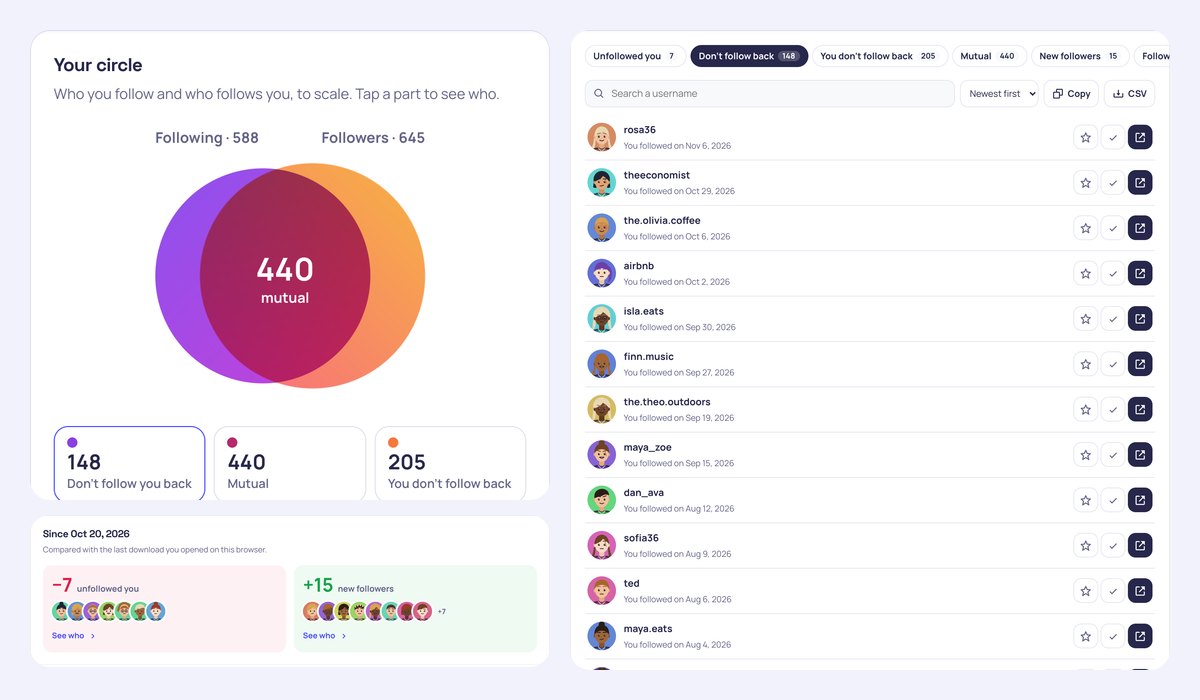
Since Oct 20, 2026
Compared with the last download you opened on this browser.
Your circle
Who you follow and who follows you, to scale. Tap a part to see who.
440 of the 588 accounts you follow follow you back.
- rosa36You followed on Nov 6, 2026
- theeconomistYou followed on Oct 29, 2026
- the.olivia.coffeeYou followed on Oct 6, 2026
- airbnbYou followed on Oct 2, 2026
- isla.eatsYou followed on Sep 30, 2026
- finn.musicYou followed on Sep 27, 2026
- the.theo.outdoorsYou followed on Sep 19, 2026
- maya_zoeYou followed on Sep 15, 2026
- dan_avaYou followed on Aug 12, 2026
- sofia36You followed on Aug 9, 2026
- tedYou followed on Aug 6, 2026
- maya.eatsYou followed on Aug 4, 2026
- the.lily.runsYou followed on Jul 23, 2026
- sofia.designYou followed on Jul 23, 2026
- olivia.coffeeYou followed on Jul 13, 2026
- rosa.on.tourYou followed on May 21, 2026
- ali_jackYou followed on May 21, 2026
- hugo.musicYou followed on Apr 25, 2026
- jade15You followed on Apr 22, 2026
- the.nina.filmsYou followed on Apr 18, 2026
- the.lucas.onYou followed on Apr 10, 2026
- the.jack.musicYou followed on Apr 3, 2026
- the.dan.runsYou followed on Mar 20, 2026
- adidasYou followed on Mar 17, 2026
- ethan72You followed on Feb 4, 2026
- theo.on.tourYou followed on Jan 24, 2026
- netflixYou followed on Jan 19, 2026
- eli.styleYou followed on Jan 6, 2026
- eli_adamYou followed on Dec 30, 2025
- theo24You followed on Dec 15, 2025
- natgeoYou followed on Dec 13, 2025
- luna.sketchesYou followed on Dec 10, 2025
- luna.styleYou followed on Nov 24, 2025
- pixarYou followed on Nov 22, 2025
- ali_ninaYou followed on Nov 18, 2025
- the.rosa.bakesYou followed on Nov 9, 2025
- lucas95You followed on Nov 2, 2025
- jade.in.parisYou followed on Oct 30, 2025
- the.ella.eatsYou followed on Oct 16, 2025
- mia84You followed on Sep 15, 2025
- the.aria.lensYou followed on Sep 10, 2025
- aria_sofiaYou followed on Sep 8, 2025
- ivy86You followed on Sep 6, 2025
- the.adam.clicksYou followed on Sep 5, 2025
- emma.skiYou followed on Aug 29, 2025
- eva98You followed on Aug 17, 2025
- adam22You followed on Jul 29, 2025
- the.jack.styleYou followed on Jun 10, 2025
- adam50You followed on May 6, 2025
- the.hugo.onYou followed on Apr 22, 2025
- the.eli.journalYou followed on Apr 18, 2025
- dan.clicksYou followed on Apr 17, 2025
- unicefYou followed on Apr 8, 2025
- zoe.readsYou followed on Mar 18, 2025
- aria.filmsYou followed on Mar 9, 2025
- the.ethan.readsYou followed on Mar 3, 2025
- lucas.fitYou followed on Feb 23, 2025
- adam.dailyYou followed on Feb 2, 2025
- ava91You followed on Jan 18, 2025
- the.isla.gardenYou followed on Jan 15, 2025
Your follows over time
New followers above the line, the accounts you followed below it, by year.
Who followed back, by year
Of the accounts you followed each year, how many follow you now.
Your first followers
The ones who were there from the start.
- noah.coffeeJun 18, 2017
- the.maya.readsJun 24, 2017
- aria_lucasJan 22, 2018
- isla72Apr 5, 2018
- dan.eatsApr 9, 2018
Newest followers
- the.isla.travelsNov 11, 2026
- the.luna.vibesNov 8, 2026
- aria64Nov 6, 2026
- mia.travelsOct 29, 2026
- jade.skiOct 23, 2026
Share your circle
A story picture with your numbers and your follow-back rate. No usernames on it.
What is the Instagram Unfollowers Checker?
The Instagram Unfollowers Checker shows you who doesn’t follow you back on Instagram, who you don’t follow back, who your mutuals are and, from one download to the next, who unfollowed you. It reads the followers and following lists from Instagram’s own “Download your information” file, so you never type your password into a third-party app, and the file is read in your browser without being uploaded anywhere.
What you get
- Don’t follow you back: every account you follow that doesn’t follow you, with the day you followed it. Star the ones you keep anyway (brands, celebrities) and tick off the ones you have unfollowed.
- Who unfollowed you: open a new download later and see who left since the last one, and who is new. Or drop two downloads together to compare them.
- Your circle: following and followers as two circles drawn to scale, with your mutuals where they overlap, and your follow-back rate.
- You don’t follow back, mutuals, pending follow requests, accounts you unfollowed, close friends and blocked accounts, when they are in your download.
- Your follows over time: new followers and new follows by month or year, who followed back by year, and your very first followers.
- Search, sort, copy the usernames or download any list as CSV, and share a story picture of your circle.
How to see who doesn’t follow you back on Instagram
- In Instagram, open your profile, the ☰ menu and Accounts Center.
- Go to Your information and permissions › Download your information › Download or transfer information.
- Pick your Instagram account, choose Some of your information and tick only Followers and following.
- Choose Download to device, date range All time and format JSON, then Create files.
- When Instagram says it is ready (usually within minutes), download the .zip and drop it on this page.
Frequently asked questions
How can I see who unfollowed me on Instagram?
Instagram doesn’t list who unfollowed you, and its download only has your followers as they are today. So this page remembers the followers of each download you open, in your browser only, and the next time you open a newer one it shows who is gone and who is new. You can also drop an old and a new download together to compare them right away.
Is it safe? Do you need my password?
No password and no login. Apps that ask for your Instagram password can get your account limited or stolen; this page only reads the file Instagram gives you. It is opened in your browser and never sent to our servers. The profile pictures are drawn from the usernames: nothing is fetched from Instagram.
Why does someone who follows me show as not following back?
The lists are as they were when Instagram made your download. Someone who followed you after that, changed their username or deactivated their account can look different until you download again. A renamed account shows up as one unfollower and one new follower.
Does it work with the HTML download, and with big accounts?
Yes. JSON and HTML downloads both work (JSON has the dates for the timeline), and big accounts whose followers are split over several files are read in full.
Can I unfollow everyone who doesn’t follow back here?
No tool should do that for you: mass unfollowing from an app breaks Instagram’s rules and can get your account blocked. Each row has a button to open the profile on Instagram, where you unfollow yourself, and a tick to keep track of where you are. For more about your Instagram year, try Instagram Wrapped.