Text Tools
 Image Tools
 PDF Tools
 Social Media Tools
 Security Tools
 Coding Tools
 CSS Tools
 Color Tools
 Miscellaneous Tools
 Add to Chrome
 Add to Firefox

Builds Facebook comment threads with reactions, Top fan and Author badges and page replies, and downloads them as a PNG.
Appearance
Write with AI
Pick a vibe and, if you like, say what the post is about. The comments below are replaced with new ones you can still edit.
Written by AI with invented names. Check it before you share, and do not use it to mislead anyone.
Comments
What is Online Facebook Comment Generator?
Facebook Comment Generator is a free tool for making Facebook comments as an image. It draws comment threads as they look in the Facebook app: each comment in a rounded grey bubble with the name in bold, the reaction icons and count tucked into the bubble's corner, Like and Reply underneath, and replies indented below with smaller profile pictures.
Facebook is where businesses talk to their customers in public, so most of the people who need a Facebook comment that does not exist yet are working on a page: practising how to answer a complaint, showing a client how a post might be received, or putting example threads into training material and reports.
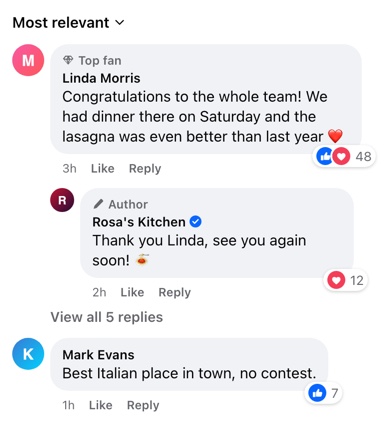
Reactions, Badges and Page Replies
- Reactions. Choose Like, Love, Care, Haha or Wow, alone or in the combinations Facebook shows most often, with the total next to them. The icons overlap in the same small white pill the app uses.
- Top fan. Pages give this badge to their most active followers, and it appears above the name with a diamond icon. It is a quick way to make a comment look like it comes from a loyal customer.
- Author. Facebook labels comments from whoever wrote the post. Combine it with "Verified" and the page's name for a convincing reply from a business.
- Liked by you. Turns the Like button under a comment blue, as it is after you have reacted.
- Edited. Adds the "Edited" note after Like and Reply.
- Most relevant. The sorting menu that sits above every comment section, which you can show or hide.
Practising Replies Before They Go Live
Public replies on a page are read by everyone who sees the post, not just the person who complained, which makes them worth drafting. Put the customer's comment in, write your page's answer as a reply with the Author badge, and look at the thread as your followers will before anything is posted. The same threads make good material for training new community managers, since they can be built to cover the awkward cases — the angry review, the off-topic question, the joke that needs a light touch.
A Comment Thread Written by AI
For a mockup in a pitch or a lesson, inventing believable comments is often the slowest part. "Write with AI" drafts the thread: pick a tone (supportive, funny, critical, questions) and describe the post, for example "a bakery announcing Sunday opening hours". It writes five comments under ordinary first and last names, and when the page itself answers, the reply gets the Author badge.
How to use Online Facebook Comment Generator?
- Choose light or dark mode, and whether to show "Most relevant" above the comments.
- For a ready-made thread, use "Write with AI": choose a tone, describe the post and let it write the comments.
- Edit each comment: name, profile picture, time and text. Facebook shortens times to 2h, 3d or 1w.
- Pick the reactions and set the reaction count, then add a Top fan or Author badge if you need one.
- Add replies with "+ Add Reply" and type a number in "Hidden Replies" to show "View all replies" under a comment.
- Click "Export Comments" to download the thread as a PNG or copy it.
Frequently asked questions
Which reactions are available?
Like, Love, Care, Haha and Wow, as single reactions or in common pairs and trios. Sad and Angry are not included yet.
How do I make a reply from a business page?
Add a reply under the customer's comment, type the page's name, upload its logo as the profile picture, and set the badge to "Author". Tick "Verified" too if the page has a blue badge.
Can I use it for a client presentation or a report?
Yes. It is a common use: example threads in a strategy deck, or a cleaned-up version of a real conversation in a report, with the customer's name and photo replaced so nobody's personal details end up on a slide. Label invented examples as examples.
What size is the image?
It is drawn at phone width and exported at 780 pixels wide, with the height following the length of the thread.
Does it post anything to Facebook?
No. It has no connection to Facebook or Meta, there is no login, and the pictures you upload stay in your browser.
Can AI write the Facebook comments?
Yes. "Write with AI" writes a thread of five comments for the tone and post you describe, with made-up names, and replies from the page get the Author badge. Everything stays editable, so you can change a word or a reaction afterwards.
Where does the text I type for the AI go?
Only to OpenAI's model, to write the comments. 10015.io does not save it, and your photos and the rest of the thread never leave your browser.
Usage Policy
Mock threads for planning, training and fun are what this tool is for. By using Facebook Comment Generator by 10015.io you agree not to make comments that appear to come from a real person or business, not to use them as fake reviews or as evidence of something that was never said, and not to use them against anyone. 10015.io is not responsible for the images made with the tool.