Text Tools
 Image Tools
 PDF Tools
 Social Media Tools
 Security Tools
 Coding Tools
 CSS Tools
 Color Tools
 Miscellaneous Tools
 Add to Chrome
 Add to Firefox


Makes a One Piece style bounty poster from your photo, for one pirate or a whole crew on a wall.
Sample photo: Michael Miller, CC BY 2.0, cropped
Rank: Emperor of the Sea
Status
Download
Saved 2480 pixels wide in the shape of A4, sharp enough to print. The PNG keeps the torn edge see-through. Your work is kept in this browser.
What is the One Piece Wanted Poster Maker?
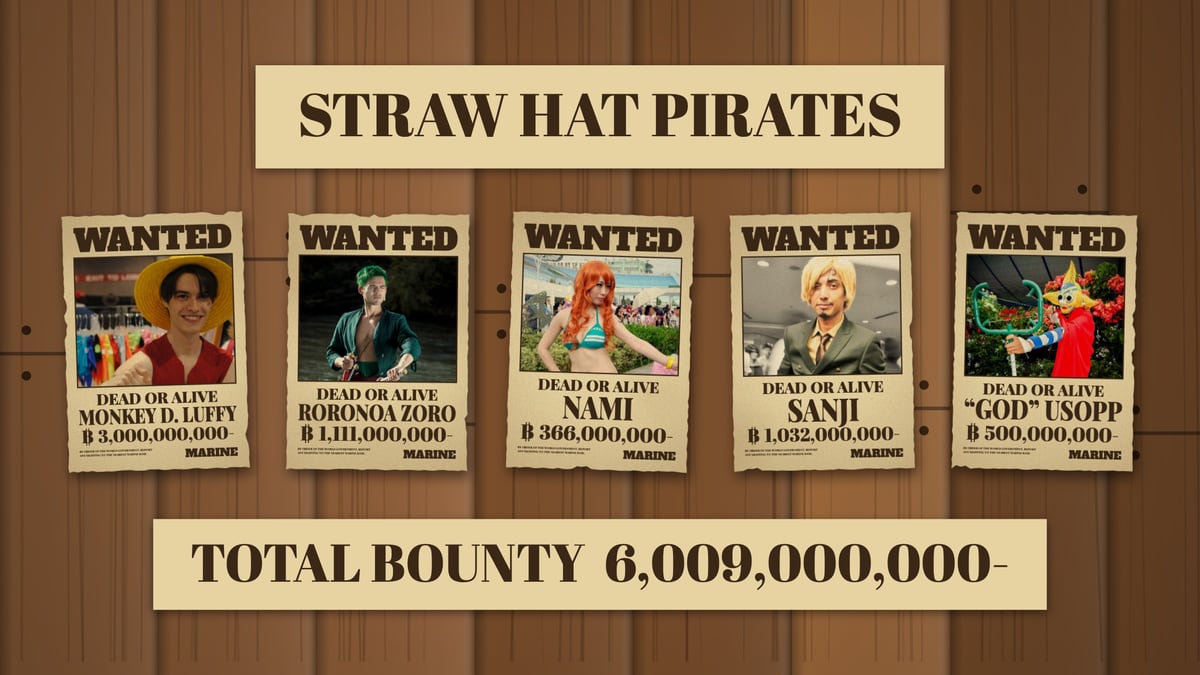
One Piece Wanted Poster Maker draws the pirate bounty poster of One Piece around your own photo. WANTED runs across the top of an aged sheet, your picture sits in its frame, and under it come DEAD OR ALIVE, the name in tall letters and the bounty in berries, with the berry sign in front and MARINE in the corner. Type a name and a number and the poster is drawn as you type. Then add the rest of your crew: each pirate gets a poster, and the whole crew is pinned to a wooden wall with its total bounty underneath. Everything is made in your browser; the photos are not uploaded.
What you can make
- A bounty poster for yourself, a friend or a pet: photo, name, bounty and status, on paper with stains, folds and torn edges.
- A crew wall: up to ten pirates, each with their own poster, arranged on a wooden wall, dark timber or a ship's deck, with the crew's name above and the total bounty below.
- A captured pirate: cross a poster out in red, or stamp it CAPTURED, RETIRED or any word you like.
- A printable sheet: one poster in the shape of A4, 2,480 pixels wide, or every poster of the crew in one ZIP file.
What you can change
- The bounty: any number, grouped in threes as you type, with the berry sign and the dash that follows the sum on the real posters. The tool tells you what rank a bounty of that size makes you, from small-time pirate to Emperor of the Sea.
- The status: DEAD OR ALIVE, ONLY ALIVE, ONLY DEAD, or a line of your own.
- The photo: drag it in its frame, zoom in on a face, and choose full colour, faded, sepia, black and white or manga ink, which prints the photo in black with screen tone like a page of the manga.
- The sheet: the headline, the word in the corner, the small print, how worn the paper is, its colour, nail holes, and new stains and tears in one tap.
- The wall: its timber, or a plain colour, and its shape: 4:5, square, a 9:16 story, 16:9 or A4.
How to make a One Piece wanted poster
- Press Choose Your Photo, or drop or paste a picture onto the poster. The sample photos, cosplayers of ten pirates of the series, are there to try first.
- Drag the poster to place the face in the frame, and zoom in if it is small.
- Type the pirate's name and the bounty. The quick sums under the field go from a rookie's 30,000,000 to an emperor's 3,000,000,000.
- Press Add a crew member for each of your friends. The crew appears on a wall; choose a pirate in the row above the poster to change theirs.
- Press Download for a PNG or JPG, or Print. With a crew, the menu also saves every poster at once as a ZIP.
Ideas
- Birthday parties: a poster for each guest at the door of a pirate party, with the birthday child as captain and the highest bounty.
- Friend groups and Discord servers: the whole crew on one wall, with bounties to argue about.
- Cosplay and conventions: print your own poster on A4 or take the PNG to a print shop for a larger one.
- Profile pictures and posts: the square wall is made for a feed, the 9:16 one for a story.
- Pets: the cat who rules the house deserves at least 300,000,000.
Frequently asked questions
Is it free? Is there a watermark?
It is free, there is no watermark and no account. Make as many posters as you like.
How do I print my poster?
Under Wall, choose Poster only, then press Print. In the print window choose no margins or "fit to page" and turn off headers and footers. The sheet has the proportions of A4 and is 2,480 pixels wide, which is 300 dots an inch, so it prints sharp on A4 and fits US Letter with a small margin. For a bigger poster, download the PNG and take it to a print shop.
How do I make posters for my whole crew?
Press Add a crew member once for each person, up to ten. Each new pirate starts as one of the sample cosplayers, with that pirate's name and bounty: choose them in the row above the poster and put in their own photo, name and sum. The wall shows everyone together. To get each poster as its own file, open the Download menu and choose All posters (ZIP).
What does ONLY ALIVE mean?
Most bounty posters say DEAD OR ALIVE: the reward is paid either way. ONLY ALIVE means the pirate must be brought in unharmed for the bounty to be paid. Choose either under Status, or write a line of your own.
Why is the edge of my PNG see-through?
The paper has a torn edge, and the PNG keeps what is outside it transparent, so the poster can be laid over any background in an editor. The JPG puts it on white. Set Wear and age to 0 for a clean, straight edge, or pin the poster to a wall for a finished picture.
Are my photos uploaded?
No. The posters are drawn by your browser on your own device. Your crew is kept in the browser's own storage so that it is still there when you come back; it is not sent anywhere.
Usage Policy
One Piece Wanted Poster Maker by 10015.io is a fan-made tool for parties, cosplay, memes and fun. It is not affiliated with or endorsed by Eiichiro Oda, Shueisha, Toei Animation or any holder of rights in One Piece, and it uses none of the series' artwork: the poster is drawn from scratch around your own photo. The sample photos are of cosplayers, published on Wikimedia Commons under free licences; each is credited under the poster. Do not use it to accuse, harass or impersonate a real person. For western, police and GTA styles, see the Wanted Poster Maker.