Text Tools
 Image Tools
 PDF Tools
 Social Media Tools
 Security Tools
 Coding Tools
 CSS Tools
 Color Tools
 Miscellaneous Tools
 Add to Chrome
 Add to Firefox
Rank anything from S to F or in a pyramid, with pictures, words or emoji, play blind ranking, and save it as an image or a story.
Unranked 16 of 16
Design
Add items
You can also paste pictures or a list (Ctrl+V), or drop pictures on the unranked area.
Start from a list
Rows
Click a row’s label or its cog to rename it, change its colour, add or delete rows.
Look
Keys: click an item, then 1–6 to rank it, 0 to unrank, Del to delete. Ctrl+Z undoes.
What is Tier List Maker?
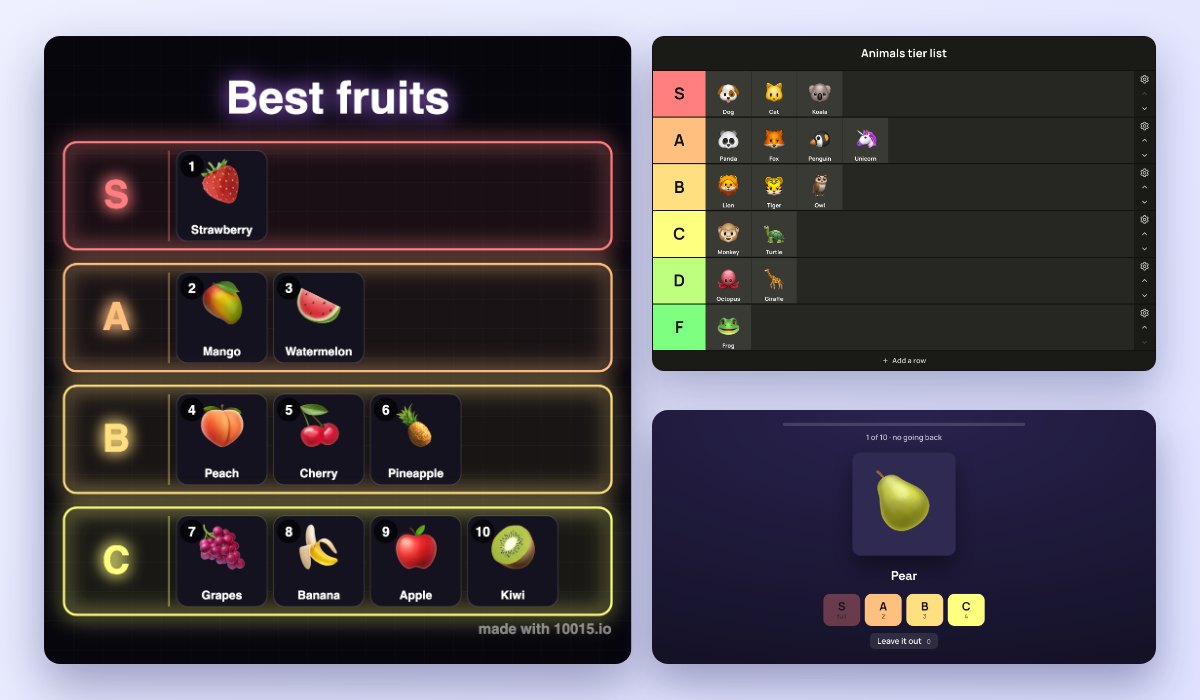
Tier List Maker lets you rank anything in the familiar rows from S at the top to F at the bottom, in the red-to-green colours everyone knows. Drag your items into the rows, or click an item and press a number, and save the finished list as an image to share.
Items can be pictures, words or emoji: upload or paste pictures, or type a list, one per line. Every row can be renamed, recoloured, moved, added or deleted, and the whole list drawn in one of six designs. And for the game everyone plays in videos, there is blind ranking: the items come one at a time, in a random order, and once placed they stay.
When anything can go anywhere, a tier list can end up with half the items in S. The pyramid stops that: the top row holds just one item, the next two, then three, then four, and every spot is numbered, so the pyramid is your top 10 (or more, with more rows). Put an item in any spot, drop it on a taken one to swap them, and in a blind ranking a full row is closed, so you have to choose what is worth the top.
What You Can Do
- Drag and drop with a mouse or a finger, or click an item and press 1 to 6; drag one to the bin to delete it.
- Tiers or a pyramid: any number in each row, or one at the top, then two, three and four, in numbered spots.
- Pictures, words and emoji: upload, paste (Ctrl+V) or drop pictures, or type a list; a word-only tier list works too.
- Blind ranking: one random item at a time, no going back, then save the result; in a pyramid, full rows close and items can be left out.
- Every row: rename it, pick any colour, move it, add rows above or below, clear or delete it.
- Row sets: S to F, S to D, GOAT to Trash, Love to Hate, neon or greyscale.
- Six designs: Classic, Cards, Gradient, Neon, Sticker and Editorial, the same on the page and in the image.
- Look: dark, light or midnight, small to large items, label width, names on pictures; a picture can be changed or taken off at any time.
- Undo and redo every move.
- Save and share: an image, a 9:16 story, a copy to paste, or a link others can open and rank.
- Ready-made lists to start from, and your list kept in your browser for next time.
How to use Tier List Maker?
- Add your items: type a list, add pictures, or pick a ready-made list.
- Choose Tiers or Pyramid at the top left.
- Drag each item into a row or a numbered spot, or click it and press the row’s number.
- Rename and recolour the rows, add a title, and choose a design.
- Download the image or the story, or copy a link to share.
Frequently asked questions
What does S tier mean?
S is the top tier, above A: the very best. The letters come from school grades (A to F), with S for "special" or "superior", a habit from Japanese video games. A tier list ranks things from S down to F, with the best at the top.
How does blind ranking work?
Blind ranking shows the unranked items one at a time, in a random order, without letting you see what comes next. You place each one in a row for good: if a better one comes later, the row is already taken by what you chose. It is the game behind the popular "blind ranking" videos: press Blind Ranking above the unranked items, then a row or its number for each item.
What is a ranking pyramid?
A tier list where every row has room for only so many: one at the top, two below it, then three, then four. With six rows that is 21 spots, numbered 1 to 21, so it is a ranked top list as well as tiers. Press Pyramid at the top left: the rows stay as they are, and a row holding more than it has room for keeps its first items and sends the rest back to unranked.
Can I leave a spot empty, or move an item to a taken spot?
Yes to both. Drop an item on any spot, even with an empty one before it, and it stays there. Drop it on a taken spot and the two swap: the one that was there goes where the dragged item came from. Clicking a row or pressing its number fills the first empty spot. Going back to Tiers closes the gaps, and undo brings the pyramid back.
Can I make a tier list with text only?
Yes: type a list, one item per line, and each becomes a tile with its name. Start a line with an emoji to give it a picture, such as "🍕 Pizza". To decide something at random instead, try the List Randomizer, and for your favourite albums, the Album Chart Maker.
Are my pictures uploaded?
No. Pictures are kept in your browser and never leave your device. A share link carries the words and emoji of your list; pictures are left out of it.