Text Tools
 Image Tools
 PDF Tools
 Social Media Tools
 Security Tools
 Coding Tools
 CSS Tools
 Color Tools
 Miscellaneous Tools
 Add to Chrome
 Add to Firefox

Test every key online on a full-size, TKL, 75% or 60% keyboard, with rollover (NKRO) and chatter.
Last key
- code
- –
- keyCode
- –
- Location
- –
Rollover (NKRO)
0 keysHold as many keys as you can at once. Every one should light up: if a key you hold stays dark, the keyboard is blocking (ghosting) it.
Chatter
Not testedA worn switch types a letter twice. Any second press faster than the threshold is flagged, and the key turns red.
Events
0 presses- Key presses appear here.
Keyboard test report
- Keys tested0/104
- Most keys at once0
- Chattering keys0
- Presses0
What is Online Keyboard Tester?
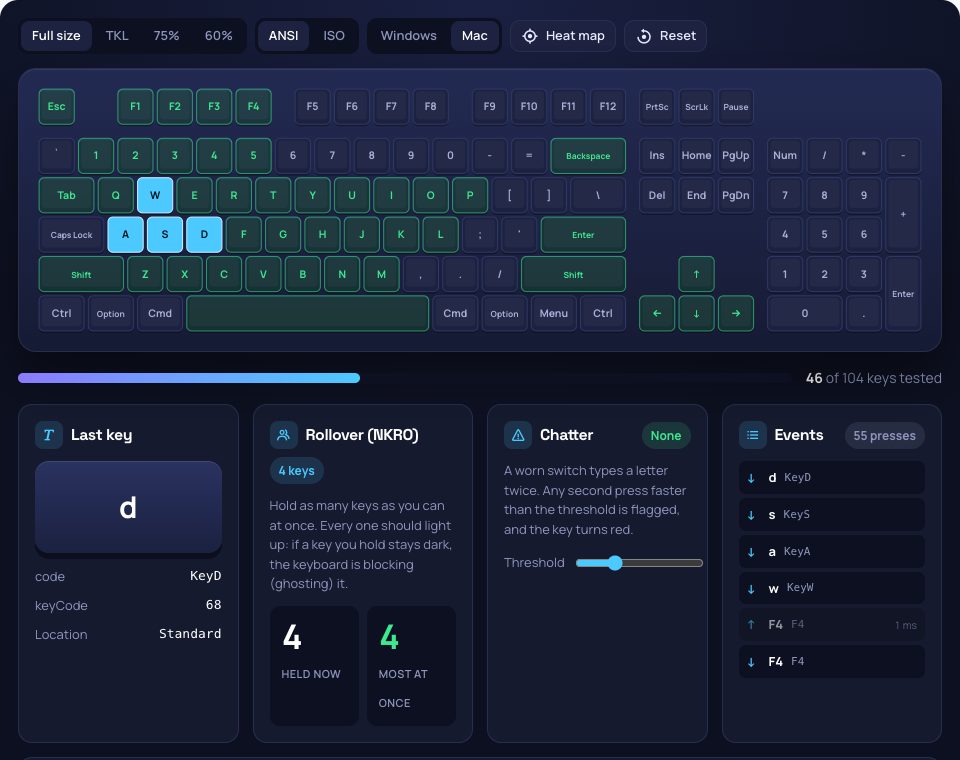
Keyboard Tester checks that every key on a keyboard works. Press a key and it lights up on a keyboard drawn to match yours, then stays green, so you can see at a glance which keys you have tested and which never responded. It reads the physical key, not the letter, so it works with any language setting, and it also catches a chattering switch that types twice and measures how many keys the keyboard can register at once.
Your Keyboard, Drawn to Match
Choose full size (with the numpad), TKL, 75% or 60%, ANSI or ISO (the tall Enter key and the extra key beside the left Shift, as used across Europe), and Windows or Mac labels. Keys the drawing does not include, such as media keys or the extra keys of Japanese and Korean keyboards, are listed separately when pressed. Switch on the heat map to colour every key by how often it was pressed.
Rollover, Ghosting and Chatter
- Rollover (NKRO): hold several keys at once and see how many the keyboard reports together. Office keyboards often stop at 2 or 3 in some combinations (ghosting), gaming keyboards manage 6 or every key.
- Chatter: a worn or dirty switch sends a second press a few milliseconds after the first, so letters come out doubled. Any second press faster than the threshold (30 ms by default) is flagged and the key turns red.
- Key details: the key, its code, the legacy keyCode and its location (left, right or numpad) for every press, and how long each key was held.
How to use Online Keyboard Tester?
- Pick the size and layout that match your keyboard.
- Press every key once, until the whole keyboard is green.
- Hold as many keys as you can at once to test rollover.
- Type normally for a while: any chattering key turns red.
- Copy or download the report.
Frequently asked questions
Why don't some keys light up?
If a key never lights up, the keyboard is not sending it, or it is one the system keeps for itself: the Windows key, Fn, and shortcuts such as Ctrl+W or Alt+Tab never reach a web page. Fn combinations show up as the key they produce. Check a key that seems dead with another keyboard or another computer to tell a hardware fault from a setting.
How do I fix a key that types twice?
Blow out the switch with compressed air, or on a mechanical keyboard pull the keycap and clean around the switch. If it keeps chattering the switch is worn: hot-swap keyboards let you replace it, and some keyboard software has a "debounce" setting that filters the second press.
Does it work on a laptop keyboard?
Yes. Pick the 75% layout, which is closest to most laptops, or 60% for compact ones; keys your laptop has that the drawing lacks are listed below it when pressed.