Text Tools
 Image Tools
 PDF Tools
 Social Media Tools
 Security Tools
 Coding Tools
 CSS Tools
 Color Tools
 Miscellaneous Tools
 Add to Chrome
 Add to Firefox
Makes a 2027 calendar to print: the year on one page or a month per page, with your country's holidays, your own dates and photos, as a PDF.
Calendar
Holidays and Your Dates
One per line as Mar 14: Mom's birthday. 03-14 works too, and 2027-03-14 for that year only.
Look
Photos
The photo goes faded behind the whole year, so the dates stay clear. Try black and white or the calendar colour for a quieter page that prints with less ink.
What is Online Printable Calendar Generator?
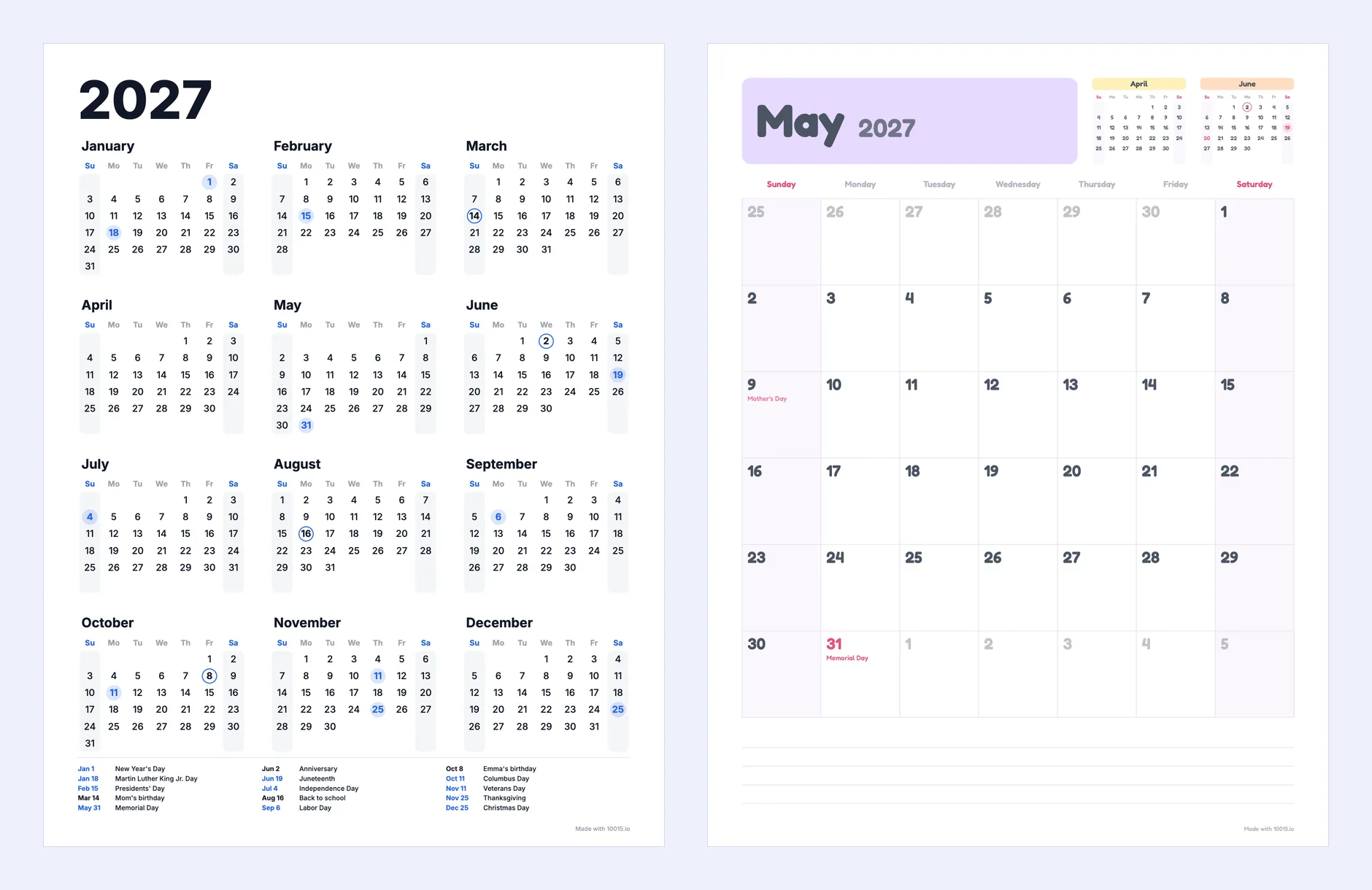
Printable Calendar Generator is a free tool for making calendars to print, for 2027 or any other year. Instead of a fixed template you set it up the way you want it: the whole year on one page, a month per page, or both together, on A4 or US Letter paper, upright or landscape, with the week starting on Sunday or Monday. Add your country's public holidays, your own birthdays and dates, and a photo for each month, then download every page as one PDF ready for the printer.
Yearly and Monthly Calendars
- Year on one page. All twelve months at a glance, with the holidays and your dates marked in colour and listed by date at the foot of the page — handy for the fridge, a desk or the front of a planner.
- A month per page. Twelve pages with big squares to write in. Holiday names and your dates are already written in the days, the months before and after are shown in small, and lines at the bottom leave room for notes.
- Year + 12 months. Both together, thirteen pages in one PDF: a whole wall calendar or planner in one download.
- A single month. Just the month you need, for a schedule, a rota or a meal plan.
Holidays Included
Choose a country and its public holidays are filled in: the United States, the United Kingdom, Canada, Australia, Germany, France, Spain, Italy, the Netherlands and Turkey. Moving holidays are worked out for the year — Easter and the days that follow it, Thanksgiving, Memorial Day, the bank holidays, and Ramadan and Sacrifice feasts from the Islamic calendar — and in the UK and Australia a holiday that falls on a weekend gets its substitute day. Tick "Observances too" for days that are not days off, such as Valentine's Day, Mother's Day, Father's Day and Halloween.
Your Own Dates
Birthdays, anniversaries, school terms, bin days: write each on its own line as Mar 14: Mom's birthday and it is ringed on the year page and written in the day on the month page. A date without a year comes back every year; write 2027-03-14 for a date in one year only.
Make It Yours
- Six styles. Minimal, Classic, Pastel, Bold, Botanical and Handwritten, each with its own fonts, plus any colour you like for the holidays and headings.
- Photo calendar. Upload up to twelve photos and each month gets one at the top of its page — a family calendar to give at Christmas.
- A photo behind the dates. Or lay the photo over the whole page, faded so every date stays easy to read: strongest at the top and fading away under the days, around the edges like a frame, or evenly all over. Make it black and white or turn it into the calendar's own colour, soften it out of focus, and choose how strong it shows. It works for the year on one page too.
- 22 languages. Month and day names in English, Spanish, French, German, Italian, Portuguese, Dutch, Turkish, Polish, Swedish, Japanese, Chinese and more.
- School and academic years. Start the twelve months in August or September for a 2027–2028 school calendar.
- Week numbers, shaded weekends, the days of the neighbouring months and your own title are all optional.
How to use Online Printable Calendar Generator?
- Choose the year, the layout and the day your week starts on.
- Pick your country for its holidays, and write your own dates, one per line.
- Choose a style, a colour, the paper size and the orientation.
- For monthly pages, upload photos if you want a photo calendar.
- Open the full screen view to check every page up close, then click "Download PDF" and print it, or save the page on screen as a PNG.
Frequently asked questions
How do I print a 2027 calendar?
Download the PDF and open it; it is already the size of your paper, so print at "Actual size" (or 100%) rather than "Fit to page" to keep the margins as they are. For a monthly calendar, print double-sided or bind the pages at the top for a wall calendar.
Is it A4 or US Letter?
Either. The paper is chosen from your region to begin with — Letter in the US and Canada, A4 elsewhere — and can be changed with one click.
Can I make a calendar for another year?
Yes. Choose any year from two years back to five ahead; holidays such as Easter and Thanksgiving move with it.
Does it work offline, and are my photos uploaded?
The calendar is drawn in your browser. Your photos and dates are not uploaded anywhere; the settings, but not the photos, are remembered in this browser for next time.
Will the dates still be readable over a photo?
Yes. The photo is faded towards the paper colour and every number and holiday name gets a soft halo of paper around it. For the clearest page choose "Strong at the Top, Fading Down" or "Around the Edges", or tick "Soft focus"; black and white or the calendar colour also prints with less ink.
Is it free to use for gifts or to sell?
Yes, the calendars are yours to print, give away or use in your own products. The small "Made with 10015.io" line at the foot of the page can be turned off.
Can I plan the year with goals as well?
Pair the calendar with the Goals Bingo Card Maker: write your 2027 goals on a bingo card, print it next to the calendar and tick them off through the year.