Text Tools
 Image Tools
 PDF Tools
 Social Media Tools
 Security Tools
 Coding Tools
 CSS Tools
 Color Tools
 Miscellaneous Tools
 Add to Chrome
 Add to Firefox

Puts the date on your photos, as the orange date of a film camera or as a modern timestamp, reading the date each photo was taken.
Drag your image here, or click to browse
Your photos stay in your browser: nothing is uploaded. Add several to do them all at once.
Found it useful? or .
What is Online Add Date Stamp to Photo?
Add Date Stamp to Photo writes the date on your photos and saves them again. It reads the date each photo was taken from the photo itself, so a picture from last summer gets last summer's date without you typing anything, and it can stamp a whole folder at once. Phones stopped offering a date stamp years ago; this puts it back on pictures you have already taken, on an iPhone, an Android phone or a computer, with no app to install.
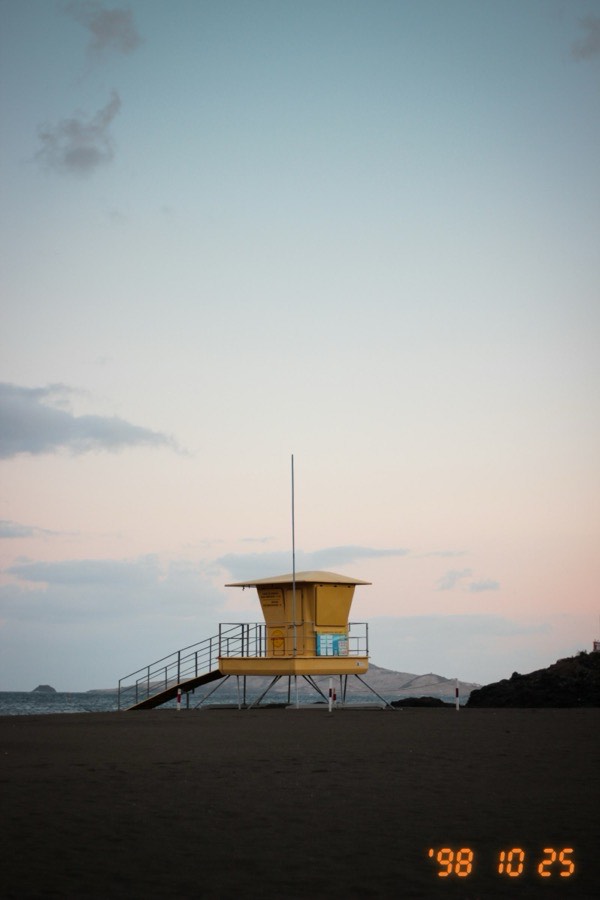
A photo with an orange retro film camera date stamp in the corner, added with the Add Date Stamp to Photo tool
The Orange Film Camera Date
The Retro style is the date film and early digital cameras burned into the corner of the picture: slanted orange digits like '98 10 25, made of the same seven-segment bars as the little display that printed them, with the soft glow they left on the film. The digits are drawn, not typed in a font, so they look the same on every device. Pick the order (year first like Japanese cameras, or month or day first), orange, red or yellow, how much it glows, and whether it shows the date, the time or both. "Change the Year To" turns the year into 1998 or any other, if you want the photo to look like it came out of a shoebox.
A Modern Timestamp
The Timestamp style writes the date and time in clean white text, like a timestamp camera app: 2026-10-25 14:32, Oct 25, 2026 2:32 PM, or 25.10.2026 14:32, with an optional second line for a place or a name and a dark background behind it when the photo is bright. It suits photo diaries, progress pictures, and pictures of a room, a car or a parcel where it helps to see when they were taken.
Where the Date Comes From
- Date taken: phones and cameras save the moment a photo was taken inside the JPEG file (its EXIF data), and the tool uses it. Each photo shows where its date came from.
- File date: screenshots, PNGs and photos sent through some messaging apps have lost that data, so the date the file was last changed is used instead, which you can correct.
- Your own date: change the date of any single photo, or choose "The same date for all" to stamp every photo with one date.
How to use Online Add Date Stamp to Photo?
- Drop one or more photos onto the page, or click to choose them. They are opened in your browser, not uploaded.
- Check the date under each photo; it is the date it was taken where the photo has one. Edit any that are wrong.
- Choose Retro or Timestamp, then the format, colour, position and size. The preview shows the selected photo with its stamp.
- Click "Download Photo", or "Download All" to get every stamped photo in one ZIP file.
Frequently asked questions
How do I add a date stamp to photos on iPhone or Android without an app?
Open this page in Safari or Chrome on the phone, tap the upload area and choose the photos from your library. The date each was taken is read from the photo, and the stamped copies are saved back to your downloads or, on an iPhone, through the share sheet to Photos.
Can I stamp photos that were taken years ago?
Yes. That is what reading the date from the photo is for: an old picture gets the date it was actually taken, not today's. If it has lost its date, type the right one under the photo.
Does it reduce the quality of my photos?
The photo keeps its full size and is saved as a high-quality JPEG (PNGs stay PNG). The only exception is very large photos, over 16 megapixels, which are scaled to fit what phone browsers can draw. The saved copy does not carry the original's EXIF data, such as the camera model and location, since the date is now on the picture itself.
Which photos does it read the date from?
JPEG photos from phones and cameras, which is almost all of them. HEIC photos from an iPhone are usually turned into JPEG when you pick them in a browser, and keep their date. PNG and WebP files rarely carry one, so their file date is used.
Usage Policy
Dating your own photos, for memories, a scrapbook or a retro look, is what this is for. A stamp is only a picture of a date, and it is easy to change, so it is not proof of when a photo was taken; using it to present a photo as taken on a date it was not, as evidence, in a claim or in a dispute, is not allowed. By using Add Date Stamp to Photo by 10015.io you agree not to use it to deceive anyone, and that 10015.io is not responsible for what is made with it.
Similar Image Tools
See All