Text Tools
 Image Tools
 PDF Tools
 Social Media Tools
 Security Tools
 Coding Tools
 CSS Tools
 Color Tools
 Miscellaneous Tools
 Add to Chrome
 Add to Firefox


Sort the pixels of a photo into streaks by brightness, hue or saturation, at any angle, for a melting glitch art look.
Or drop or paste a picture. It stays on your device.
Looks
Direction
Download
What is Pixel Sorting?
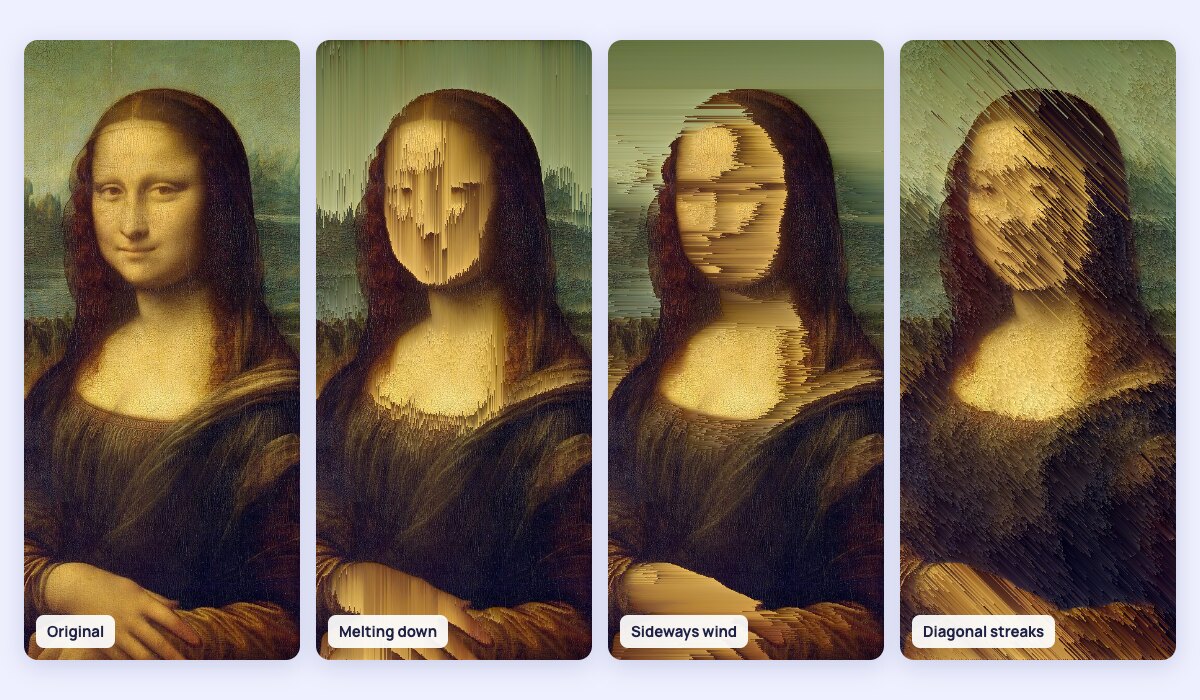
Pixel sorting is a glitch art technique: along each row or column of a picture, runs of pixels are put in order, from dark to light for example. Bright skies pour down like rain, faces melt into streaks, and the parts that are left alone keep the picture recognisable. The technique was made popular by the artist Kim Asendorf around 2010 and is now a staple of album covers, posters and music videos.
What you can control
- Direction: left to right, top to bottom, the other way round, or any angle in between.
- Sort by brightness, hue, saturation, or the red, green or blue channel, in either order.
- Which pixels: only those inside a brightness band (the classic look), runs between edges so shapes hold together, random runs for a choppy glitch, or whole lines.
- See the mask: show in white exactly which pixels will be sorted, to tune the band.
- Looks to start from: Melting down, Light rain, Sideways wind, Glitch, Diagonal streaks and Sorted shadows.
How to use Pixel Sorting?
- Upload, drop or paste a photo. A sample portrait is loaded to start with.
- Pick a look, or choose the direction and what to sort by.
- Move the Darkest and Lightest sliders to choose which pixels are sorted. Turn on "Show which pixels are sorted" to see them.
- Hold the eye button to compare with the original.
- Download the result as a PNG or a JPG.
Frequently asked questions
How does pixel sorting work?
The tool goes through the picture line by line in the direction you choose. In each line it finds runs of neighbouring pixels that pass the mask, for example every pixel between 25% and 80% brightness, and sorts each run by the key you picked. Pixels outside the mask stay where they are, and they also break the runs, which is what keeps the edges of the picture sharp.
How do I get the classic melting look?
Sort top to bottom by brightness, with a band that leaves out the darkest and the brightest pixels, around 25% to 80%. Pictures with a bright sky, light hair or a plain background work best. Widen the band for longer streaks, narrow it for a subtler effect, and tick Reverse to let the streaks rise instead of fall.
Is my photo uploaded?
No. The sorting is done in your browser, on your device; the photo is never sent anywhere. The result is up to 2000 pixels on its long side. For other glitch and print effects, try Image Dithering and the Halftone Generator.