Text Tools
 Image Tools
 PDF Tools
 Social Media Tools
 Security Tools
 Coding Tools
 CSS Tools
 Color Tools
 Miscellaneous Tools
 Add to Chrome
 Add to Firefox

Take photo booth strips with your webcam: countdown, filters, frames, stickers and captions, then download, print or share.
Allow the camera, strike a pose. Your photos never leave this device.
Start the camera, or upload photos
Photos you have taken move to the new layout, cropped from the middle to its shape.
Stickers go on the strip on the right: drag to move, pull the corner to resize and turn.
Click a photo to retake or replace it.
What is Online Photo Booth?
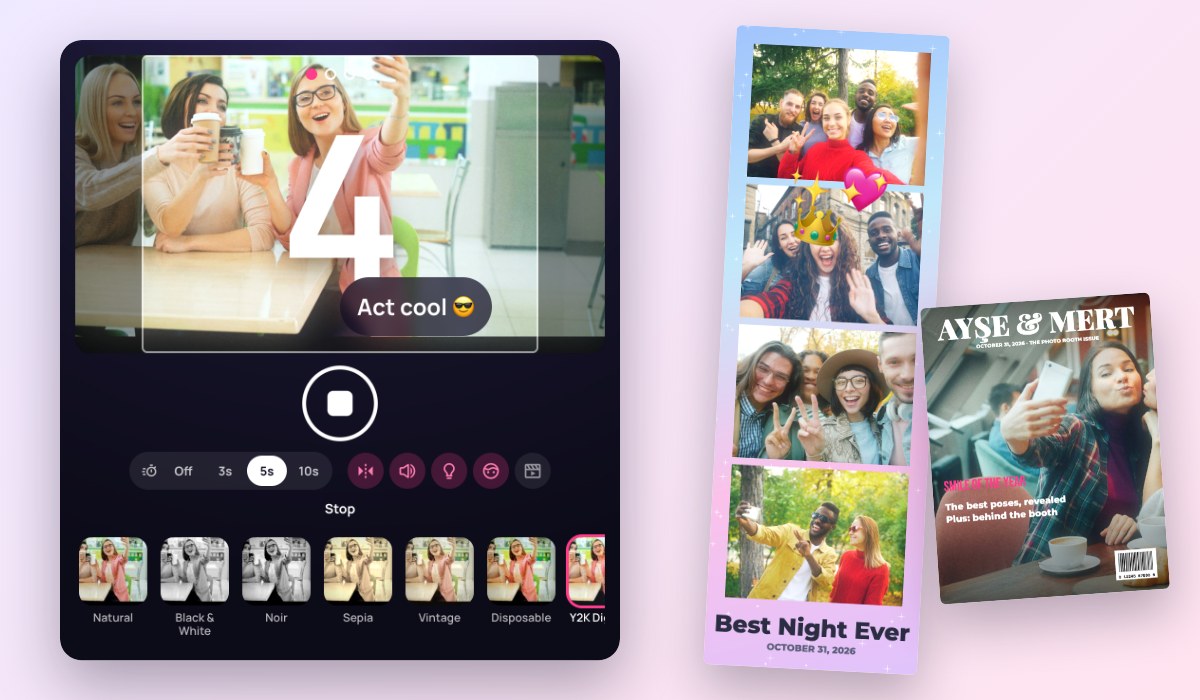
Online Photo Booth turns your webcam into a real photo booth: press the button, watch the countdown, strike a pose at the flash, and a few seconds later you have a photo strip ready to download, print or send. It works on a laptop, a tablet or a phone, with the front or the back camera.
Make the strip your own with 12 filters, from black and white to a Y2K digicam glow, 16 frame designs for weddings, birthdays and holidays, emoji stickers, your caption, the date and even your logo. Everything happens in your browser: your photos never leave your device.
What You Can Do
- Layouts: the classic 2×6 strip of 4, a strip of 3 squares, 2×2 and 2×3 grids on 4×6 paper, an instant photo, a 9:16 story and a magazine cover.
- A real booth feel: a 3, 5 or 10 second countdown with beeps, a white flash, a shutter sound and a pose idea for each photo, one after another or one per press.
- Retake any photo: click it on the strip to take it again, replace it with a picture from your device, or take it out.
- Filters that you see live on the camera and can still change afterwards, with brightness and soft skin.
- Frames and text: 16 designs or your own colour, rounded corners, 8 fonts, a caption, the date, a 90s orange date on each photo and your logo.
- Stickers: emoji to drag, resize and turn anywhere on the strip.
- Live photos: a second of movement kept with each photo, for a GIF where the whole strip moves.
- Downloads: PNG, JPG, a print-ready PDF (2×6, two strips on 4×6 photo paper, or a Letter or A4 sheet), an animated GIF and a 9:16 video for stories. Print it straight away, copy it, or share it from your phone.
- Together: take photos with someone far away. Send a link, and you are side by side in every photo, counting down at the same moment.
- Party mode: full screen for guests at a wedding or a party, with Space to start and a Next Guest button, and every strip of the evening kept to download.
- No camera? Upload your own photos and make a strip from them.
How to use Online Photo Booth?
- Press Start the Camera and allow your browser to use it.
- Choose a layout and a filter, and set the countdown.
- Press the round button (or Space) and pose for each photo.
- Add a frame, a caption and stickers, and retake any photo you do not like.
- Download the strip, print it, or save a GIF or a video.
Frequently asked questions
Are my photos uploaded anywhere?
No. The camera, the filters and the strip all work inside your browser, and nothing is sent to a server. The photos are gone when you close the page, unless you download them. Only your settings, such as the layout and the frame, are remembered for next time. In Together mode, your camera and photos go straight to the person you invited, over an encrypted connection; on some networks that connection passes through a relay server, which cannot see it.
How do I take photos with someone far away?
Press the person button on the camera, then Create a Booth Link, and send the link to your friend. When they open it and start their camera, you see each other side by side. Either of you can press the button: you both count down together, and every photo of the strip has the two of you in it. It is perfect for long-distance couples, family far away and friends in different cities.
Why does the camera not start?
Your browser asks before a site can use the camera. If you said no, click the camera icon in the address bar and allow it, then press Try Again. A camera that is busy in another app, such as a video call, has to be closed there first. On a phone, use the switch button to change between the front and the back camera.
How do I print a photo booth strip?
Choose PDF in More Formats. A classic strip is 2×6 inches, the size of a real booth strip; "two strips on 4×6" puts two of them on standard photo paper to cut in half, so any photo printer or print shop can print it. Print at 100%, without "fit to page".
Can I use it at a wedding or a party?
Yes: set it up on a laptop or a tablet, add your names or your logo and a frame, and press the full screen button for party mode. Guests press Space or the button to start, and Next Guest when they are done; each strip of the evening stays in "This session" to download later. To go further, make a printable calendar with the photos, or give them a 90s look with the Disposable Camera Filter.