Text Tools
 Image Tools
 PDF Tools
 Social Media Tools
 Security Tools
 Coding Tools
 CSS Tools
 Color Tools
 Miscellaneous Tools
 Add to Chrome
 Add to Firefox


Drop a photo to see everything stored inside it: where and when it was taken, the camera and its settings, a hidden preview, AI prompts and Content Credentials. Nothing is uploaded.
Drop a photo here, paste it, or browse
JPEG, PNG, WebP, HEIC, AVIF, GIF, TIFF and DNG
Your photo is read in this browser and never uploaded.
Found it useful? or .
What is Image Metadata Viewer?
Image Metadata Viewer shows everything a picture file says about itself. Phones and cameras store far more than the picture: the exact spot where it was taken, the date and time to the second, the phone or camera with its serial number, every setting, and often a small preview of the original. Editing apps add their own history, and AI image tools can save the very prompt that made the picture.
Drop a photo and the tool reads it all: the EXIF data, the GPS location (with a map), XMP and IPTC fields, the colour profile, Content Credentials (C2PA) and the prompts written by Stable Diffusion, ComfyUI, Midjourney and others. It sums up what the file gives away, and lets you remove the metadata in one click. The photo is read in your own browser and is never uploaded.
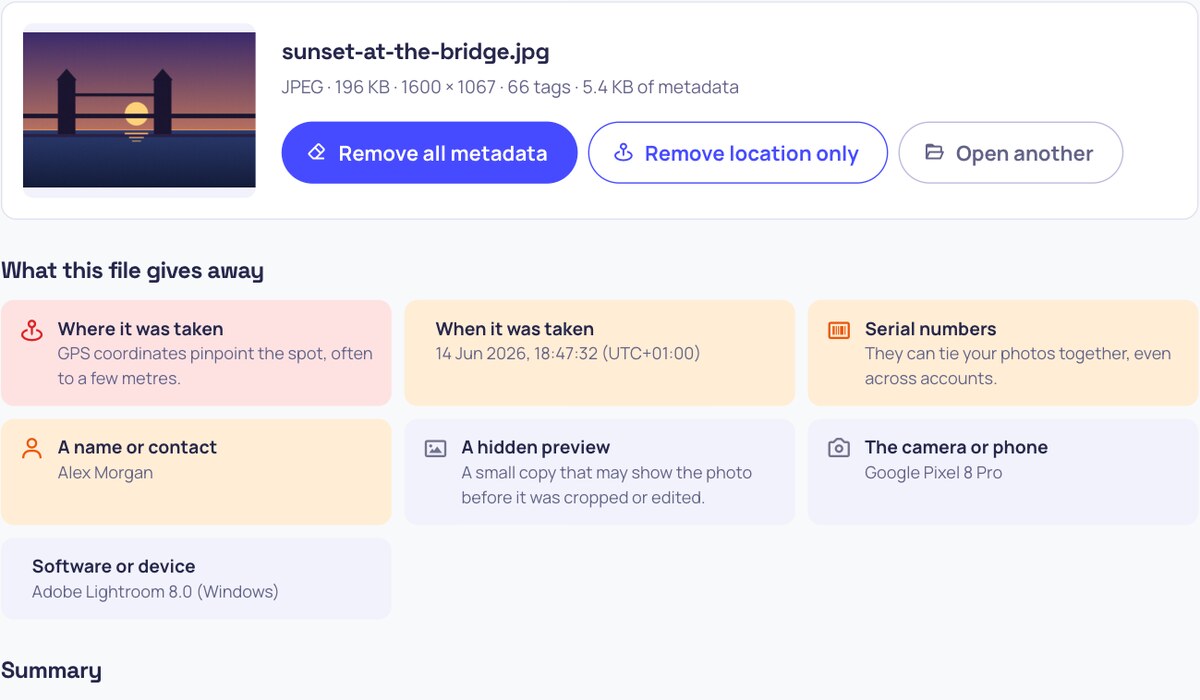
An image metadata viewer showing a photo with its GPS location, camera, settings, date and a warning about what the file gives away
What it shows
- What the file gives away: location, date, serial numbers, names, a hidden preview, AI prompts, each flagged by how much it reveals.
- Location: latitude and longitude, altitude, the direction the camera faced and its accuracy, with a map, Google Maps and OpenStreetMap links.
- Camera and settings: phone or camera, lens, shutter speed, aperture, ISO, focal length (and its 35 mm equivalent), flash and white balance.
- Dates: when it was taken, with the time zone, and when it was last edited.
- AI and Content Credentials: prompts and settings from Stable Diffusion, ComfyUI, NovelAI, InvokeAI, Fooocus and Midjourney; the IPTC "made with AI" label; and C2PA records from ChatGPT, Adobe, Google and cameras.
- The hidden preview: the small copy cameras store, which can still show a photo before it was cropped.
- Every tag, searchable: EXIF, GPS, XMP, IPTC, ICC, PNG text, edit history and the file's structure, with its SHA-256 fingerprint; copy or download it as JSON or CSV.
- All common formats: JPEG, PNG, WebP, HEIC and HEIF from iPhones, AVIF, GIF, TIFF and DNG.
How to use Image Metadata Viewer?
- Drop a photo on the box, paste it, or click to choose one. Use the original file: photos sent through most chat apps have already lost their metadata.
- Read "What this file gives away" first, then the cards for the location, camera, dates and AI.
- Search every tag below, or download them as JSON or CSV.
- To share the photo safely, press Remove all metadata, or Remove location only to keep the rest.
Frequently asked questions
What is EXIF data?
EXIF is the information a camera or phone writes into each photo: its make and model, the shutter speed, aperture and ISO, the date and time, the orientation, and on most phones the GPS position. It travels with the file wherever you send it, unless the app or website removes it.
Can a photo show where it was taken?
Yes, if location was turned on for the camera, which it is by default on most phones. The GPS position is usually accurate to a few metres, enough to find a home address. Social networks such as Instagram, Facebook and X remove it when you post, but email, cloud links, messaging apps sending "files" or "documents", and many forums and marketplaces keep it.
Can I tell if an image was made by AI?
Often, if the metadata is still there. Stable Diffusion apps and ComfyUI save the full prompt and settings; ChatGPT, Adobe Firefly, Google and others add Content Credentials or an IPTC label that says the image was made with AI. But metadata is easy to remove, so a picture with no signs may still be AI-made. Invisible watermarks such as Google's SynthID are in the pixels, not the metadata, and cannot be read here.
Why does my photo show no metadata?
It was probably removed on the way: WhatsApp, Instagram, Facebook, X and most websites strip it when you upload, and screenshots never had any camera data. Some phones also leave out the location when you share. Open the original file from your phone, camera or computer instead.
Is my photo uploaded?
No. The file is read by your browser on your own device and is not sent anywhere. The only thing loaded from outside is the map, and only if you press "Show on the map".
How do I remove the metadata?
Press Remove all metadata to save a clean copy, or Remove location only to keep the camera details and dates. To clean many photos at once, use Remove Metadata from Image. Both keep the picture exactly as it is, without re-compressing it.
Similar Image Tools
See All