Text Tools
 Image Tools
 PDF Tools
 Social Media Tools
 Security Tools
 Coding Tools
 CSS Tools
 Color Tools
 Miscellaneous Tools
 Add to Chrome
 Add to Firefox

Gives photos the look of an early 2000s digital camera: CCD colours, flash, noise, low resolution, JPEG compression and the orange date.
Drag your image here, or click to browse
Your photos stay in your browser: nothing is uploaded. Add several to do them all at once.
Found it useful? or .
What is Online Digicam Filter?
A digicam is the small digital camera everyone carried before phones had good ones, and the pictures it took have come back into fashion: bright, slightly cold colours from its CCD sensor, a flash that whitens faces and blacks out the room, noise in the shadows, soft edges from a few megapixels, the blocky artefacts of heavy JPEG compression, and often the date in orange in the corner. Digicam Filter gives your photos that look, without buying an old camera on eBay.
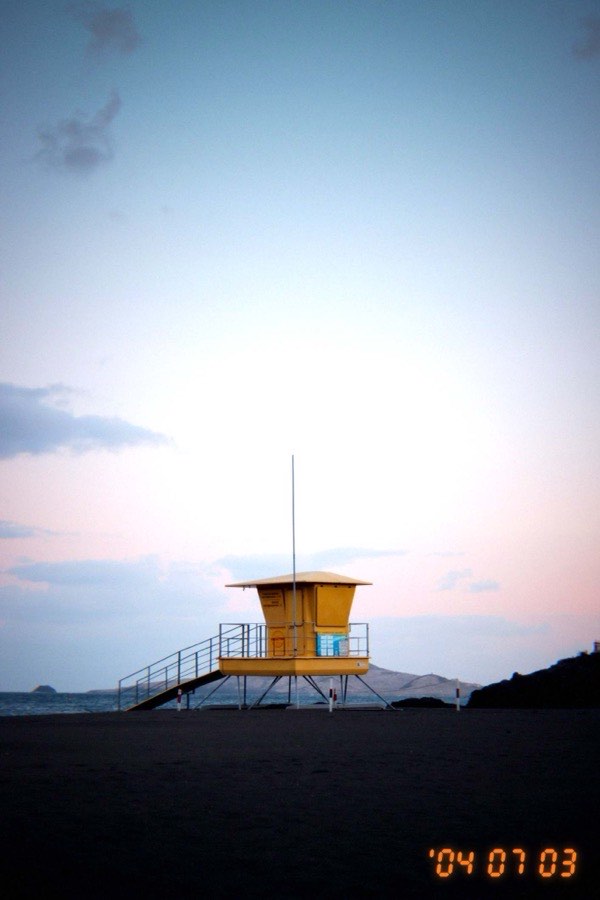
A photo with a Y2K digicam effect: cool CCD colours, flash, noise and an orange date stamp, made with the Digicam Filter
What Makes the Digicam Look
- CCD colours: the cool, punchy colours of early sensors, or the warmer and brighter takes of other compacts.
- Flash: the built-in flash that lights the middle of the picture and falls off fast.
- Resolution: the photo is taken again, as it were, at an old camera's resolution, from 5 MP down to 0.3 MP VGA. The older the camera, the softer its lens, the more noise and the heavier the compression, and the result is enlarged back to your photo's size, soft and blocky the way a 640 × 480 picture looks on a screen today.
- Sensor noise and colour fringes: coloured speckles in the dark areas and the red and blue edges of a small lens.
- JPEG compression: the photo is really saved as a low-quality JPEG and read back, so the blocks and smears are the genuine thing.
- Date stamp: the orange date, on by default, using the date each photo was taken.
"Night flash with noise" is the party picture of 2004; "90s camcorder" softens and smears colours like a still taken from a video tape. Every slider can be changed after choosing a look.
How to use Online Digicam Filter?
- Add your photos, or try the looks on the sample first.
- Choose a look and a camera resolution, then adjust the flash, noise and compression.
- Keep the orange date stamp, change its format or year, or untick it.
- Download one photo, or all of them as a ZIP.
Frequently asked questions
Why does the 0.3 MP setting look so rough?
Because a VGA camera did: the picture is made at 640 × 480, with that camera's soft lens, noise and compression, then enlarged to your photo's size, so the low resolution shows. Choose "The camera's real size" under Saved Size to keep it at 640 × 480 instead, or "Original size" as the resolution to keep every pixel and only add the look.
What is the difference between this and the Disposable Camera Filter?
The Disposable Camera Filter imitates film: grain, warm or green film colours, light leaks and print frames. This one imitates the digital cameras that replaced film: cooler colours, digital noise, low resolution and compression. The tabs above the photo switch between them and the date stamp tool.
Can I use it for the 2000s or 90s aesthetic on Instagram and TikTok?
That is what it is made for. For the full effect, use photos taken with the phone's flash on, at night or indoors, and keep the date stamp; change the year to 2004 or 1999 to finish the story.
Are my photos uploaded?
No. Everything happens in your browser, and the photos are saved straight back to your device.
Usage Policy
Use Digicam Filter by 10015.io on photos you have the right to edit, and not to pass an edited picture off as an untouched original where that matters. 10015.io is not responsible for what is made with it.
Similar Image Tools
See All