Text Tools
 Image Tools
 PDF Tools
 Social Media Tools
 Security Tools
 Coding Tools
 CSS Tools
 Color Tools
 Miscellaneous Tools
 Add to Chrome
 Add to Firefox


Drop your photos to remove their hidden metadata (location, dates, camera, AI prompts) in bulk. The picture stays exactly the same and never leaves your device.
Drop photos here, paste them, or browse
JPEG, PNG, WebP, HEIC, AVIF and GIF · as many as you like
Cleaned in this browser: your photos are never uploaded, and the picture is not re-compressed.
Want to see what a photo holds first? Open it in the Image Metadata Viewer.
Found it useful? or .
What is Remove Metadata from Image?
Remove Metadata from Image deletes the hidden information stored in your photos before you share them: the GPS location that can lead to your home, the date and time, the phone or camera and its serial number, your name, the editing history, AI prompts, and the small preview that can still show what you cropped out.
Unlike most tools, it does not re-save the picture. It takes the metadata out of the file and copies the picture data byte for byte, so the quality, size and format stay exactly the same, and a HEIC stays a HEIC. Each cleaned photo is read back to check that nothing is left. Everything happens in your browser, so your photos are never uploaded.
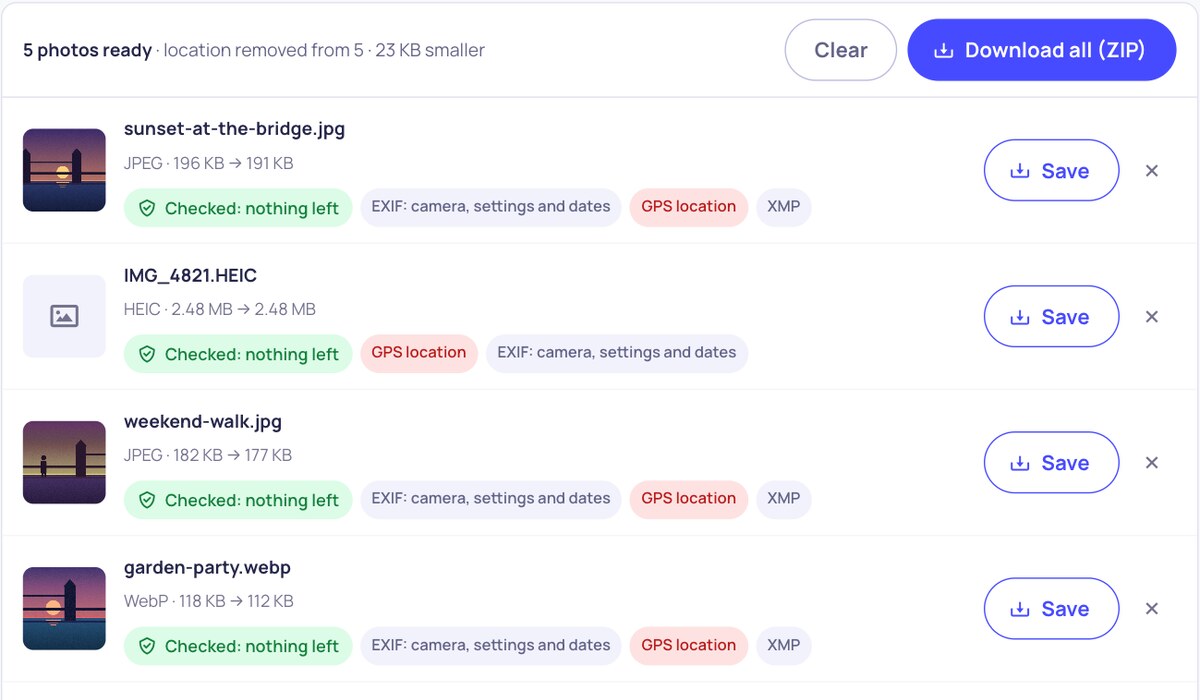
A list of photos cleaned of their metadata, each showing the GPS location, EXIF and XMP that were removed and a check mark
Features
- Removes everything personal: EXIF, GPS, XMP, IPTC, comments, maker notes, the hidden preview, edit history, AI prompts from Stable Diffusion and ComfyUI, and Content Credentials.
- Or only the location: keep the camera details and dates, and take out just the GPS position and place names.
- No quality loss: the picture is not re-compressed; pixels are untouched and files usually get smaller.
- Keeps photos looking right: the rotation and colour profile can stay, so pictures do not turn sideways or lose their colours.
- Bulk: drop as many photos as you like and download them one by one or as a ZIP.
- Checked: each result is read back to make sure the metadata is gone.
- Formats: JPEG, PNG, WebP, HEIC and HEIF from iPhones, AVIF and GIF.
How to use Remove Metadata from Image?
- Choose what to remove: all metadata, or only the location.
- Drop your photos on the box, paste them, or click to choose them.
- See what was removed from each one, and the check that nothing is left.
- Save the photos one by one, or press Download all to get a ZIP.
Frequently asked questions
Why remove metadata from photos?
A photo from a phone usually holds the exact place it was taken, to within a few metres, along with the date, the time and the device. Sold items, rental listings, dating profiles, school and sports photos, and pictures sent as files can all reveal where you live or where your children spend their day. Removing the metadata keeps the picture and drops the rest.
Does it reduce the quality?
No. Most tools draw the photo onto a canvas and save a new JPEG, which loses quality and can change the colours. This one leaves the picture data untouched and removes only the metadata around it, so the pixels are exactly the same as before.
Will my photo be rotated after cleaning?
Not with "Keep orientation and colours" ticked. Cameras often save a photo sideways and add a tag that says how to turn it; the tool keeps that one tag, and nothing else, so the photo still shows the right way up. Untick it to remove absolutely everything.
Does it work with iPhone HEIC photos?
Yes. The HEIC file stays a HEIC: its EXIF and XMP are emptied where they are, so the photo, its quality and its depth and HDR parts are not touched. JPEG, PNG, WebP, AVIF and GIF work too.
Are my photos uploaded?
No. Everything runs in your browser, on your device, so the photos are never sent anywhere. That also makes it fast, even for large batches.
How can I see what a photo contains?
Open it in the Image Metadata Viewer. It shows the location on a map, the camera and its settings, the dates, any AI prompt and every tag, and it can remove the metadata too.
Similar Image Tools
See All