Text Tools
 Image Tools
 PDF Tools
 Social Media Tools
 Security Tools
 Coding Tools
 CSS Tools
 Color Tools
 Miscellaneous Tools
 Add to Chrome
 Add to Firefox

Compress image to 20KB, 50KB, 100KB or any KB size: photos and signatures just under the limit, free.
JPG, PNG, WebP or GIF, up to 30 at once. Compressed in your browser, never uploaded.
Quality is lowered first; the pixel size shrinks only if quality alone cannot reach the target.
What is Compress Image to KB?
Compress Image to KB shrinks a photo, scan or signature until its file is just under the size you choose, such as 20 KB, 50 KB, 100 KB or 200 KB. You pick the target, drop the image, and get a JPG (or WebP or PNG) that fits the limit as closely as possible, for example 49.7 KB for a 50 KB limit rather than a needlessly blurry 18 KB. It is made for the moment an upload form says "file size must be less than 50 KB" and your phone photo is 4 MB.
Everything happens in your browser. The images are decoded, redrawn and re-encoded on your own device, so nothing is uploaded to a server, there is no sign-up, no watermark and no daily limit. That matters for the documents people usually compress this way: ID photos, signatures, certificates and scans.
How to compress an image to a size in KB
- Choose the target size: 10, 20, 30, 50, 100, 200 or 500 KB, or type any other number in the last box.
- Drop one or more images on the panel or press Choose images. JPG, PNG, WebP and GIF work, up to 30 at once.
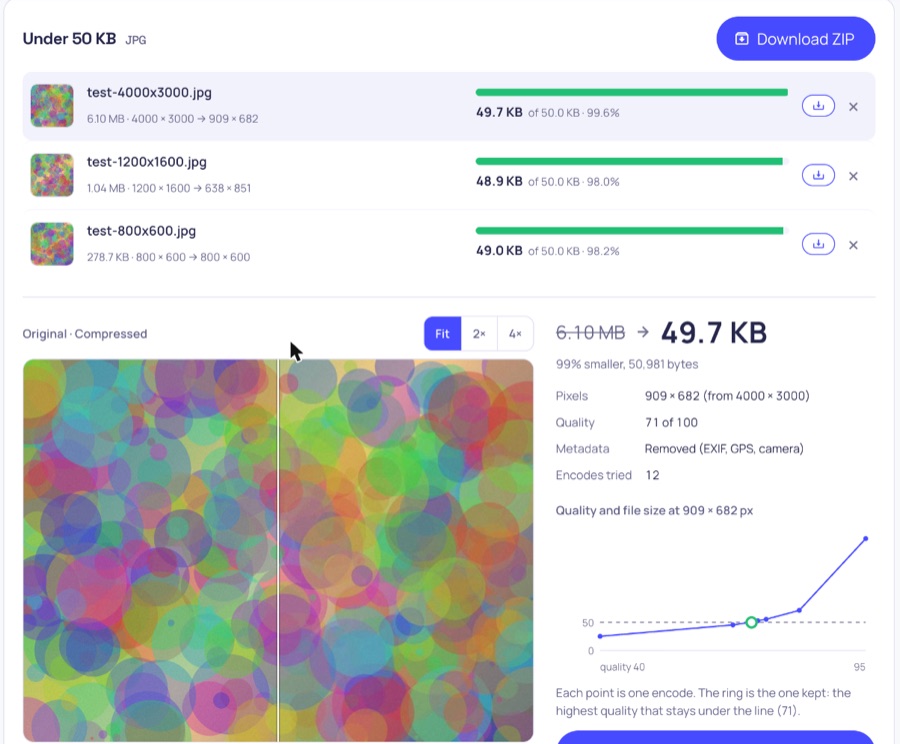
- Each image is compressed right away. The bar under it shows how much of the target the new file uses, and the numbers show the exact size.
- Need a fixed size in pixels, for example 200 × 230 px for a form photo? Set Pixel size to Exact and type the width and height, or pick one of the typical form uploads.
- Check the result with the compare slider, zoom in to 2× or 4× if you want to see the detail, then press Download. With several images, Download ZIP saves them all at once.
How the tool reaches the target
A JPG's size cannot be set directly; it is the result of the pixel size, the picture's detail and the quality setting. So the tool searches. It first saves the image at a very high quality. If that already fits, you get it unchanged in pixel size. If not, it tries a low quality to see whether the target can be reached at all at this size, then halves the gap between "fits" and "too big" again and again, about nine times, until it finds the highest quality whose file still fits. The quality and size curve next to the result shows every one of these tries, with the one kept marked by a ring.
When even a low quality is too big, lowering the quality further would only turn the picture into blocks. Then the tool reduces the pixel size instead, in proportion to how far off it is, and searches the quality again. A slightly smaller, clean image almost always looks better than a full-size one made of compression artefacts, and most upload forms show photos small anyway.
Compress image to 20KB
20 KB is a common limit for signatures and for thumbnail photos on application portals. A full phone photo cannot fit in 20 KB at its original size, so expect the result to be around 400 to 700 pixels wide for a photo, which still looks sharp on screen. A signature on white paper fits easily: crop it close to the ink first, and the plain background compresses to almost nothing.
Compress image to 50KB
50 KB is the limit most often asked for with passport-style photos. At 200 × 230 pixels, the size many forms ask for, a JPG at high quality is usually only 10 to 25 KB, so the photo keeps full quality. If the form asks only for "under 50 KB" with no pixel size, keep Pixel size on Auto and the tool chooses the largest image that fits, typically around 800 to 1,000 pixels wide for a portrait.
Compress image to 100KB, 200KB and 500KB
100 KB to 200 KB is enough for a sharp photo at 1,200 to 1,600 pixels, which suits email, websites, marketplace listings and document scans. 500 KB keeps most phone photos at a large size with no visible loss. For scanned documents, larger targets matter more than for photos, because small text needs enough pixels to stay readable.
Photos and signatures for online forms
Job, exam, visa and government portals often ask for a photo and a signature with both a pixel size and a file size, such as "200 × 230 pixels, 20 to 50 KB, JPG". The tool's typical form uploads fill in common combinations in one press:
- Signature: 140 × 60 px, under 20 KB, placed on white without cropping the ink.
- Form photo: 200 × 230 px, under 50 KB, cropped to fill the frame from the centre.
- Passport photo: 413 × 531 px, which is 35 × 45 mm at 300 dpi, under 100 KB.
- Web upload: longest side at most 1,600 px, under 200 KB.
These are typical values, not the official rules of any particular form, and requirements change from one year's notice to the next. Always read the instructions of the form you are filling in and type its exact numbers into the target and pixel boxes. Some forms also set a minimum file size, such as 10 KB; the result's exact size in bytes is shown, so you can check both ends.
For a photo, Crop to fill trims the edges so the face fills the frame at the required shape; check that nothing important is cut. For a signature, White edges keeps the whole signature and fills the leftover space with white. Sign with a dark pen on plain white paper and photograph it in daylight, and the result will be crisp even at 10 KB.
KB, kB and KiB: how file size is counted
A kilobyte is counted two ways. Windows, most upload forms and most "under 50 KB" checks use 1 KB = 1,024 bytes, so 50 KB is 51,200 bytes. macOS, phones and storage makers use 1 kB = 1,000 bytes, so 50 kB is 50,000 bytes. A file of 50,800 bytes is therefore "49.6 KB" on Windows but "51 KB" on a Mac. If a form rejects a file that looks small enough, this is often why.
The tool counts 1,024 bytes by default. Switch to 1,000 bytes and the result fits the stricter reading as well, so it passes either check. The exact number of bytes is always shown under the result.
Why quality drops, and how to keep it
JPG compression throws away detail the eye notices least: fine texture, subtle colour changes and noise. Pushed too far, it shows as blocky 8 × 8 squares, smeared skin, halos around edges and banding in skies. The file size depends far more on detail than on the number of pixels, so a grainy indoor photo needs much more space than a sharp portrait against a plain wall.
- Crop first. Every pixel you remove is space the remaining ones can use.
- Use a plain, bright background. Noise from a dim room costs a lot of bytes.
- Let the pixel size shrink. On Auto the tool trades size for quality sensibly; forcing a large exact size into a small target is what produces blocks.
- Choose WebP where it is accepted. At the same size it usually looks clearly better than JPG, but most government forms still accept JPG only.
- Avoid PNG for photos. PNG is lossless, so the only way to make it smaller is fewer pixels. It suits screenshots and line drawings.
Privacy and metadata
Photos from phones carry EXIF data: the camera model, the date and often the GPS position where they were taken. Re-encoding through the canvas writes only the picture, so all metadata is removed from the result, which also saves a few kilobytes. The orientation stored in that data is applied first, so a photo taken in portrait does not come out sideways. Because the work is done on your device, the files stay with you; closing the tab clears them.
Frequently asked questions
Is this image compressor free and online?
Yes. It is free, works in any modern browser on phone or computer and needs no account. It runs offline once the page has loaded, since nothing is sent to a server.
Will the result be exactly 50 KB?
It will be just under it, usually within 1 to 3 percent, for example 49.2 to 49.9 KB. Landing exactly on a number is neither possible with JPG nor useful: forms check that the file is not above the limit, and a file a few bytes under passes.
Why is my image bigger than the original after compressing?
If the original is already smaller than the target, the tool saves it at high quality, which can be a little larger than a heavily compressed original. Choose a smaller target, or keep the original file if it already fits.
The bar is red. What does it mean?
It means the exact pixel size you set cannot get under the target even at the lowest quality, which happens with large dimensions and very small targets. Lower the width and height, or raise the target.
How do I reduce photo size in KB without changing its dimensions?
Set Pixel size to Exact and enter the current width and height. Only the quality will change. For most photos this works down to about one byte per ten pixels before artefacts become obvious.
Can I compress several images to the same size at once?
Yes. Add up to 30 images; each is compressed to the same target and settings, and Download ZIP saves them together with names that include the target, such as photo-50kb.jpg.
Can I compress a PDF or an iPhone HEIC photo here?
No, this tool takes JPG, PNG, WebP and GIF images. Save a HEIC photo as JPG first (on iPhone, Settings › Camera › Formats › Most Compatible makes new photos JPG), and use a PDF compressor for documents.