Text Tools
 Image Tools
 PDF Tools
 Social Media Tools
 Security Tools
 Coding Tools
 CSS Tools
 Color Tools
 Miscellaneous Tools
 Add to Chrome
 Add to Firefox


Get the video out of a Samsung or Pixel Motion Photo: the original MP4 at once, or a trimmed MP4 or GIF. Nothing is uploaded.
Going the other way? Turn a video into a Live Photo or a Motion Photo.
How to bring a Motion Photo here
- A Motion Photo from a Samsung, Pixel or other Android phone is one .jpg with the video inside it.
- Tap Choose a Motion Photo and pick it from your gallery. The video comes out at once, exactly as the phone recorded it.
- If it comes through as a still, use Browse all files instead and pick it from the folder it is in (DCIM › Camera).
- A motion photo that was sent through WhatsApp, Messenger or most chat apps has lost its video: use the original on the phone that took it.
What is Motion Photo to Video?
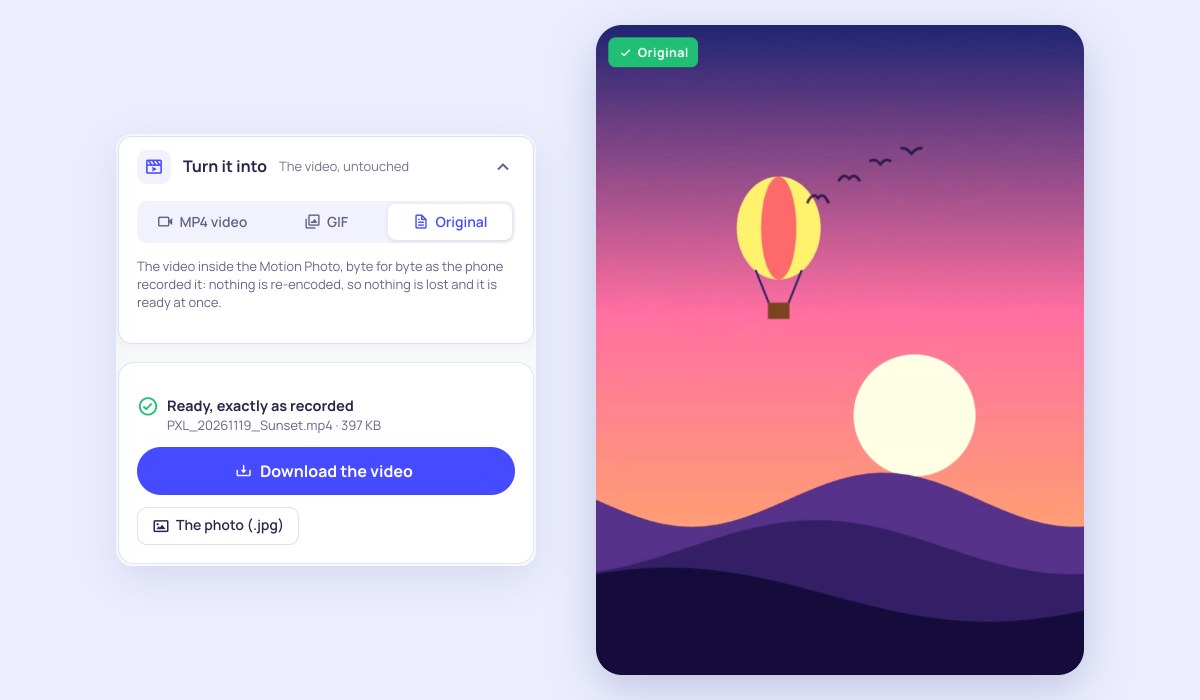
Motion Photo to Video takes an Android Motion Photo, the picture with a few seconds of video inside it that Samsung, Pixel and other Android cameras take, and gives you that video as a file. A Motion Photo is one .jpg (or .heic) with an MP4 stored after the picture. The page finds it and hands it over byte for byte, with nothing re-encoded, so it is ready the moment you choose the photo and nothing is lost. If you want less of it, a boomerang, another shape or a GIF, it makes that too. Everything happens in your browser, on your device.
What makes it different
- The original video, untouched: the MP4 inside the photo is cut out exactly as the phone recorded it, with its sound. No re-encoding, no loss of quality, no waiting.
- Samsung and Google formats: it reads Samsung’s own motion photo record, Google’s Motion Photo and older MicroVideo formats, and HEIC motion photos, and says which one it found.
- The photo too: save the still on its own as a plain .jpg, without the video inside it, to share it as a small ordinary picture.
- MP4 or GIF your way: trim it, play it there and back or backwards, change its speed, repeat it, or set it in 9:16, 1:1 or another shape, with a preview of the result.
- It tells you when the video is gone: a motion photo sent through a chat app is often only a still. The page says so instead of failing silently, and says how to get the original.
- Nothing is uploaded: the photo is read on your device, so it stays private.
How to convert a Motion Photo to a video
- Tap Choose a Motion Photo and pick it from your gallery. On a computer, drop the .jpg on the page.
- The video inside is found at once. To keep it exactly as recorded, press Download the video.
- For a shorter clip, a boomerang or a GIF, choose MP4 video or GIF, then trim it and choose how it plays.
- Press Make the video or Make the GIF, then Download.
- It is in your Download folder: in Google Photos under Collections › On this device › Download, in Samsung Gallery under Albums › Download.
Frequently asked questions
What is a Motion Photo?
A photo that also holds the second or three before and after the shutter. Samsung calls it Motion Photo, Pixel phones call it Top Shot or Motion, and it is Android’s answer to the iPhone’s Live Photo. The file is a normal picture with an MP4 video appended to it, plus a note of where the video starts. A gallery that knows the format plays it; anything else shows only the picture.
Does it work with Samsung motion photos?
Yes. Samsung phones store the video in their own record at the end of the file, and the page reads that first. It also reads Samsung’s HEIC motion photos, where the phone is set to save pictures in high efficiency.
Why does it say my photo has no video in it?
Because that copy has lost it. WhatsApp, Messenger, Instagram and most chat and social apps rewrite pictures and drop the video, and so do some cloud services and editors. Use the original on the phone that took it. If you are on that phone and it still comes through as a still, tap Browse all files and pick the photo from DCIM › Camera, so the gallery cannot hand over a plain copy.
Is the original video better than a new MP4?
It is the same recording with nothing changed, so it cannot be better than that, and it is ready at once. Make a new MP4 only when you want to change something: the length, the direction, the speed, the shape, or to get H.264 from a phone that records motion photos in HEVC and plays badly elsewhere.
Can I turn a Motion Photo into a GIF?
Yes. Choose GIF, then the width, the frames a second and the colours. The page shows about how heavy the GIF will be before you make it.
Does it work with iPhone Live Photos?
Yes: a Live Photo’s .MOV, or its photo and .MOV together, can be chosen here too. Live Photo to Video and Live Photo to GIF are the same converter with the steps for an iPhone. To make a Motion Photo from a video, use Video to Motion Photo.
Is it free? Is my photo uploaded?
It is free, with no sign-up, no watermark and no limit. Nothing is uploaded: the page reads the photo on your device and the video never leaves it.