Text Tools
 Image Tools
 PDF Tools
 Social Media Tools
 Security Tools
 Coding Tools
 CSS Tools
 Color Tools
 Miscellaneous Tools
 Add to Chrome
 Add to Firefox

Turn a photo into halftone dots, squares or lines, in one ink, CMYK or its own colours, and download it as a PNG or a vector SVG.
Or drop or paste a picture. It stays on your device.
Looks
Download
What is Halftone Generator?
Halftone Generator turns a photo into a halftone: a grid of dots that are big where the picture is dark and small where it is light, the way newspapers, comics and posters have been printed for over a hundred years. From a distance the dots blend back into the picture; up close they give it the bold, printed look of pop art and vintage ads.
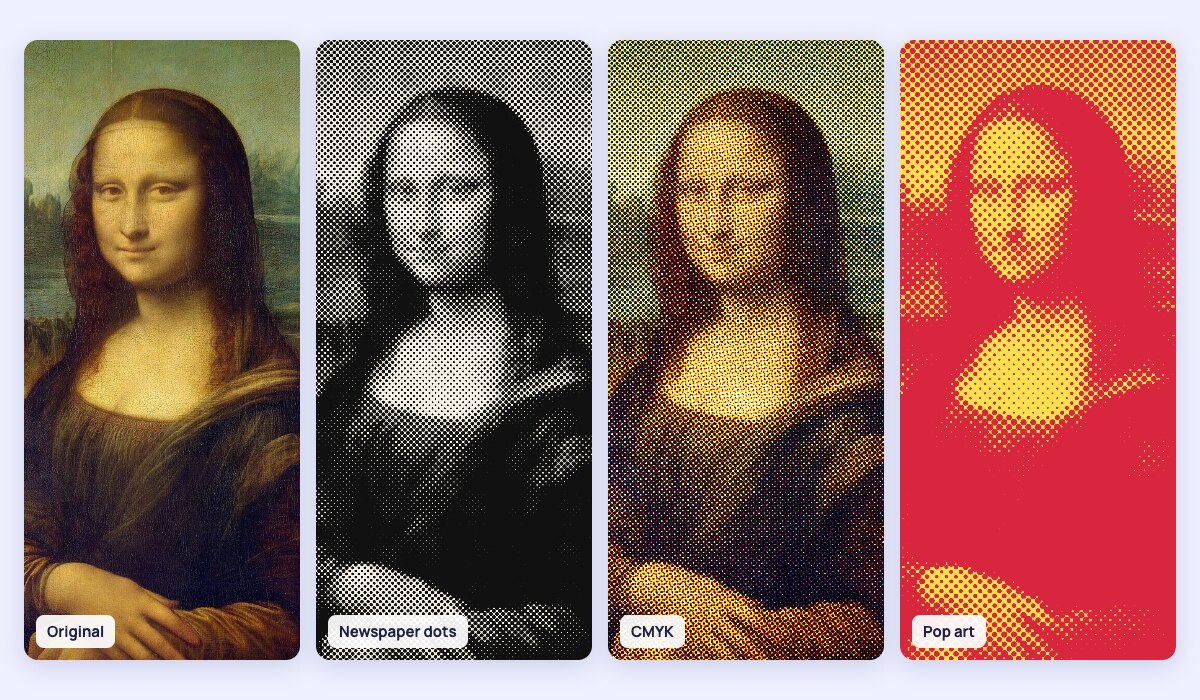
Halftone styles
- One colour: dots in any ink on any paper colour, from black on newsprint to red on yellow pop art.
- CMYK: four screens in cyan, magenta, yellow and black, each at its own printing angle (15°, 75°, 0° and 45°), mixed like real print. The little rosettes appear where they overlap.
- Picture's colours: each dot in the colour of that spot, lovely on a black background.
- Shapes: round dots, squares, diamonds, or lines that thicken in the dark parts like an engraving.
- Settings: dot spacing, dot size, the screen angle, brightness and contrast, and invert for big dots in the light parts.
- Vector SVG: every dot as a shape, so the picture can be printed at any size, cut with a vinyl cutter or a laser, or edited in Illustrator, Inkscape or Figma.
How to use Halftone Generator?
- Upload, drop or paste a picture. A sample portrait is loaded to start with.
- Pick a look, such as Newspaper, CMYK print or Pop art, then fine-tune it.
- Set the dot spacing: bigger spacing makes bigger, bolder dots.
- Hold the eye button to compare with the original.
- Download a 2000-pixel PNG, or an SVG for any size.
Frequently asked questions
What is a halftone effect?
Printing presses cannot print grey: each spot either has ink or it does not. A halftone fakes the shades with dots of different sizes on a regular grid, so a dark area is covered by big dots and a light one by tiny ones. Colour printing does the same with four inks, cyan, magenta, yellow and black, each screen turned to its own angle.
Which dot spacing should I use?
For a picture that still reads as a photo, use 6 to 12 pixels. For a bold poster or pop art look, 18 pixels or more. Large dots work best on faces and simple shapes; a busy picture needs smaller dots to stay recognisable. Raising the contrast a little usually makes the dots crisper.
Can I get a halftone as a vector?
Yes. Download the SVG: each ink is one path made of all its dots, so you can scale it to a billboard, change the colours or cut it with a Cricut, a vinyl cutter or a laser engraver. For screen printing, use one colour and print the SVG on film.
Why do the CMYK dots look like rosettes?
The four screens are turned to different angles so their dots do not line up into a distracting moiré pattern. Where they overlap they form small flower-like rosettes, the same pattern you see in a printed magazine under a magnifier.
Is my photo uploaded?
No. The halftone is made in your browser, on your own device; the picture is never sent anywhere. For other retro looks, try Image Dithering and Pixel Sorting.