Text Tools
 Image Tools
 PDF Tools
 Social Media Tools
 Security Tools
 Coding Tools
 CSS Tools
 Color Tools
 Miscellaneous Tools
 Add to Chrome
 Add to Firefox

Gives photos the look of a disposable film camera: film colours, grain, flash, light leaks and vignette, with a print frame and the orange date if you like.
Drag your image here, or click to browse
Your photos stay in your browser: nothing is uploaded. Add several to do them all at once.
Found it useful? or .
What is Online Disposable Camera Filter?
Disposable Camera Filter makes your photos look like they came back from the shop in a paper envelope: the colours of cheap film, visible grain, the hard flash that lights the front and leaves the back in the dark, darker corners from a plastic lens, and now and then a warm streak of light that got onto the roll. It works on photos you already have, from a phone or a camera, several at a time, and none of them leave your browser.
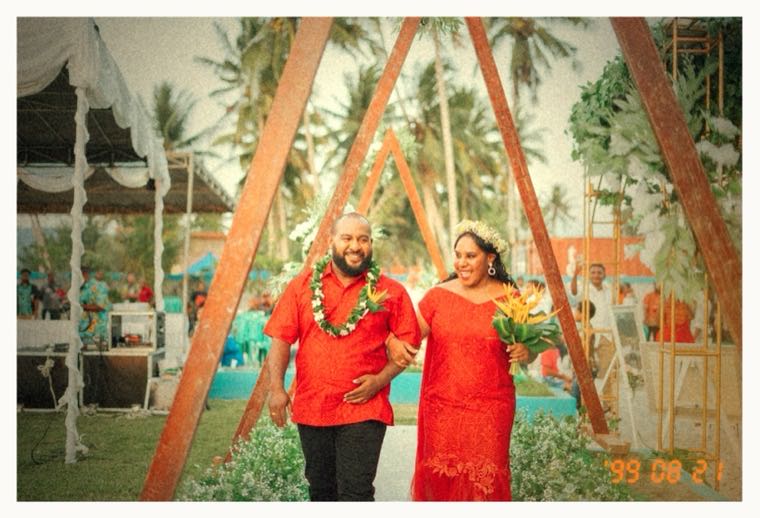
A photo with a warm disposable camera filter: film colours, grain, light leak and vignette, made with the Disposable Camera Filter
Film Looks
- Warm disposable: the yellow-orange colour of the classic Kodak-style one-time-use camera, warm skin and creamy highlights.
- Green disposable: the cooler, greener shadows of the Fuji-style cameras.
- Golden hour 200: rich, saturated, sunny consumer film.
- Soft portrait 400: low contrast and gentle colours, kind to faces.
- Faded 80s print: lifted blacks and a reddish cast, like a print that sat in an album for forty years.
- Black and white 400: grainy, contrasty monochrome.
Each look sets the grain, flash, vignette and light leaks, and every one of them can then be turned up or down. "New Grain and Light Leaks" throws a different leak, and every photo in a batch gets its own, like the frames of one roll. A white print border or an instant photo frame finishes it, and the date can be printed in the corner in orange, the way the cameras did.
How to use Online Disposable Camera Filter?
- Add one or more photos. A sample is shown until you do, so you can try the looks first.
- Choose a look, then adjust strength, grain, flash, vignette and light leaks to taste.
- Pick a frame, and tick "Add the orange date stamp" for the date in the corner; it uses the date each photo was taken.
- Click "Download Photo", or "Download All" for a ZIP of every photo.
Frequently asked questions
How do I get the disposable camera look on my phone photos?
Open this page on your phone, add photos from your library and choose "Warm disposable" or "Green disposable". It works best on photos taken with flash, or indoors and at night, because that is how disposable cameras were mostly used.
Is this the same as a VSCO or Instagram filter?
It goes further than a colour filter: grain, a flash that falls off from the middle, lens vignetting, halation around bright spots and light leaks are added to the photo, not just a change of colours. There is no account and no app, and the photos are saved at full size.
Will every photo get the same light leak?
No. Each photo gets its own grain and leak, so a batch looks like one roll rather than one picture copied. Press "New Grain and Light Leaks" to throw them again, or set Light Leaks to zero to have none.
Does it upload my photos?
No. The photos are opened and processed in your browser and saved straight back to your device.
Usage Policy
Use Disposable Camera Filter by 10015.io on photos you have the right to edit. Do not use it to pass off an edited picture as an untouched original where that matters, and remember that 10015.io is not responsible for what is made with it.
Similar Image Tools
See All