Text Tools
 Image Tools
 PDF Tools
 Social Media Tools
 Security Tools
 Coding Tools
 CSS Tools
 Color Tools
 Miscellaneous Tools
 Add to Chrome
 Add to Firefox


A front page or a clipping with your headline, photo and story, in vintage, classic or tabloid style, to download or print.
What is Newspaper Generator?
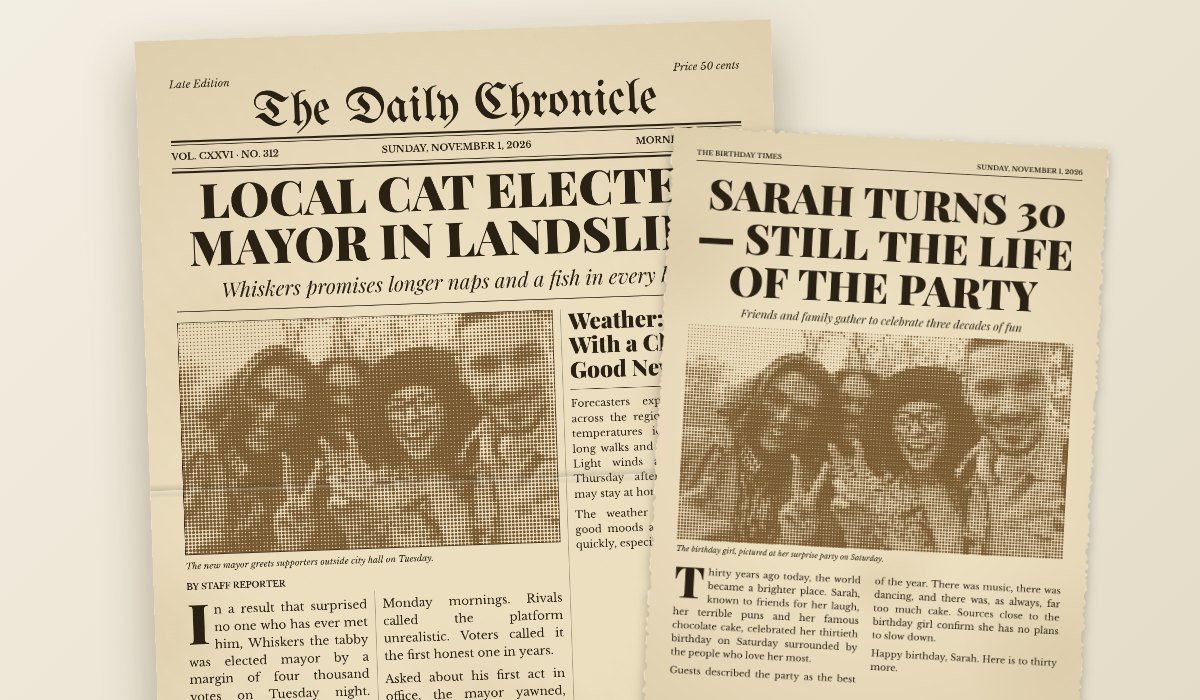
Newspaper Generator makes a newspaper front page with your own headline, photo and story: a masthead with your paper's name, the date, a big headline, a subheadline, your photo printed in halftone dots, and the story set in justified columns with a drop cap, just like a real front page. Or make a clipping: one story torn out of the page, on a transparent background.
Use it for a birthday ("the day you were born"), a wedding, an anniversary, a retirement, a school project, or a joke for a friend. Start from a ready-made story, change everything, and download it or print it on A4.
What You Can Do
- Front page or clipping: a full A4 page, or one story torn out with a shadow.
- Three styles: vintage (old paper, sepia ink), classic black and white, or a red tabloid.
- Your photo as halftone dots, black and white or colour, with a caption.
- Real newspaper typesetting: a blackletter masthead, justified columns, a drop cap, a second story.
- Any date, written out the way papers do, plus the edition, price and corner notes.
- Aged paper and a fold for an old, kept-in-a-drawer look.
- Ready-made stories: funny news, a birthday, a wedding, breaking news.
- Download a high-resolution PNG or print it on A4.
How to use Newspaper Generator?
- Choose Front Page or Clipping, and a ready-made story to start from.
- Type your newspaper name, headline and story, and pick the date.
- Add a photo and choose how it is printed.
- Pick a style and how aged the paper looks, then download or print.
Frequently asked questions
How do I make a "the day you were born" newspaper?
Start from the Birthday story, set the date to the birthday, and write the headline and story about the person. Add a photo, choose the vintage style with some ageing, and print it on A4 for a frame or a card.
Can I use the name of a real newspaper?
Please do not: make up your own paper's name. The pages are meant for gifts, parties and fun, and a made-up name keeps it clear that the story is yours. For other made-up screenshots, see the iPhone Notes App Generator.
Is my photo uploaded?
No. The page is drawn in your browser, and your photo never leaves your device.