Text Tools
 Image Tools
 PDF Tools
 Social Media Tools
 Security Tools
 Coding Tools
 CSS Tools
 Color Tools
 Miscellaneous Tools
 Add to Chrome
 Add to Firefox
Makes screenshots of a note in the iPhone Notes app, with checklists, lists, paper styles and light or dark mode.
Note
Start a line with "# " for a heading, "## " for a subheading, "- " for a bulleted list, "-- " for a dashed list, "1. " for a numbered list, and "[ ] " or "[x] " for a checklist. Put **two asterisks** around text to make it bold.
Screen
What is Online iPhone Notes App Generator?
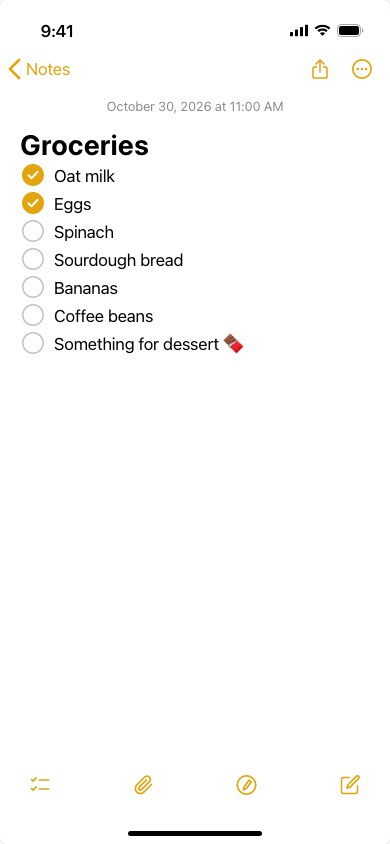
iPhone Notes App Generator draws a note open in the iPhone's Notes app with your own text and saves it as a screenshot. It has the parts that make it look real: the yellow back button and icons, the date centred over the text, a bold title, checklists with yellow ticks, the bottom toolbar, and light or dark mode.
The Notes app screenshot is a format of its own. It is how statements, apologies and announcements get posted on Instagram and X, and it is used in memes, in TikTok and Reels videos, in fan fiction and AU threads, in school projects, and in mockups of a story or a design. Typing into a real phone and cropping the screenshot works, until you want dark mode, a long note in one image or a different date.
Formatting
Write the note as plain text and start a line with a few characters to format it the way Notes does:
- Title: the first line, in large bold type. Turn it off for a note without a title, such as an apology.
- # Heading and ## Subheading.
- - Bulleted, -- dashed and 1. numbered lists.
- [ ] Checklist items, and [x] for a ticked one.
- **Bold** text anywhere in a line.
Templates
Start from a notes app apology, a personal announcement, a grocery list, a to-do list, a bucket list or late-night thoughts, and change the words to your own.
How to use Online iPhone Notes App Generator?
- Pick a template, or clear the box and write your own note.
- Format it with the line starts listed above the box.
- Set the date line, the folder name on the back button, the theme, the paper and the text size.
- Tick "Full-Length Screenshot" for a note longer than one screen.
- Download the screenshot as a PNG or copy it to paste straight into a post.
Frequently asked questions
What is a notes app apology?
A statement written in the Notes app and posted as a screenshot, usually by a public figure answering a controversy. The format became a meme of its own, so people now use it for jokes, for fictional characters and for real announcements alike. The "Notes App Apology" template gives you the familiar layout to write your own.
Can I make a long note in one image?
Yes. Tick "Full-Length Screenshot" and the note grows to fit all of its text, the way a scrolling screenshot does on an iPhone. Without it, the image is the size of one iPhone screen and a long note is cut at the bottom.
Does it look like the latest iOS?
It follows the Notes app of recent iOS versions: the toolbar with checklist, attachment, markup and new note buttons, the round checklist circles, and the 28-point title. Small details change between iOS updates, so it is a close likeness rather than a pixel copy.
Is my note uploaded anywhere?
No. The screenshot is drawn and saved in your browser, and the text never leaves your device.
What else can I make?
For other iPhone screens, the Screen Time Generator makes Screen Time reports, the Fake Notification Generator lock screen notifications, and the iMessage Chat Generator text conversations.