Text Tools
 Image Tools
 PDF Tools
 Social Media Tools
 Security Tools
 Coding Tools
 CSS Tools
 Color Tools
 Miscellaneous Tools
 Add to Chrome
 Add to Firefox

Split a photo into posts that join up on your profile grid, or into a seamless carousel, sized for the new 3:4 grid.
Drag your image here, or click to browse
Your photo stays in your browser: nothing is uploaded.
Zoom: 100%
Drag the photo to move it. Scroll or pinch to zoom.
Make
A photo split over your profile: posted one by one, the posts join up into one big picture.
Grid
Post size
Recommended: the profile grid shows 3:4, so these posts fit it exactly.
Background and file
Your profile
0posts
1,204followers
318following
See the new posts above the ones on your profile now.
Post them in the order of the numbers on the photo: 1 (bottom right) first, the top left last. The files are named in this order.
Found it useful? or .
What is Instagram Grid Maker?
Instagram Grid Maker cuts one photo into posts that join up into one big picture on your Instagram profile: a 3×1 banner, a 3×3 square or a whole wall of 15 posts. You see your profile as it will look, the posts are numbered in the order to share them, and you download them all in one ZIP.
It is made for the new profile grid, which shows each post as a 3:4 rectangle instead of a square. Most splitters still cut squares, which leaves gaps or cuts faces in half on the new grid. Here every post lines up, and 4:5 or square posts also carry the edge of the picture in the strips the grid hides, so each one looks right when it is opened too.
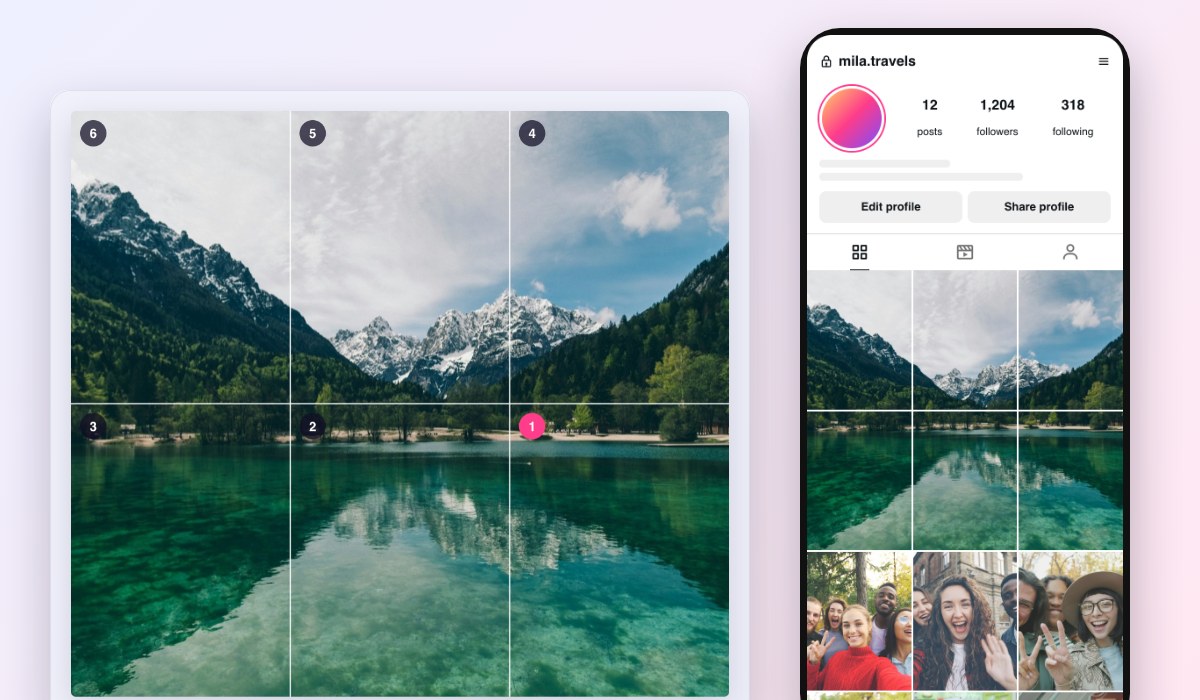
A mountain lake photo split into Instagram posts that join up on a profile grid, with the posting order numbered
What You Can Do
- Profile grid: 3×1 to 3×5, so 3 to 15 posts that make one picture on your profile.
- Seamless carousel: 2 to 10 slides in one post, to swipe through a panorama.
- 3:4, 4:5 or square posts: 1080×1440 to fit the new grid exactly, or 1080×1350 and 1080×1080 with the hidden side strips filled.
- Drag and zoom the photo into place, or fit the whole photo with a blurred, white, black or coloured background.
- Profile preview: see your profile with the new posts on top, in light or dark mode, even above photos of your current posts.
- Posting order: each post numbered, so they land in the right places, and a ZIP of them all, named in that order.
- Private: the photo is cut in your browser and never uploaded.
How to use Instagram Grid Maker?
- Add your photo, or try the sample one.
- Choose a profile grid or a carousel, its size and the post size.
- Drag and zoom the photo until the grid shows what you want.
- Download the posts and share them in order: 1 first, then 2, and so on.
Frequently asked questions
What size is the new Instagram grid?
Since 2025 the profile grid shows posts as 3:4 rectangles (portrait) instead of squares. A 1080×1440 (3:4) post fits a grid tile exactly. A 1080×1350 (4:5) post shows on the grid without a thin strip down each side, and a square 1080×1080 post without a wider one; both still show whole when someone opens them.
In which order do I post them?
Instagram puts your newest post first, at the top left. So post the last piece first: start with the one numbered 1, at the bottom right, and finish with the top left. Post them one after another, without anything else in between, or the picture shifts. The files in the ZIP are named in this order.
Why does my grid look shifted on my profile?
The grid is three posts wide, so the pieces only line up if they go in as whole rows: 3, 6, 9 and so on, one after another. Pinned posts are shown first and can push the rows out of line: unpin them while you post, or pin them again afterwards.
What is the difference between a grid and a carousel?
A grid is several posts that make one picture on your profile page. A carousel is one post of up to ten slides, which people swipe through in their feed, and a wide panorama flows from one slide to the next. To check how a single post looks first, try the Instagram Post Generator.
Similar Social Media Tools
See All