Text Tools
 Image Tools
 PDF Tools
 Social Media Tools
 Security Tools
 Coding Tools
 CSS Tools
 Color Tools
 Miscellaneous Tools
 Add to Chrome
 Add to Firefox


Turns your Strava export into a year of story cards: distance, climbing, routes, heatmap, pace and streaks.
A made-up year. Upload your Strava data to see yours.
Your data
Your export is read on this device and never uploaded, routes included. The cards show routes without a map or place names.
Wrapped
What is Strava Wrapped?
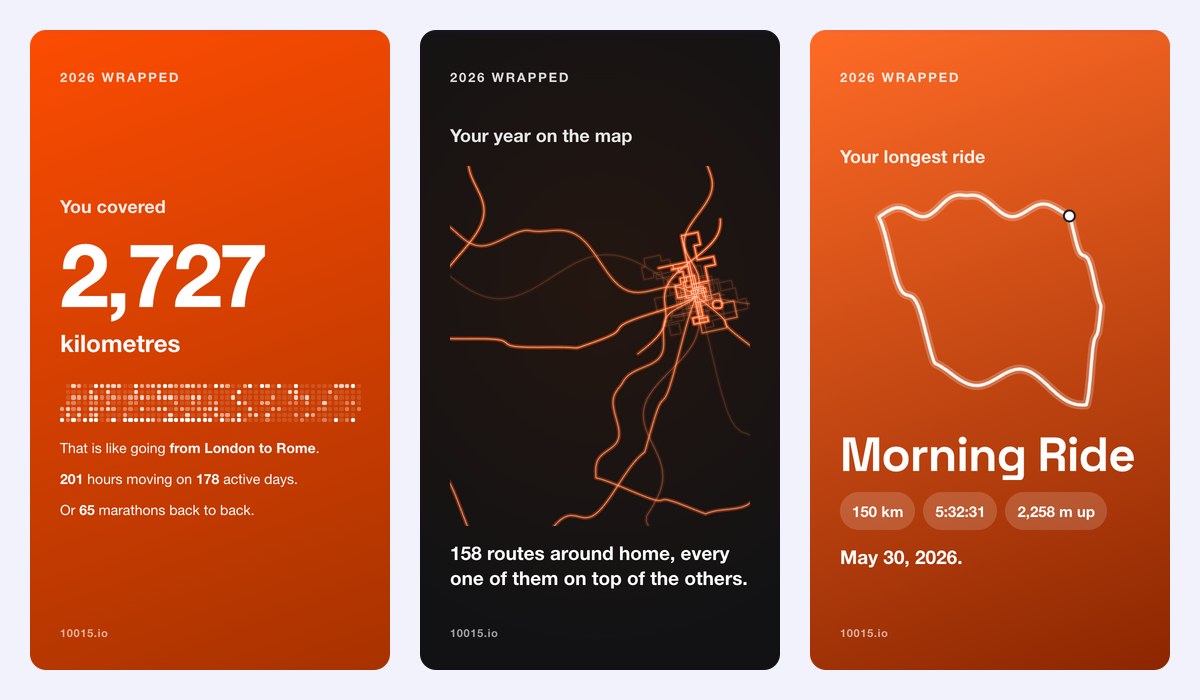
Strava Wrapped turns your Strava data into your year in sport as story cards: how far you went and how long you moved, how high you climbed, the sports your hours went to, your longest activity with its route, your biggest climb with its profile, your fastest run, your strongest month, the hour you train, your weekly streak, your most used shoes or bike, and a personal heatmap of every route you did around home. Strava's own Year in Sport now comes with a subscription; this one is free, for any year or all time, and works for runners, cyclists, hikers and swimmers alike.
The cards
- Distance and time: kilometres or miles, hours moving, active days on a calendar of the year, and how far that would take you.
- Your sports: running, cycling, swimming, hiking and the rest, with times, distance and hours.
- Your year on the map: every route around home drawn on top of each other, the busiest roads glowing brightest.
- Longest activity, biggest climb and fastest run: the route, the elevation profile and the pace.
- Strongest month, your Strava hour and your streak of weeks in a row.
- Your routes, your gear and your athlete type, from The Early Bird to The Mountain Goat, and a summary to share.
How to use Strava Wrapped?
- On strava.com, open Settings › My Account › Download or Delete Your Account, click Get Started and Request Your Archive.
- Strava emails you a link to a .zip, usually within a few hours. Download it.
- Drop the .zip on this page (or just its activities.csv, without routes) and pick the year.
- Choose kilometres or miles, swipe through the cards and download them one by one or all at once.
Frequently asked questions
Is my Strava data uploaded anywhere?
No. The archive is opened and read in your browser, routes included, and nothing leaves your device. The cards draw routes as lines without a map, street names or places, so a shared card does not show where you live.
Do I need a Strava subscription for this?
No. Every Strava account can request its archive, free or subscribed, and this page reads it for free. It is not made by Strava and is not affiliated with it.
Why do some activities have no route?
Indoor rides and runs, swims in a pool, gym sessions and activities added by hand have no GPS track. They still count in your distance, time and sports; only the map, the route shapes and the elevation profile need a track. If you upload only activities.csv, there are no routes at all.
What is a personal heatmap?
All your routes drawn on top of each other: the roads and paths you take most glow brightest, and your usual loops stand out. The map centres on where most of your activities start, so a trip far from home does not shrink it.
More Wrapped
See your year in music with Spotify Wrapped, in film with Letterboxd Wrapped and in games with Steam Wrapped.