 Text Tools
 Image Tools
 PDF Tools
 Social Media Tools
 Security Tools
 Coding Tools
 CSS Tools
 Color Tools
 Miscellaneous Tools
 Add to Chrome
 Add to Firefox
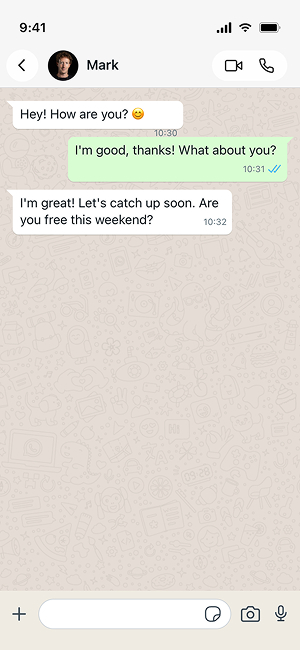
Both sides of a conversation, down to the blue double tick that does most of the work in selling a screenshot.
Settings
Messages
What is Online WhatsApp Chat Generator?
If you have ever wanted to prank a friend with a fake WhatsApp conversation, you probably know how painful the whole process is. You would need to create a new account, change the profile picture, type out messages, take screenshots and hope nobody notices the inconsistencies. That is exactly why we built this free online WhatsApp chat generator.
WhatsApp has been around since 2009, and it has grown into the most widely used messaging app on the planet with well over 2 billion monthly active users. People rely on it for everything from casual chats with friends to work conversations and family group chats. Because of how familiar the interface looks to almost everyone, a realistic-looking WhatsApp screenshot is one of the most effective ways to pull off a harmless prank or create content for social media.
This tool lets you put together a full WhatsApp conversation between two people without touching the actual app. You pick a contact name, upload an avatar if you want, and then add as many messages as you need. Each message can be assigned to either person, and you can set individual timestamps so the whole thing reads like a natural back-and-forth exchange.
The preview updates in real time, so you can see exactly what the final image will look like before you export it. We paid close attention to the small details that make WhatsApp recognizable: the green sender bubbles, white receiver bubbles, blue double checkmarks for read receipts, the iOS-style status bar at the top, and even the message input bar at the bottom. Both light and dark themes are supported, so you can match whichever mode the "victim" of your prank actually uses.
Once you are happy with the result, you can either download it as a JPG image or copy it straight to your clipboard. From there, just paste it into any messaging app, social media post, or wherever you want to share it.
Why Use a Fake WhatsApp Chat Maker?
There are plenty of reasons people use tools like this, and most of them are completely innocent. Maybe you want to send a funny screenshot to a group chat and watch everyone lose their minds. Maybe you are a content creator who needs realistic-looking chat screenshots for a YouTube thumbnail or a TikTok skit. Or maybe you just want to settle a silly argument by "proving" that someone said something they definitely did not say (with everyone in on the joke, of course).
Whatever the reason, the point is to have fun. We are not here to help anyone deceive or hurt others, and we take that seriously. Check out the usage policy below if you have any questions about what is and is not okay.
How to use Online WhatsApp Chat Generator?
Creating a fake WhatsApp chat takes about a minute. Here is how it works:
- Start by picking a theme. Light mode gives you the classic beige background with green bubbles, while dark mode switches everything to darker tones, just like the real app.
- Enter a contact name. This is the name that will show up in the header bar at the top of the chat screen. You can also upload a profile picture to make it look even more convincing.
- Add your messages one by one using the "Add Message" button. For each message, choose who is sending it (you or the contact), type out the text, and set the timestamp. The sender automatically alternates, but you can change it with the dropdown.
- Keep an eye on the live preview on the left side of the screen. It shows exactly what the final screenshot will look like, complete with message bubbles, read receipts, and all the other familiar WhatsApp elements.
- When everything looks good, hit the "Export" button. You can download the image as a JPG file or copy it directly to your clipboard so you can paste it wherever you need it.
Features
- Realistic iOS design — The generated screenshot matches the current WhatsApp iOS interface pixel by pixel, including the status bar, header, message bubbles, and input bar.
- Light and dark themes — Switch between the two modes to match whatever the other person is actually using.
- Custom avatars — Upload any image as the contact's profile picture to add an extra layer of realism.
- Unlimited messages — Add as many messages as you need. Short chats, long conversations, it is all up to you.
- Individual timestamps — Set a different time for each message so the conversation flow looks natural.
- Read receipts — Your messages (the green bubbles) automatically get the blue double checkmark, just like they would in a real chat.
- One-click export — Download as JPG or copy to clipboard. No watermarks, no signup required.
Frequently asked questions
What details can I control?
Both participants, their avatars, the message order and sides, timestamps, and the delivery ticks — including the blue double tick that does most of the work in making a screenshot look genuine.
What are the legitimate uses?
Product mockups, support documentation, teaching material and app store screenshots. Anywhere you need a realistic conversation without exposing a real one.
How far can a joke go?
Among people who know it is a joke, as far as you like. A fabricated conversation attributed to a real person and passed off as real is a different thing entirely, and the consequences land on whoever shares it.
Does it touch WhatsApp?
No. It draws an image. Nothing is sent, no account is connected, no message exists.
Is anything uploaded?
No. Avatars and text are rendered locally in your browser.
What other chat formats are there?
The iMessage Chat Generator and the Instagram DM Generator cover the other two platforms, and the Tweet to Image Converter does the same job for a real tweet.
Usage Policy
10015.io is not responsible for the generated images by users. By using WhatsApp Chat Generator by 10015.io, you agree to use our tool lawfully and ethically, and in accordance with these rules:
- You do not use generated WhatsApp chat images to create content that has ill intent including but not limited to harass, attack, incite violence, slander, threaten, disparage, intimidate, or otherwise hurt other people or entities.
- You do not use generated WhatsApp chat images to spread false information that will affect human life in a negative way.
- You do not present generated WhatsApp conversations as fact. As described, main intent is having good time by making fun of people, not just misleading them.
- You make it obvious to any viewers that WhatsApp conversations generated by this tool are not original/genuine.