Text Tools
 Image Tools
 PDF Tools
 Social Media Tools
 Security Tools
 Coding Tools
 CSS Tools
 Color Tools
 Miscellaneous Tools
 Add to Chrome
 Add to Firefox
Writes the tags that decide how your link previews elsewhere; 1200x630 is the image size that works everywhere.
What is Online Open Graph Meta Generator?
Open Graph Meta Generator is a free online tool for generating Open Graph metadata for websites. Open Graph Protocol (OPG) is a set of HTML meta tags for determining how a webpage will be previewed when sharing on external sites. Facebook and many other social media sites use these tags for shaping their previews for links.
There are many different properties in Open Graph protocol. Some tags are required while some are optional. You should set title, type, URL and image for OG Meta since these 4 parameters are required. You can get detailed info from Open Graph Protocol official site ogp.me
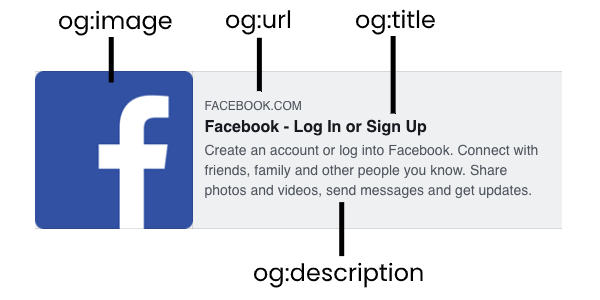
When you share a page from your website on Facebook or other social media sites, they show a preview for your link. It is a preview for this link. It is a basic card with a link showing information about the link. You can preview and debug your Open Graph metadata by using Facebook Sharing Debugger. Here is a link preview showing how tags is used in shaping the preview.
How to use Online Open Graph Meta Generator?
You can generate Open Graph metadata for your web page by following these steps.
- There are 2 input areas. One is required metadata and other is optional. Required metadata fields (title, type, URL and image) must be filled for a valid Open Graph tag list. You may also add optional metadata if your page is compatible with this tag.
- Click the button "Generate" after entering the information about your webpage.
- Open Graph meta tags will be shown on output field. Simply copy this code and paste in between the "head" tags in your webpage.
Frequently asked questions
What does Open Graph actually do?
It tells other sites how to render your link. Without it, a platform guesses at the title, description and image from your markup, and the guess is frequently wrong or empty — which is why some links share as a bare URL with no card.
Which tags matter most?
og:title, og:description, og:image and og:url. The image does most of the work, since it is the part people actually see in a feed.
What size should the image be?
1200x630 is the safe answer and works nearly everywhere. Below about 600x315 some platforms drop the large card and fall back to a small thumbnail.
Do I need Twitter tags as well as Open Graph?
X reads Open Graph when its own tags are absent, so you can get away without them. Adding twitter:card is still worth it — it is what decides whether you get a large image or a narrow one.
Why does my preview still show the old image?
Caching. Platforms keep what they fetched the first time, sometimes for days. Each of the big ones has a debugger that forces a refresh, and that is usually faster than waiting.
Where do I check the lengths?
Titles and descriptions get truncated like search results do — the Letter Counter has the limits built in.