Text Tools
 Image Tools
 PDF Tools
 Social Media Tools
 Security Tools
 Coding Tools
 CSS Tools
 Color Tools
 Miscellaneous Tools
 Add to Chrome
 Add to Firefox

Builds a Telegram conversation with read ticks, reactions and the chat wallpaper, and downloads it as a PNG.
Chat
Messages
What is Online Telegram Chat Generator?
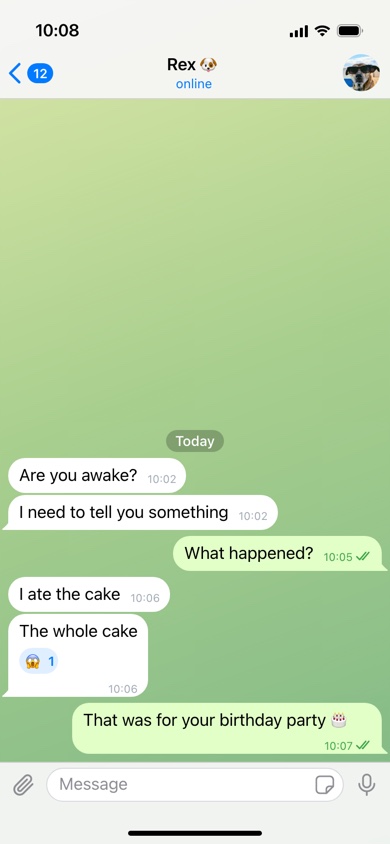
Telegram Chat Generator is a free tool for making a Telegram conversation as an image. It draws a chat from the Telegram app on an iPhone: the back button with its unread count, the contact's name with "online" or "last seen recently" underneath, their photo or coloured initials, the patterned wallpaper behind the chat, bubbles with the time tucked into their corner, and the message bar at the bottom.
What Sets a Telegram Chat Apart
- The time is inside the bubble. Unlike most messaging apps, Telegram writes each message's time in its bottom-right corner, on the last line of text when there is room and on a line of its own when there is not. Every message here has its own time for that reason.
- One tick or two. Telegram has no separate "delivered" state: one tick means the message reached Telegram's servers, two ticks mean it has been read. Choose either, or none.
- "Last seen recently". Telegram lets people hide their exact last-seen time, in which case others see "last seen recently", "within a week" or "a long time ago" instead. Type any of these, or "online", which turns blue.
- Wallpapers. Chats sit on a coloured, softly patterned background rather than plain white — green by default, with blue and plain versions here, each with its own dark variant.
- Reactions in the bubble. A reaction appears as a small chip inside the message, with the count beside the emoji.
- Initials instead of a photo. Contacts without a picture get a gradient circle with their initials, as Telegram does.
How to use Online Telegram Chat Generator?
- Name the contact, add their photo or leave it empty for initials, and set the line under their name.
- Set the unread count on the back button, whether your messages show one tick or two, the wallpaper and light or dark mode.
- Write each message with its sender and the time it was sent. Add a date pill such as "Today" above a message where a new day starts.
- Put an emoji in "Reaction" for messages someone reacted to, and tick "Edited" for any that were changed after sending.
- Click "Export Screenshot" to download the chat as a PNG or copy it.
Frequently asked questions
What do one and two ticks mean in Telegram?
One tick means your message has been sent to Telegram's cloud; two ticks mean the other person has opened the chat and read it. There is no third "delivered" step, which is why the setting only offers the two.
Why does every message need a time?
Because Telegram prints one in every bubble. A chat with the times missing is the first thing that gives a fake away, so each message keeps its own, and new messages start with the time of the one before.
Can I make a dark mode Telegram screenshot?
Yes. Dark mode switches the bars, bubbles and text to Telegram's night colours, and each wallpaper has a dark version to match.
What size is the image?
780 × 1688 pixels, the shape of an iPhone screen. As in the app, the newest messages sit at the bottom and older ones disappear off the top when there are too many to fit.
Is anything sent through Telegram?
No. The tool has no connection to Telegram and needs no account; it only draws a picture in your browser. For other messengers see the WhatsApp Chat Generator and Messenger Chat Generator.
Usage Policy
Telegram is used for a lot of buying, selling and investing, and forged Telegram chats turn up in scams as often as in jokes. By using Telegram Chat Generator by 10015.io you agree not to create chats that imitate a real person, group or business, not to use them as proof of a deal, a payment or a promise, and not to use them to deceive or intimidate anyone. 10015.io is not responsible for the images made with it.