Text Tools
 Image Tools
 PDF Tools
 Social Media Tools
 Security Tools
 Coding Tools
 CSS Tools
 Color Tools
 Miscellaneous Tools
 Add to Chrome
 Add to Firefox

Both sides of a DM thread with avatars, order and read receipts, rendered as a screenshot that never existed.
Settings
Messages
What is Online Instagram DM Generator?
So you want to fake an Instagram DM conversation. Maybe your friend claimed they never said something, or you want to create a funny screenshot for a meme page, or you just need a realistic-looking chat image for a video you are editing. Whatever the reason, doing it the "real" way is a huge pain. You would have to create a fake account, set up a profile picture, exchange messages with yourself from two phones, and then screenshot the result. Not exactly a five-minute task.
That is why we made this free Instagram DM generator. It lets you build an entire Instagram Direct Message conversation from scratch, right in your browser. No accounts needed, no apps to install, nothing. Just type out your messages, pick who says what, and export it as an image when you are done.
Instagram launched Direct Messages back in 2013, and since then DMs have become one of the most used features on the platform. With over 2 billion monthly active users on Instagram, pretty much everyone recognizes what an Instagram chat looks like. The purple sender bubbles, the gray receiver bubbles, the little profile picture next to incoming messages — it is all very distinctive. That is exactly what makes a well-crafted fake DM so convincing (and so funny).
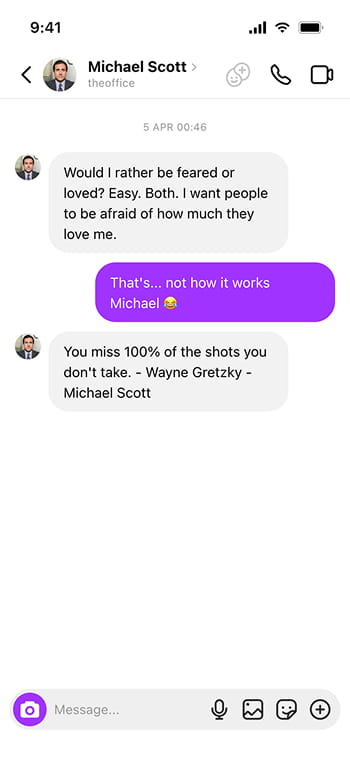
Our generator replicates the current Instagram iOS DM interface with all the details you would expect: the header with the contact name and action icons, the chat area with properly styled message bubbles, date separators between message groups, and even the camera button and input bar at the bottom. Both light mode and dark mode are fully supported so you can match whatever the other person actually uses.
Why Would You Need a Fake Instagram DM?
Honestly, the number one use case is pranking friends. There is something universally funny about sending someone a screenshot of a conversation they definitely did not have. The key, of course, is making sure everyone eventually finds out it is fake — the goal is laughs, not confusion.
Beyond pranks, content creators use these screenshots all the time. If you are making a YouTube video, a TikTok skit, or an Instagram reel that involves showing a chat conversation, this tool saves you from having to stage an entire real exchange. Graphic designers sometimes need placeholder chat screenshots for mockups and presentations too.
How to use Online Instagram DM Generator?
From a blank chat to a finished screenshot:
- Pick a theme — light or dark mode. This changes the entire look of the chat to match the real Instagram app.
- Fill in the contact details. Enter a display name, a username (the text that appears below the name in the header), and optionally upload a profile picture.
- Start adding messages. Click "Add Message" and for each one, choose the sender (you or the contact), type the message text, and optionally set a date/time separator. The sender alternates automatically, but you can change it with the dropdown.
- Keep an eye on the phone preview — every name, photo and message you change shows up there straight away.
- Press "Export Instagram DM" for a JPG download, or copy the image and paste it wherever you are posting.
Features
- Instagram's iPhone DM screen — purple sent messages, grey replies, the header with call and video buttons, and the camera button in the message bar.
- Light and dark modes — Both themes are fully supported with accurate colors for each.
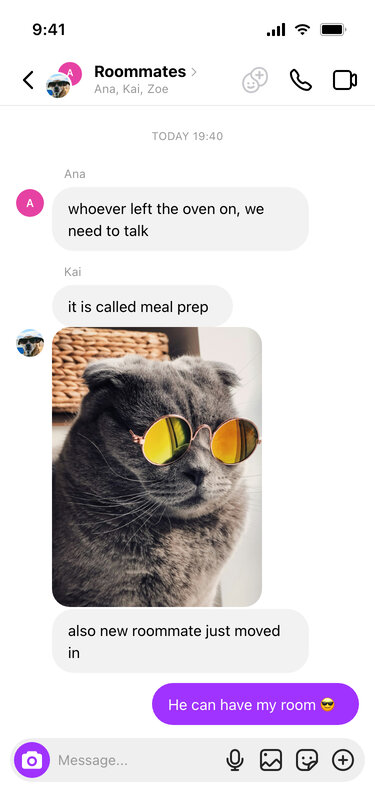
- Group DMs — Turn the conversation into a group with its own name, add members, and every message shows who sent it with their name and profile picture.
- Custom contact info — Set a display name, username, and profile picture for the person you are chatting with.
- No length limit — keep adding messages, photos and replies until the conversation says everything it needs to.
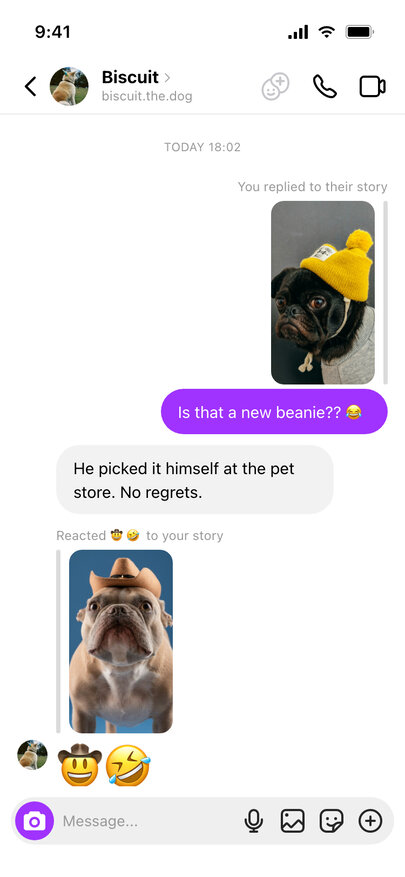
- Story replies and reactions — show a message as an answer to someone's story, with the story picture above it and "Replied to your story" in grey.
- Date separators — Add date/time labels between message groups for a more realistic look.
- Configurable input placeholder — Change the "Message..." text at the bottom to any language you want.
- Instant download — save it as a JPG or copy it, free and without an account.
Replies to a Story
Plenty of Instagram conversations start with a story: someone posts a picture, a friend answers it, and the answer lands in the DMs with a small copy of that story on top. Tick "Reply to a story" on any message and upload the story picture; it appears in 9:16 with a grey bar beside it and "You replied to their story" or "Replied to your story" above, depending on who sent the message. If the reply is only an emoji or two, it becomes a reaction instead: the line reads "Reacted 😂 to your story" and the emoji is drawn large without a bubble.
Frequently asked questions
What can I set up?
Both participants with their own avatars and usernames, the messages in order, who sent each one, and the read and timestamp details that make a conversation look real.
Can I create an Instagram group chat?
Yes — pick Group as the chat type, name the group and add its members. The header shows two members' pictures with the group name and the list of people in it, each member's name appears over their messages, and replies can point to anyone's message, so a busy group conversation reads naturally.
How do I fake a reply to an Instagram story?
Add the message, choose who sent it, then tick "Reply to a story" under it and pick the story photo. Messages from you show it as their story, messages from the other person as yours, and a reply of just emoji turns into a story reaction.
Why would I want one?
Jokes between friends, mostly. The serious use is mockups — showing how a support flow or an automated reply would read in a real DM thread, without having to stage it in a live account.
How far can I take a joke with this?
As far as everyone in it is in on it. A fabricated conversation attributed to a real person, shared as though it happened, is the point at which it stops being a joke and becomes something you can be sued over.
Does it connect to Instagram?
No. It draws an image. No account, no messages, nothing sent.
Is anything uploaded?
No. Everything you add, including photos, is processed by your browser and never leaves your device.
Can I make Instagram Notes too?
The notes above the inbox have their own tool: the Instagram Notes Generator draws the row of thought bubbles over profile pictures, music notes with a song and artist, and a note opened with its reply field and heart.
Are there other chat formats?
Yes — the WhatsApp Chat Generator and the iMessage Chat Generator cover WhatsApp and the iPhone, the Messenger Chat Generator covers Facebook's chat, and the Instagram Post Generator makes the feed post to go with your DM.
Usage Policy
Instagram is where many people meet, flirt and argue, which makes a fake DM easy to misuse. By using Instagram DM Generator by 10015.io you agree to the following, and 10015.io is not responsible for images made with the tool:
- Do not fake DMs from real accounts — creators, celebrities, brands or people you know — to embarrass, harass or catfish anyone.
- Do not use it for giveaway, sponsorship or crypto scams that pretend to come from a well-known account.
- Do not post a generated conversation as a real leak, call-out or "receipts" against a real person.
- Say that the screenshot is fake or a mockup when you post it.